

Closed (cannot reproduce)
Project:
Webform Pager
Version:
7.x-1.5
Component:
Code
Priority:
Normal
Category:
Support request
Assigned:
Unassigned
Reporter:
Created:
18 Jul 2013 at 18:04 UTC
Updated:
7 Nov 2013 at 15:18 UTC
Jump to comment: Most recent, Most recent file


Comments
Comment #1
strakkie commentedHi y.glastra,
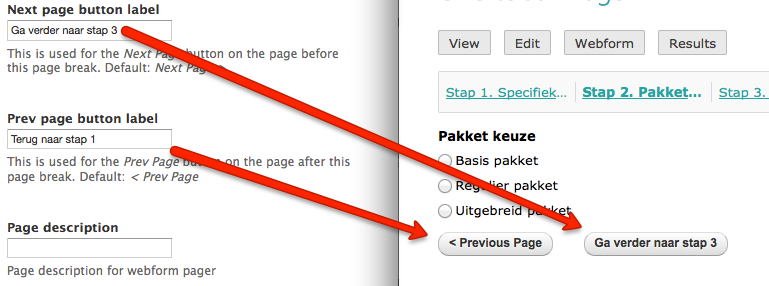
I have just tried out using custom labels for the next and previous buttons of my webform but no matter how many pages i create, the webform shows the correct custom text.
Did you supply the custom text for the buttons on each page break? I had to create the custom text on all page breaks to get the custom text everywhere.
Also, if you still have this problem after supplying the text on each page-break; the next/previous buttons are default Webform functionallity. This problem should not be caused by the webform_pager module, perhaps you could test this without the pager if the problem still exists?
Please let me know what you find out.
Strakkie
Comment #2
strakkie commented