

Closed (fixed)
Project:
Webform
Version:
6.x-2.7
Component:
Code
Priority:
Normal
Category:
Support request
Assigned:
Unassigned
Reporter:
Created:
29 Apr 2009 at 08:06 UTC
Updated:
27 Dec 2011 at 02:52 UTC
Jump to comment: Most recent file

Comments
Comment #1
quicksketchHmm, curious. Obviously Webform works normally for most people, as this issue would've prevented use of the module at all. Are you using any other webform-related modules?
Comment #2
maxferrario commentedI have the same problem here: Drupal 6.11, Webform 6.x-2.6, no other webform-related modules installed.
I also reinstalled Drupal from scratch deleting all db tables, but the problem is still there.
I am using drupal with IIS, and clean URLs are disabled: when I tried to add a new form component the page called by the HTML form is /index.php?q=node/1/edit/components (the nid of the webform is 1).
As I have a different test website with webform installed, I tried to add a field copying-and-pasting the URL from that (still working, with Drupal 6.10) website
http://mysite/index.php?q=node/1/edit/components/new/textfield&name=Nome...
and I could add the field to the webform!
Comment #3
maxferrario commentedI tried from a different computer and now it is possible to add a new field to the webform...
I will try again at work tomorrow morning to see if it's fixed: if not I will try to see which response I get from the server (here after the post the browser is redirected to the /components/new/fieldtype... page
Massimo
Comment #4
maxferrario commentedI do not know what happened, but now adding fields to the form works again here in my office too...
@quicksketch If this happens again what can I do to trace the error? Examine the response HTTP headers?
Massimo
Comment #5
quicksketchI'm not sure what caused this, so it's a little tough to know where to begin. I'd recommend that you try clearing your Drupal cache (click "Clear all caches" on the admin/settings/performance page) and see if that remedies the problem.
Comment #6
artol commentedI tried to clear cache, but it did not helped. Later I found out the problem. It was self caused.
Comment #7
mylesorme commentedI'm not using any other webform components - It seems to be an issue related to this particular server - I have one installation to play on - completely stripped down, minimal drupal installation with just webforms as contributed module - same problem - localhost - no problems. (and the old host had no problems either)
Tried a different workstation - no difference.
Tried clearing cache - nope; sessions - nope
I had the same issue with cck until the last update, but I can't work out what fixed it.
I'm on Dream Host...
I'm stumped - the behaviour is entirely consistent - no records are being added to the webform_components table.
Since it is happening on one particular server I can't debug the code remotely - (or rather I have no idea how to debug other than running a dubugger and stepping through the code as it executes on my local machine)
If anyone knows of a tool set that allows me to debug on the server I'm willing to give it a shot.
Alternatively if anyone knows what was done on CCK that fixed this issue I'd love to know that!
Comment #8
mylesorme commentedJust a thought Max - since your issue seems browser related try:
1) delete entries for your user in the session table (or truncate the table if no-one else is on)
2) check that you have not got different versions of the same browser installed on your system by mistake - I had similar problems with another module and found that getting rid of firefox 3.5 beta (actually uninstalling both 3.0 and 3.5) and reinstalling 3.0 solved the problem.
Comment #9
sethlbrown commentedWe've seen this issue before were a Proxy Server was caching a form, with its token, and then when anyone tried to submit the form they'd get an error message or failure b/c the form token was not unique.
Comment #10
artol commentedI cleared cache and sessions in server and cleare browser cache, tried to disable javascript, but nothing changes the way it works. I also tried with different browser, but no go.
Comment #11
artol commentedIs it correct that the name of add button in webform components form is 'edit-add-add'?
Comment #12
artol commentedI found my problem and now everything works. Reason was self made.
Comment #13
mylesorme commentedCould you share this even if it was self-caused - it could be we are having the same problem for the same reason and could learn from you
Comment #14
sskully commentedHi, I'm having the same problem with webform.
I originally had it working on my localhost site. After I created my second form I received an error about duplicate menu node or something like that. So I uninstalled the module, deleted the nodes and content and reinstalled it. Now I can't see any of the form components. Is there a fix for this?
Please help, I really need to use this module!
Comment #15
michalczernik commentedI've got the same issue on the production website and it's causing me a lot of problems.
Suddenly I can't add any components to webforms and when I'm trying to access mydomain.com/node/XXX/edit/components I get just blank page.
Any idea what could be causing the issue?
Thank you!
Comment #16
jefflane commentedI have this problem as well on two different production sites. One is a clean install 6.13 with webforms 6.x-2.7.
I can add a webform, but cannot add any components.
To fix this issue once, I had to remove and reinstall the module, blowing away any saved data. This is my second time seeing this on as many sites.
Comment #17
artol commentedMy problem was caused when I removed referencing errors in code (@), I removed one too many @ signs. Sory, I do not remember exact error but something like using unsupported referencing type. I think this should not be problem anymore anyway.
Comment #18
hages commentedClean install using Drupal 6.14 with Apache 2.2.13, PHP 5.30, MySQL 5.1.38 on Vista (32-bit). No other modules than webform-6.x-2.7 installed. On Preview or attempting to add a Form component:
warning: Parameter 2 to webform_component_edit_form() expected to be a reference, value given in C:\apache2\htdocs\drupal\includes\form.inc on line 371.
This prevents Webform from working at all. Any ideas?
Comment #19
djalloway commentedi've been able to duplicate most of the above scenarios using various memory/database caching features available on my Ubuntu Linux server box.
symptoms may include:
all of the above are indicative of server caching using, just as sethlbrown pointed out, back up in comment #9.
at the moment I have no tangible scenario or solution as a fix, except the suggestion to check what kind of additional caching your web server may be using, and trying to disable it to see if you experience any changes.
@Hages (comment #18)
this is a separate issue and deals directly with the latest version of PHP 5.3.x, which Drupal recently updated to support (6.14) but this module may have some bugs in it in relation to this version of PHP.
please repost in a new issue
Comment #20
vignesh_ramraj commentedI got the warning message "warning: Parameter 2 to webform_component_edit_form() expected to be a reference" when i tried to add Form Components.
And i solved the problem by changing the content of the file \sites\all\modules\webform\webform_components.inc Line No: 270
from
function webform_component_edit_form($form_state, &$node, $component, $clone = FALSE) {
to
function webform_component_edit_form($form_state, $node, $component, $clone = FALSE) {
I hope this solves your problem
Comment #21
RedMapleMedia commentedDrupal 6.14 vs webforms (latest)...
I"m getting same error.....
Please can people add to the bug report here to get this fixed ASAP
Let's make some noise:
http://drupal.org/node/588234
Thanks!
Comment #22
Neelam commentedI am facing the same problem. Can anyone help in this?
Comment #23
djalloway commentedThis issue does NOT relate to the PHP 5.3 error
warning: Parameter 2 to webform_component_edit_form() expected to be a referencePlease do not post comments pertaining to this here.
If you are getting that error message please refer to the following issue.
#588234: Webform causes error in PHP 5.3
This issue is in relation to caching issues on the hosting server (PLEASE read the above comments in detail before posting)
Thank you.
Comment #24
cloudcontrol commentedThanks vignesh_ramraj - that worked for me!
I had to do a similar thing with the 'views' module (running PHP 5.3) - what is this extra '&' that's in the module code, and why is it there when the thing functions without it? If anyone has time to explain to this newb, that is... thanks!
Comment #25
pingers commentedI've experienced not seeing components being added to the components page.
This was due to the node being cached in the cache_node table.
I added the following to the end of webform_component_edit_form_submit() function.
cache_clear_all($form_state['values']['nid'], 'cache_node');This solved the issue for me (mind you, I was using 6.x-2.8).
EDIT: Also needed in the delete() function too ;)
Comment #26
memcinto commentedI am having the same problem. However, I *am* able to add components by using the /node/xxx/edit/components path. It's just that when I edit, I do NOT get the
Configuration | Form components
options below the Edit tab.
Comment #27
quicksketchThat is because your theme probably does not support the secondary level of tabs (which is a problem with your theme). If you switch to Garland you will be able to see these tabs.
Comment #28
quicksketchClosing after lack of activity.
Comment #29
alextronic commentedSorry to re-open this, quicksketch...
This seems to be addressing the same problem as http://drupal.org/node/585180
I am still having this issue and none of the hints provided in any of the 2 threads led to a solution.
You guys solved it? Still having the problem? Any suggestions?
Thanks.
Comment #30
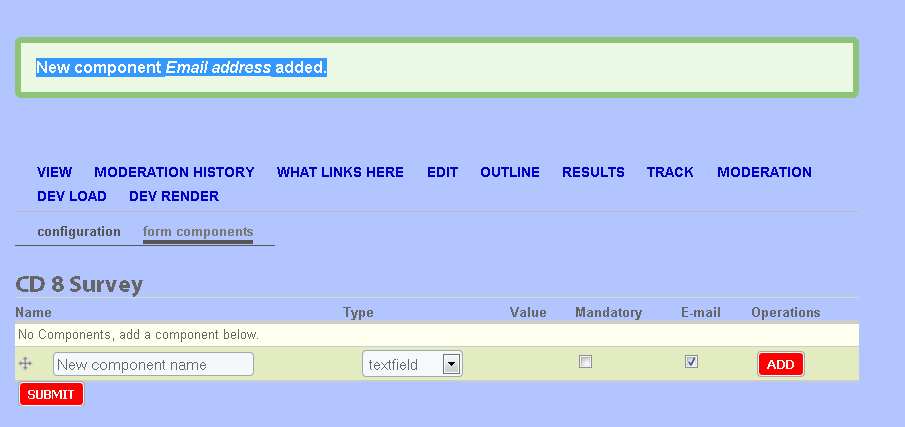
Alan.Guggenheim commentedJust installed Webform on 6.15 and I have the same problem: When I add a compoonent, (click Add, enter details, click submit, goes back to Webfor edit main screen) I get a boxed message saying for example: "New component Email address added." yet no component shows up in the list below.
2-9-2010 Updated:
I found the problem and fixed it. it was partially self-inflicted:
I had a content type "Webform" that was actually not the correct one. I had created it a long time ago while installing webform as a result of not understanding clearly the installation instructions: They say something like "This will not work until you have created a Webform", and i created a Webform Type instead of just a new webform...
Deleted it, uninstalled module and re-installed and now it works beautifuly.
Thanks
Comment #31
quicksketchWow interesting. Sounds like some funny handling of node types by Drupal core going on here. An interesting note however is that in the 3.x version, the "webform" content type is now just the same as any other content type, so this won't happen in the new version.
Comment #32
alextronic commentedI still have the same problem as OP: "Pressing add, does not do anything".
I don't even get the 'New component added' message.
I CAN clone an existing component, and then the new one will be added, but if try to drag it to the last position, I get a "Validation Error" message!!! Weird!
Comment #33
alextronic commentedIn my case, the culprit was definitely Suhosin php plugin. Following the link at http://drupal.org/node/585180#comment-2567770 gives parameters that let me keep working. Thanks quicksketch.
Comment #34
gollyg commentedI am experiencing this problem on Drupal 6.15 with Webform 6.x-2.9. This problem is occurring in a local development environment running MAMP (no Suhosin patch), a remote Ubuntu server and a remote shared server.
In my case I have traced the problem to the installation of the webform_component table - the email column is missing. This is strange, as I can't see any strange characters in the install schema. Every other column is present. This has happened on each host via a direct installation (I am not merely copying my database across).
With the missing column the insert query returns an error, but rather silently, as there is no check that the query returns true. Error returned by devel:
I will try running the install process with a debugger to see if I can get it to happen again and see what might be the problem.
Comment #35
gollyg commentedUninstall/reinstall resolved the issue both locally and remotely.
Very strange.
Comment #36
quicksketchMoving back to fixed. There are thousands of Webform installations using 2.7 and 2.9 versions of the module, making this sound like server configuration issues more than a problem with the module.
Comment #38
Akash Verma commentedHow to create table in a web form and how to insert data in it
Comment #39
quicksketchAkash Verma: Your question is not at all related to this issue.
Comment #42
stixes commentedHad this issue, and it was related to me using Features to save the state of the webform content-type. Reverting the feature overwrites the module installed Webform type and webform module gets confused I guess.
my $0.02
Comment #43
Revalis commentedSorry to rez an old topic, but I'm encountering pretty much this same issue. I've read through a few other issues that are semi-related, but none of the proposed "solutions" have done anything for me.
I have a Drupal 6.22 install using the 3.11 build of Webforms. The only other "Webform-related" module I can say I have is Mollum; but it seems to be working fine, and I doubt this is even occurring on a page Mollum would affect.
In any case, I can create a new Webform fine. But when I edit the Webform tab and try to add a new component (doesn't matter which type) and click add -- nothing happens. It's as if the screen reloads. I've cleared the cache (browser and drupal) and it doesn't seem to be changing anything. Also, I'm not using any additional modules like Features or Entity Cache like I've seen mentioned in other posts.
Does anyone have any other ideas / directions to point me in to find what could be hindering the adding of components to the webform? Thanks!
Comment #44
Revalis commentedComment #45
pingers commentedGiven that the question pertains to a new version of webform, I'd open a new issue, rather than undo the tagging of an older issue.
Feel free to reference this issue in the new issue though.
Re-closing. Cheers.
Comment #46
jsbruns commentedSo after spending a few hours tracing the source code I was able to find one definitive issue that when fixed, corrected any issues I had adding webform components. I'll summarize what I found and how I fixed it below, followed by the modified code I used for the fix. Maybe one of the project developers can comment??
On line 323 in the function 'webform_components_form_submit' it appears to check the $_POST array for several conditions, attempting to determine whether a new component is being added, an existing component edited or deleted, or the order of an existing component changed. The condition in question checks the $_POST['op'] variable to see if it equals 'Add', indicating a new webform component being added. After examining the $_POST variable I immediately noticed that despite attempting to add a new component, $_POST['op'] did not exist anywhere in the $_POST array. What did exist however was $_POST['add'], which after modifying the condition to see if it exists fixed my problem.
Although I think it's unlikely, I suppose there's a chance this condition statement could at some point need to check the $_POST['op'] variable. So just in case I'm leaving it in place, appending with an OR followed by the modified $_POST['add'].
Replace the following on line 323:
elseif (isset($_POST['op']) && $_POST['op'] == t('Add')) {with the following:
elseif ( ( isset($_POST['op']) && $_POST['op'] == t('Add') ) || isset($_POST['add']) ) {That was all it took and I can add/edit/delete components without any issues. Hopefully the fix works for some of the other users out there. Good luck.
Comment #47
quicksketchpingers is right (see #45). Open a new issue.
Comment #48
loopduplicate commentedn case anyone is still using an old version of webform and has this problem still, I found that using the fix suggested in comment 12 in the following link worked: http://drupal.org/node/588234#comment-2117702
Essentially, the problem was that when using PHP 5.3, returning the $node value by reference isn't cool :)