

 Come together with the global Drupal community in Rotterdam, 28 Sept – 1 Oct 2026. Sessions, contribution, connection, and Early Bird savings until 8 June.
Hi,
I am using webform 6.x-2.1.3 on a new drupal 6.4 installation.
I could successfully create a test webform, but when I try to edit it and add more components/fields I cannot find a way to accomplish the task.
I tried to add the 5.x module to a 5.x drupal installation and I can easily update it using the "Components" block.
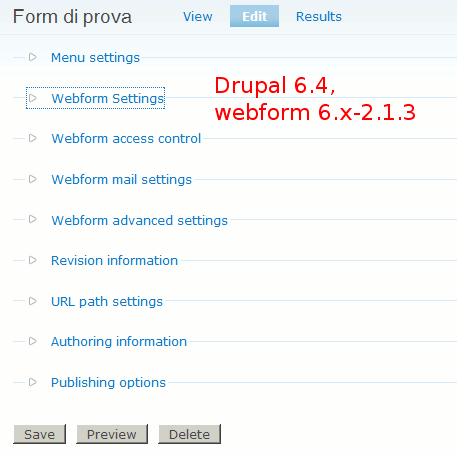
See the attached images for a snapshot of the admin screen.
Am I missing something or this is a bug in the current 6 version?
Massimo
| Comment | File | Size | Author |
|---|---|---|---|
| #8 | StartUpPackFormSS.gif | 90.33 KB | Paul-Hickman |
| Admin screen for drupal 5.7 and webform 5.x-1.10 | 14.93 KB | maxferrario | |
| Admin screen for drupal 6.4 and webform 6.x-2.1.3 | 10.69 KB | maxferrario |


Comments
Comment #1
maxferrario commentedI forgot to mention that on my test site I unstalled the webform-6.x-2.0-beta3 webform module and then I upgraded it using drupal update feature.
I will try to remove the module and directly install the last one, to see if something changes.
Comment #2
maxferrario commentedNope,
removing the installed module (disabling it, removing the files, deleting webfrom* tables from the db end removing the webform record from the system table) and reinstalling it didn't solve the problem.
massimo
Comment #3
quicksketchThis is similar to #277537: updating webforms wiped my form components. If you're upgrading your site from Drupal 5, you *must* upgrade to the latest Drupal 5 version of the module (2.1.3) in Drupal 5 first, then upgrade to Drupal 6.
If you're not interested in maintaining your existing data, you can completely *uninstall* the module (not just disable it) by doing the following:
- Visit admin/build/modules
- Turn off Webform
- Visit admin/build/modules/uninstall
- Check the box to uninstall Webform and submit
- Turn back on Webform at admin/build/modules
Disabling the module alone doesn't uninstall it. You need to explicitly run the uninstaller.
Comment #4
maxferrario commentedAs I said in my first post, the drupal 6 installation I am testing webform with is completely new: I am not upgrading it.
The comparison with drupal 5 is only done because I used the webform module in a drupal 5 powered site.
I will try to uninstall the module and reinstall it, and will post the results here in a while.
Comment #5
maxferrario commentedI uninstalled the module as you suggested, and reinstalled it: now everything works!
I can see a "Form component" link when editing my form that was missing yesterday (as you can see from the picture I attached to my first post) and now I am able to modify an existing webform.
So please be aware that upgrading from webform-6.x-2.0-beta3 is difficult or even not possible.
As a last note, after uninstalling and reinstalling the module I found all my test webforms in place. As I didn't submit any of my test forms, I cannot tell anything about submitted data being wiped out or not.
Thanks a lot quicksketch for your quick reply, and for the great webform module!
Comment #6
quicksketchAfter uninstalling Webform and enabling it again, the Webform nodes will all still be in place, but all the components in all the existing nodes will have been removed (along with any webform-specific settings for that node).
I'm going to mark this as fixed, and I'll continue to work on #277537: updating webforms wiped my form components as a bug.
Comment #7
maxferrario commentedAfter some more work on my test installation, the problem reappeared again, but just after i enabled the webform_report module that, for drupal 6, is a module still in development.
So I will file a bug report for that module instead.
Comment #8
Paul-Hickman commentedHi,
I am having exactly the same issue of not being able to edit existing components. I clean installed Drupal and Webforms for the first time today and I haven't installed any additional Webforms modules.
I'm attaching a screenshot for your reference, hope this helps.
Paul
Comment #9
quicksketchPaul-Hickman: I think you're experiencing some of this issue #238434: Components option does not appear!
Comment #10
danmc commentedComponents don't show up.
ok - so following this issue and then #238434 :( is the answer for us to edit our themes to get the 'add components' to show up? - sorry totally lost on following all the answers.
Comment #11
quicksketchSwitch your site's theme to Garland, and see if the options appear for editing components. If this is the case, then there is a bug in your theme, where it is not properly showing all the tabs that are available. If this is the case, you should take up the problem with the developer of your theme.
Comment #12
maxferrario commentedHi,
after some modifications now webform_report 6.x-1.3 appears compatible with webform again.
But I think you should read the note from the webform_report maintainer here to see if more conflicts can arise:
Comment #13
danmc commentedswitched to garland, created a new form, saved, back to edit.
The add components tab is not visible.
Comment #14
danmc commentedThe complete remove and reinstall worked for me.
deactivated webform and other modules (webform_associate and webform_report) related to it.
Uninstalled webform.
Deleted webform directory from sites/all/modules.
downloaded fresh webform and installed again.
working.
Comment #15
Paul-Hickman commentedHi quicksketch,
Thanks it is now fixed (by changing the admin theme).
Appreciate your help.
Comment #16
PaulWood commentedDrupal: 6.10
Webform: 5.x-2.6
Webform Associate: 6.x-1.0-beta2
For me, webform_associate was the culprit.
I disabled the webform_associate module and then uninstalled it. The "Form components" tab magically appeared on my webforms.
Comment #17
quicksketchComment #18
quicksketchJust a note that 3.x completely replaces webform_associate. See #510256: Allow webforms on any content type.
Comment #19
adanelova commentedI had similar problem. But I found out, I can add and edit components only while creating new webform (i didnt notice it when creating the first one). when you update/send form... the components cannot be added or edited anymore... at least it works like that for me.
Comment #20
markconroy commentedHere's my problem (using Drupal Commons 2.3):
Can add components when creating webforms.
Can't see components after creating webforms - sometimes - was working fine until about a week ago and work fine at one stage today for about half an hour
Can't edit components by going to node/x/edit/components (though I could for some time last week when the above wasn't working), but now seem to be able to go to node/x/edit/webform/component
Checked theme and tabs2 is there, cleared caches (about a gazillion times), uninstalled (and deleted webform folder) 3 times and reinstalled it 3 times (including losing all my created forms settings and then recreated them).
About to jump from the top floor now, as I'm about to go live with a beta of the website, and we really need this module working.
Also, the forms are not sending email (which I hope I can fix up with the host, though they were being sent with the same host a month ago on a different hosting plan) - but we can access the "reports" so this isn't a huge problem yet!
Comment #21
ashrafabednode/x/edit/components wasn't working for me either. I could see the Components tab, but it seemed to link to the same place as the 'Load' tab. however, going to node/x/webform/components seems to work for me (D7)