

Closed (duplicate)
Project:
Views (for Drupal 7)
Version:
7.x-3.4
Component:
Miscellaneous
Priority:
Normal
Category:
Bug report
Assigned:
Unassigned
Reporter:
Created:
21 Aug 2012 at 18:42 UTC
Updated:
15 Nov 2012 at 16:16 UTC
Jump to comment: Most recent file




Comments
Comment #1
dagmarPlease elaborate better your issue. If you can, provide a screenshot of your problem, and export your view.
Comment #2
Hurpadurp commentedOh good, somebody else has this problem! :)
All of a sudden, the View just unset the bool's operator. Nothing popped up in reports/dblog, and no other parts of the View were changed. Each display had a red margin around it, and the horizontal CSS margin/padding to the dropdown operator in the filter options changed.
I checked the operator again, and presto chango - it worked again, and the red borders were gone. Phew.
Comment #3
PedroMiguel commentedSame problem here, the select box of the operators (on filters) are unchecked....
Comment #4
PedroMiguel commentedIf this help:
Exported part of filters (before resave the view):
Exported part of filters (after resave the view):
Comment #5
couturier commentedWell, I'm seeing a lot of people having problems with the 7.x-3.3 upgrade, but my operators on my site remained checked. I don't know what could be the problem, since that wasn't it. I'm going to cross-post a link to my issue here, in case anyone else is still searching for answers: http://drupal.org/node/1743424
Comment #6
DevJoshLopez commentedmy operators remained checked too.
Comment #7
PedroMiguel commentedmore info:
The only operators who are not checked was the one involving "list fields (text)".
Node types and similar are ok.
Comment #8
couturier commentedI think this one is solved, right? Then there are those of us for whom this did not seem to be the answer, as mentioned in #5.
Comment #9
awasson commentedI have a view with a checkbox boolean filter that became irrelevant after the update from 3.3 to 3.4 but once I went in and reconfigured it to "is one" – "of value = 1" it snapped back into shape.
Comment #10
Taxoman commentedLets keep this open a while longer for more reports.
Comment #11
andrewfn commentedI was able to use a boolean field in a filter before 3.3 -> 3.4. Now whatever I do give me the error:
No valid values found on filter:<name of field>Comment #12
awasson commentedHave you gone into the view to edit and configured the boolean field? When I update, I needed to edit the view and reconfigure the bool field... It was sort of NULL (not 1 or 0). I then sat it to be "one of 1" and everything worked.
Comment #13
andrewfn commentedYes, I have deleted it and tried to add it again.
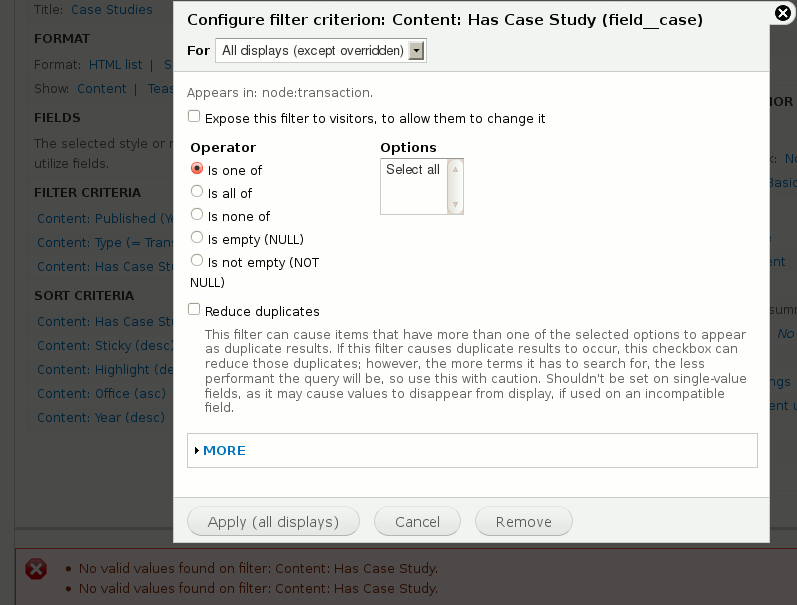
As I am adding it in the foreground dialog, I can see a red error message (No valid values found on filter:) appearing on the underlying page. This is before I try to pick any options. No combination of options seem to make the error message go away.
Comment #14
awasson commentedCan you post a screenshot of the views (editing) page?
I found that in my case it was a filter that was causing the issue and I didn't need to delete it. I just needed to configure it and tell it that I wanted it to "be one of 1".
Comment #15
andrewfn commentedHere is a screenshot. You can see the error message in the page below the dialog.
Comment #16
awasson commentedThat's odd. I'm not seeing any boolean values. All I see is select all. What are the values for the case study field supposed to be?
Comment #17
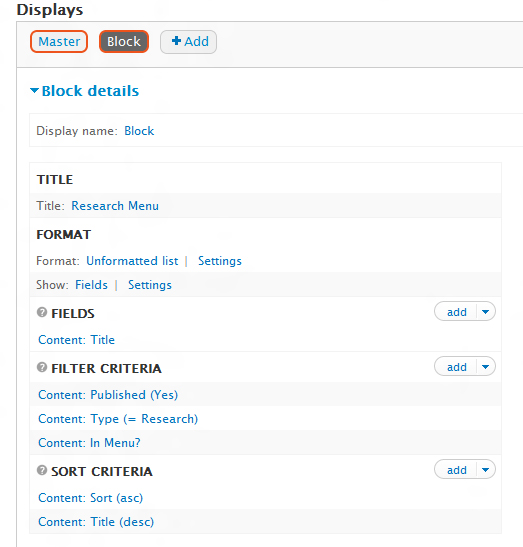
andrewfn commentedHere are a couple of screenshots from my content type. I have left the values as 0 or 1.
Do you think that is what the problem is? --it worked perfectly before, and showed me the right values.
Comment #18
awasson commentedI don't believe that if left empty 1 will be used or if left empty 0 will be used or rather I don't think views will interpret it that way.
I ran into that issue some time ago and I always insert a 1 and a 0 just in just in case.
Edit: I'm referring to the field settings of that bool.
Comment #19
andrewfn commentedThat fixed the problem for me, thanks very much! (This site is supposed to go live tomorrow morning, and I will be up all night).
But I still think there is a bug in views because the sort order worked fine on booleans even with no explicit values set, and filters worked with 7.x-3.3.
Thanks again!
Comment #20
awasson commentedYour welcome. Best of luck with the launch tomorrow and hope you manage to get some sleep before daybreak. Isn't it always the way. Glad that worked out.
Cheers,
Andrew
Comment #21
damiankloip commentedComment #22
mikeker commentedSee: #1793432: For boolean with empty values, list_allowed_values() should return array('0', '1') for the root of this issue.
Comment #22.0
mikeker commentedCreated a clearer title.