

Closed (works as designed)
Project:
Video
Version:
7.x-2.x-dev
Component:
Zencoder
Priority:
Critical
Category:
Support request
Assigned:
Reporter:
Created:
18 Jul 2012 at 17:03 UTC
Updated:
26 Jul 2012 at 21:07 UTC
Jump to comment: Most recent file


Comments
Comment #1
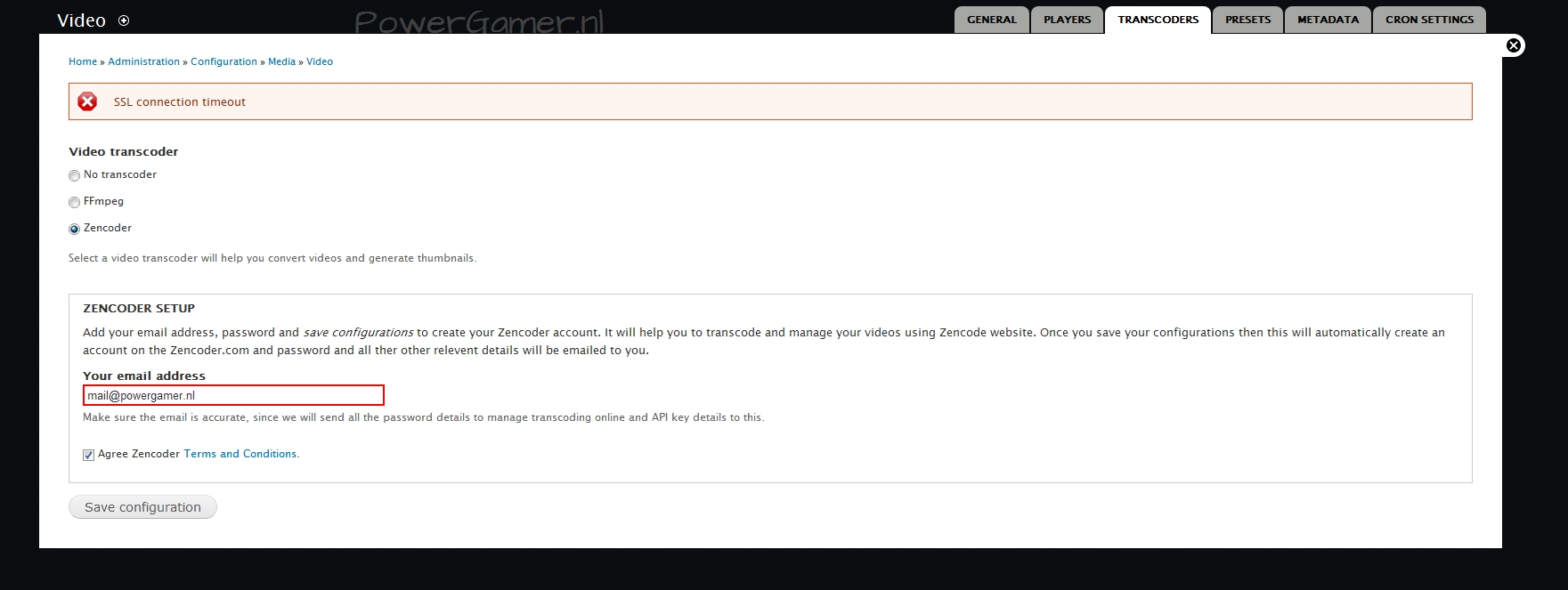
Jorrit commentedCould you describe at what moment you're getting this message? Is the error also occurring when you upload a small video? Can you provide a screenshot of the error message?
Comment #2
tloader11 commentedThanks for your fast reply !
It appears at the "transcoder" tab, when i select "Zencoder" enter my mail address, and agree the terms and conditions...
So i am not able to upload any video.... FFmpeg gives me other strange errors (version 0.6) , but that's for another time ;-)
And an screenshot as atachment
Hope this helps ?
T ter Haar
[EDIT] : So this is when i hitted save configuration... Also tried with other e-mail adresses
Comment #3
Jorrit commentedThat is weird. Is your server able to communicate with the outside world on port 443?
Comment #4
tloader11 commentedyou could port-scan the IP of the server, it has port 80,443,25 open... and located to the right server inside the network....
I really don't understand why this error occur ? :s
thanks for your time,
T ter Haar
Comment #5
Jorrit commentedIt is a problem with CURL. On the internet there are many different solutions for this problem. Search for
"SSL connection timeout" PHP curlfor these solutions. Perhaps one of those solutions helps for you.Comment #6
tloader11 commentedCould I just uninstall curl ? or is it needed ? becouse it's for my other stuff unnecessary.
[EDIT] : sorry, at this part of computering, i'm a total beginner....
Comment #7
Jorrit commentedIt is necessary. It is the component that allows PHP to make HTTP requests. It is where this error originates.
Comment #8
tloader11 commentedOh well, I don't think it's smart to remove it, in that case ;-)
But i googled for the arguments you said, and couldn't exactly understand what I have to do right now, to get it work.... :(
Could I get an precise page, were is documented what I have to do, please ? Becouse I'm not very known with editing PHP and other stuff....
Working in terminal goes fine for me ;-)
Thanks for your help !
T ter Haar
[edit] Using ubuntu 10.10 (I know, it's a little bit older, but I hate gnome3 !)
Comment #9
tloader11 commentedCould I have such link ? Becouse PHP-editing is not my thing... I'm sorry...
Thanks for the person who could give me a link !
T ter Haar
Comment #10
Jorrit commentedI think I can't help you anymore via this issue. If you want me to look at it, I need to access your site and be able to execute some PHP commands. Could you contact me via my contact form at http://drupal.org/user/161217/contact ?
Comment #11
Jorrit commentedIn private conversation, this bug seems to be fixed. It was gone without any changes to Drupal or the module.