

Closed (fixed)
Project:
Ubercart Terms of Service
Version:
6.x-1.0
Component:
Code
Priority:
Normal
Category:
Support request
Assigned:
Unassigned
Reporter:
Created:
13 Nov 2009 at 22:22 UTC
Updated:
26 Sep 2010 at 15:11 UTC
Jump to comment: Most recent file

Comments
Comment #1
pcambraI've made a test of this and I can see the ToS node working both in cart & checkout panes in a fresh drupal install.
If you upgraded the module from a older version, please reinstall the module, you can do it manually or use devel.
Are you filling in the node in the configuration? (admin/store/settings/tos)
Are you using the latest version of the module?
Are you using Ubercart 2.0?
Is the pane enabled in the pane list? (admin/store/settings/checkout/edit/panes for checkout or admin/store/settings/cart/edit/panes for cart)
Do the user has permissions to access the node configured as ToS?
If you reinstall the module, test this list of things, and the pane keeps missing in cart or checkout, please give me more information in order to know what is happening.
Comment #2
Misura commentedSorry my bad, I didn't have the Pane enabled.
Thanks again for the quick fix of the settings not saving, it is much appreciated!
Comment #3
iharley commentedI'm unable to get the pane to show either. I'm running the JUST released Ubercart (6.x-2.2) and have uninstalled and reinstalled the latest version of your module. I have input my node and have selected it to show at check out. As I think I read here that the make required setting isn't functioning yet, I've left that alone. I have enabled the pane for ToS in Checkout, just above Payment Method. What am I missing?
Comment #4
pcambraHi
I've not tested the module against the last Ubercart (2.2), I've tested it with Ubercart 2.0, but I don't think this is the problem.
The last release of the module allows the required feature, but only in Checkout panes.
Have you ensured that in the admin section of Ubercart for checkout panes (admin/store/settings/checkout/edit/panes), the terms of service is enabled?
Do you have modalframe enabled and the module configured in popup mode?, then only a checkbox & a link are displayed
Comment #5
iharley commentedI'm wondering if I'm missing a step here. I wasn't planning on using the pop-up option. My understanding is that I create a page with my ToS on it, and put that node in where it's asked for. Is this not correct?
Comment #6
pcambraYes it is, but if you have modalframe installed, you are able to show the node in a popup. If you haven't enabled that, then there will be a textarea and a checkbox in the checkout (or cart) pane.
Again, have you ensured that in the admin section of Ubercart for checkout panes (admin/store/settings/checkout/edit/panes), the terms of service is enabled?
Comment #7
iharley commentedThank you for your help in this, but I'd triple checked my check out and cart panes. I want the ToS to show on checkout, so I've made that pane active with a weight of 6 (which puts it right below shipping and right above payment) but it doesn't show. I have liked it to my node "starlight-giftstore/terms". I do not have modalframe installed, but do have the module sitting on my server, un-enabled. I'm not seeing a text area.
Comment #8
pcambraI can't reproduce at all your issue. Could you please attach a screenshot of the terms of service config and the checkout panes?
Comment #9
Susan Rust commentedHi, we're using the latest version of UC 2.2 as well and are having the same issue. We would like the TOS to appear without the modalframe and we also are not seeing the content. Here's a screen shot of the panel with the pane turned on, our TOS page, etc. Thanks for your help!
Comment #10
pcambraThanks for the feedback, greenbirdmedia!
Could you please tell me the value of these variables?
uc_termsofservice_target
uc_termsofservice_required
uc_termsofservice_node
You can find it using devel module or querying the variable table of db.
Can you change the node of the ToS as well? It is an autocomplete, you have to wait for the suggestion and then select it.
Comment #11
pcambraI've just made an update of the code, now the options are in the cart pane settings and checkout pane settings.
Update the module to the last version (when it gets populated from CVS), run update.php and if you keep getting these problems, please reopen this issue with the value of the variables named like 'uc_termsofservice_%' in your drupal install.
Comment #13
claytonk commentedI am having the subject problem: the ToS node is not being displayed in cart or checkout.
Further, looking at the Drupal variable table, none of these variables are even present:
uc_termsofservice_target
uc_termsofservice_required
uc_termsofservice_node
Comment #14
pcambraPlease, don't reopen fixed issues, you've even change the version of the module.
Are you using the last stable version of the module?, then the variables you should look for are these:
uc_termsofservice_something_node (where something should be checkout, cart, or both)
Be aware that all the settings are managed through Ubercart checkout & cart panes.
If you've upgraded from dev version, you will probably have to completely uninstall the module and install it again.
Comment #15
claytonk commented> Are you using the last stable version of the module?
Yes, 6.x-1.0, the only version offered for download....
> uc_termsofservice_something_node (where something should be checkout, cart, or both)
In the Drupal variable table, there is no variable that begins with "uc_termsofservice"
> Be aware that all the settings are managed through Ubercart checkout & cart panes
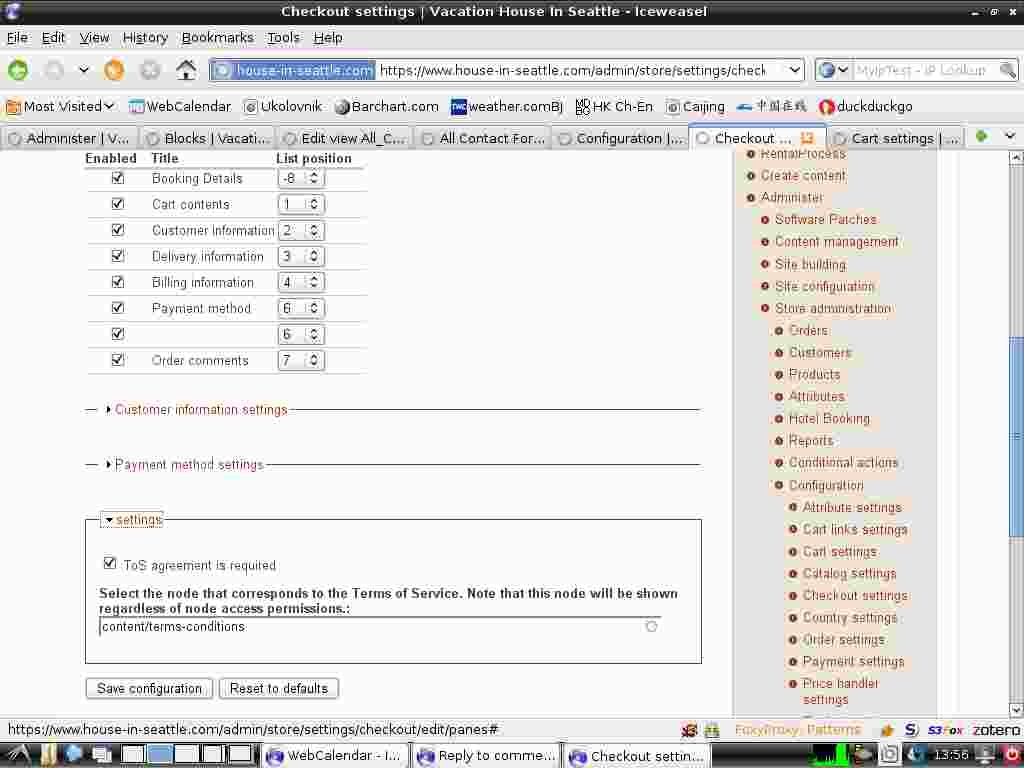
Yes, note in the screen shot I have attached how the module seems to be "there", but the pane does not seem to have a label (the blank pane in position 6)
> If you've upgraded from dev version, you will probably have to completely uninstall the module and install it again.
I don't recall a version change, but just to be sure, I disabled then re-enabled the module. No change in behavior.
Comment #16
pcambraOk, I'm comitting a fix for the void title issue, please upgrade & test this again, but the node selection field is an autocomplete, so you should write the title of the node and not the path, so the final text will appear like this one "TOS TEST [nid: 1]" but with your node title and nid, of course.
Comment #17
claytonk commentedThanks for the quick responses!! As it turns out the problem was the proper specification of the node to be displayed. After I used the node title and allowed it to auto-complete as you suggested, then clicked update, everything worked. Perhaps the prompt for the node field could be a little more specific. Thanks again....
Comment #18
pcambraThanks claytonk, I'm marking this as fixed.
Comment #20
rafaeldwan commentedI agree that the instructions on this field need to be much clearer or perhaps an error message could generated if there's not a valid entry. I've never seen nodes identified this way before, I used an relative url as that's how most modules identify drupal nodes. Just the text "use node name not absolute url" or something on the instructions would have saved me some stress and headaches.
Got it working now. Thanks for the great module!
Comment #21
pcambraI'm not sure of what you expected but I think that CCK node references or Panels, only to give two clear examples, work this way. I'll try to document it better for the stable release.