

Closed (duplicate)
Project:
Syntax Highlighter
Version:
7.x-2.0
Component:
Code
Priority:
Normal
Category:
Bug report
Assigned:
Unassigned
Reporter:
Created:
5 Jun 2013 at 15:17 UTC
Updated:
14 Jun 2013 at 04:28 UTC
Jump to comment: Most recent file


Comments
Comment #1
pradyumnahpt commentedHi all,
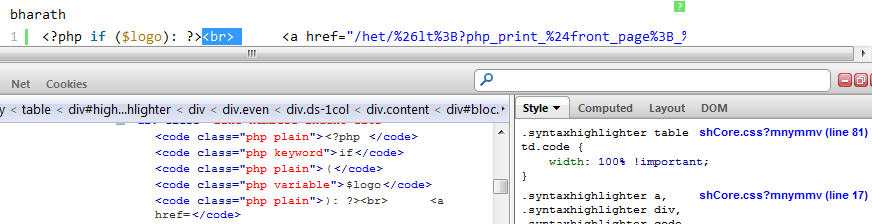
There is an update to the issue,the code appears in single line when the "Html script" checkbox in the Syntax highlighter insert interface is checked.beacuse it does not recognize the newline break tag as a html snippet and assigns a css class called "plain",so it is rendered as it is in the single line code instead of inserting a new line (no line break functionality)... please see the attached firebug screen shot of the rendering of break tag.
also if i uncheck the "Html script" check box,the break tag works fine and code is rendered across multiple lines,but there is no gutter for line numbering,and no colouring effect for different html,php elements.
Please provide any solution as to how to fix this issue.
Thanks.
Comment #2
fizk commentedAre you using version 7.x-1.1 or 7.x-2.0?
If you are using 7.x-1.1, can you try using 7.x-2.0?
Comment #3
pradyumnahpt commentedHi fizk,
Really Sorry,I am using the the 7.x-2.0 version and not 7.x-1.1,it was a misselection while creating the issue.The same issue is on 2 different sites too...
Thanks
Comment #4
pradyumnahpt commentedHi fizk,
It works for me, when i place the code(the code has html entities) by disabling the rich text editor.but not when rich text editor is on...because the html tag brackets are converted to ampersand symbols.and so break tag is not recognized as part of html.you had asked to disable rich text editor,here https://drupal.org/node/1164172 .is there a way so that I can place the embedded html code as it is, with rich text editor enabled in d7.Please correct me if I am wrong.
Thanks
Comment #5
fizk commentedpradyumnahpt, try moving "Correct faulty and chopped off HTML" to be above "Syntax highlighter".
Comment #6
pradyumnahpt commentedfizk, Thanks for the suggestion !!!!! but, I was able to solve the issue by using the
https://drupal.org/project/wysiwyg_preelementfix module,the patches to make a d7 version is present in
https://drupal.org/node/1445984 .absence of this module had created this issue,and this fixes the line break issue.
Thank you
Comment #7
fizk commentedExcellent! I'm glad you found a solution. I'll look into the patches in that issue.
Comment #7.0
fizk commentedbr tag was missing