

Active
Project:
Supersized
Version:
7.x-1.0-alpha2
Component:
User interface
Priority:
Normal
Category:
Support request
Assigned:
Unassigned
Reporter:
Created:
14 Feb 2013 at 17:20 UTC
Updated:
16 Jan 2014 at 04:05 UTC
Jump to comment: Most recent, Most recent file



Comments
Comment #1
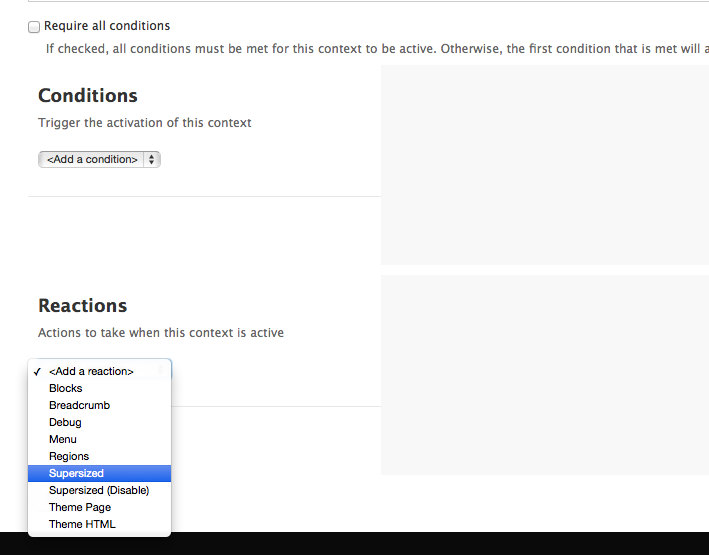
ahlofan commentedA context plugin module comes with Supersized. Make sure you have Context, Supersized Context enabled. Then all you need is to add a new context with a path condition such as 'contact' (or whatever condition suit you the best), and a Supersized action, select a node with Supersized. Save it, this will do it.
If you are not familiar with Context, please go to http://drupal.org/project/context, there are some tutorials.
Hope it helps.
Comment #2
Ov3rDoze commentedThank you very much! It works perfectly
Comment #3
ahlofan commentedComment #4
thejtate commentedThis is perfect, worked like a charm for me. Thanks for the direction @ahlofan
Comment #5
ahlofan commentedA suggestion for anyone who wants to have a default supersized background on every pages unless something specific defined.
~admin
~admin/*
~node/*/*
~node/add
~node/add/*
~taxonomy/term/*/*
~user/*/*
~batch/*
Have fun!
Comment #6
thejtate commentedHey ahlofan,
I had this working last week with using the context module. But the contextual part of this stopped working after I migrated the site to go live.
Noticed the slider stopped working on my homepage. At first the Supersize Context Module wasn't even showing up on the Context reactions list. So I turned off both modules to Supersized and uninstalled them, them reinstalled them and whatnot. The contextual reaction for Supersized is now showing up, but it's like it's not even reading/seeing it.
I even plugged in the new ~admin and ~node/*/* in the path conditions and it still shows up while editing the node itself.
Didn't know if there is anything I can do to get it to read the Supersize Context correctly?
Thanks and sorry for the trouble.
EDIT: I read they were having some issues with Drupal 7.14 and 7.18(?) with Contextual reactions. I doubt that was the cause to this, but I tested it anyhow. I ran a new Context for the front page and it loaded just fine. So it's like the context for Supersize just isn't loading for my homepage. I even made a new Context that would run everywhere for this and still only loads on the node page itself for the slider.
So odd.
Comment #7
ahlofan commentedhi thejtate,
Sorry, a bit confused.
So you are suspecting that Drupal 7.14 and 7.18 caused some problem with Context reaction right? And I don't really get what you mean by "I ran a new Context for the front page and it loaded just fine. So it's like the context for Supersize just isn't loading for my homepage." So it is ok or NOT ok loading the page using context?
Comment #8
thejtate commentedSorry for the late reply. Been a busy week.
At first the Supersize Context wasn't loading at all when I would create a new Context (wasn't showing up under the list of Reactions). I had to just uninstall and reinstall the Supersize plugin for a quick fix. I assumed it might have happened when I was updating Drupal and a few other plugins.
The main reason Supersize wasn't loading at all on the homepage afterwards was that I had a new view with a filter that was exposed to the user. Once I removed that from the homepage my Supersize worked fine.
Comment #9
ahlofan commentedComment #10
Anonymous (not verified) commentedExperiencing the same problem today with latest Drupal 7.25 and latest context module 7.x-3.1dev
There is no "Supersized" option in the context conditions or reactions, just the standard conditions, 'context, language, menu, node type, etc". I have the supersized module and the supersized context modules enabled, 7.x-1.4+4 dev.
Comment #11
ahlofan commentedJust tested on Drupal 7.26, Supersized 1.5, things are working as expected. Please try again with the latest recommended release.
cheers.
Comment #12
Anonymous (not verified) commentedUpdated to 7.26 using drush. Still not working. Not sure what I am supposed to see. Is it an extra "Condition" in the drop down list that specifies "Supersized" or is it something added to the Reactions? In either case I don't see anything related to supersized.
Comment #13
Anonymous (not verified) commentedSwitched to the non dev release, which for some reason has a higher release number? 7.x-1.5 vs the dev which was 7.x-1.4??
In any case, it still does not work. There is no indication in context ui that supersized exists. Double checked that supersized and supersized context are enabled. cleared caches, rand drush rr, even rebooted test server, no joy.
Comment #14
ahlofan commentedhi trainingcity,
dev version really means whatever I coded and pushed to GIT repository at the moment, so it may contains any un tested code. anyway, I have attached screenshots here, please take a look. can you also double check that "supersized context" module is enabled.
Comment #15
ahlofan commentedComment #16
Anonymous (not verified) commentedThanks, it is definitely missing. I tried a re-install again of context and supersized, no joy. I ran drush cron & rr again.
Any ideas what could be going on?
I am running a multisite and first installed context and supersized in the @site/modules directory while the library was installed in sites/all/modules.
I decided to remove the site specific install and did an install in sites/all/modules for both context and supersized, repeated above action, still nothing. I doubled checked that everything is enabled, etc.
Comment #17
Anonymous (not verified) commentedWondering if this is really a context issue not a supersized issue?
http://drupal.stackexchange.com/questions/75937/context-module-missing-c...
In any case, I doubt it will be resolved by Context module queue so hopefully we can troubleshoot here.
Comment #18
Anonymous (not verified) commentedAlso, I am only interested in the context option because I want supersized image only on my page which happens to be a panels page.
If you can think of another way to limit the supersized image to a single panels page please let me know. Rules? custom tpl.php?
Comment #19
Anonymous (not verified) commentedTo clarify, I only want to use the supersized background image for one page, the front page which is a panel.
Comment #20
Anonymous (not verified) commentedFound a much easier solution for folks who need to use supersized on panels and non-node pages.
There is another module, Views JQFX Supersized that works perfectly.
https://drupal.org/project/views_jqfx_supersized
This module does rely on the somewhat outdated Views jQFX module, but it works. It also has the advantage of not requiring the context module. I have had conflicts with the context module in the past and did not want to enable it just for the background image on one page anyway.