I don't know if anyone else has been pulling their hair out with this "problem", but I figured in the spirit of open source drupalness, I'd post my results.
I have a couple D7 website that each have a superfish (http://drupal.org/project/superfish) main menu. I couldn't figure out for the life of me why whenever I clicked on a parent menu item (i.e. has menu links under it), it would require a double-click. Upon inspecting the html when clicked once, I noticed that it was adding the "sf-clicked" class. I then figured out that this was being added by the Superfish Plugins section "SF-Touchscreen". The steps to recreate the problem are:
- You DO HAVE the "Use jQuery sf-Touchscreen plugin for this menu." checked
- You DO NOT HAVE the "Use this mode only if below user agents were detected." checked
- You WILL have the weird double-click madness for desktop users.
This is GREAT if somebody is on your site using an iPad, iPhone, Android, etc., but annoying as heck if on a desktop.
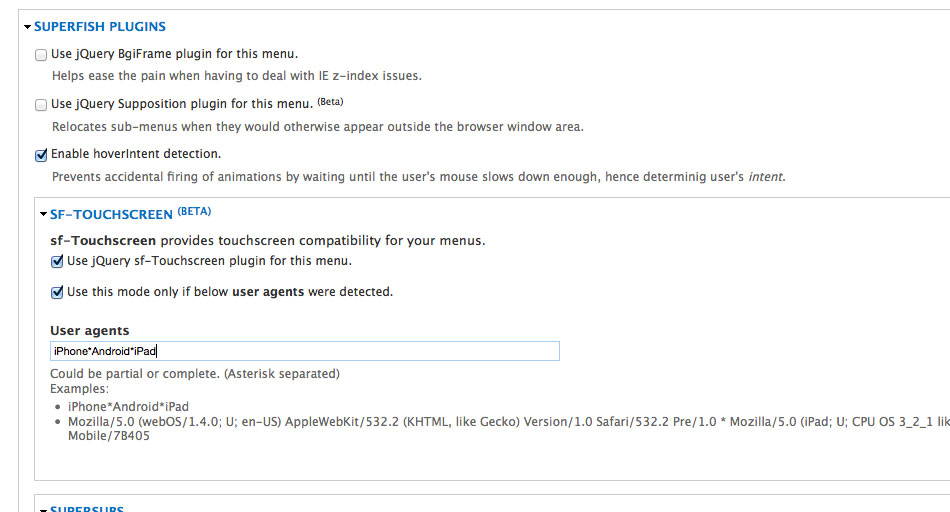
SO....Here's what I did in the Superfish Plugins section "SF-Touchscreen" in the Superfish Menu Block:
- Check "Use jQuery sf-Touchscreen plugin for this menu."
- Check "Use this mode only if below user agents were detected."
- Typed in "iPhone*Android*iPad" in the blank for "User agents"
Obviously you can specify other mobile agents, but the above is sufficient for my sites.
I hope this will help save a little frustration and "head-banging your desk" for somebody else. Happy Drupaling!!



Comments
Comment #1
pjbarry21 commentedHad the same issue, but not enough time to play with settings to discover the cause. Decided to do a quick search and found this post. My settings were identical (to the "cause") and the fix worked perfectly.
Thanks!
Comment #2
j3d commentedSolved my problem too!!! Thanks
Comment #3
topdawg commentedHmm, my setup exactly, but does not work. My iPad still requires two or even three finger clicks at the top menu
Joe
Comment #4
rerooting commentedYay, this works. Thanks!
Possibly someone could write a patch for the documentation that explains this as the field help for the option to enable SF Touchscreen?
Comment #5
topdawg commentedHere's a screen shot of my menu block setting, if I am missing something let me know but unfortunately it did not work for me. BTW, I tried on iPad2 real, and both 1&2 versions with X-code simulator.
Comment #6
promesGreat, I was looking for other solutions, but this does the trick.
Thanks.
Comment #7
mehrpadin commentedComment #8
dooug commentedSolved my headache too! Thanks!
Comment #10
jwineichen commentedI just upgraded to 1.9 and had this same problem. After fiddling with the settings, I got it to work correctly after switching the "User agent detection method" from client-side to server-side.
Comment #11
golubovicm commentedI'm not using that superfish module but I had the same issue. And solved it by installing jQuery update module. It's setting jQuery to latest supported (1.10) version and menu works well after that.
P.S. I'm using "Administration menu" plugin so I realized that my comment is maybe off topic (and I don't see way to delete it). But on other hand I stumbled to this page by searching solution for my problem, so it may be helpful to somebody else too.