Not sure if I'm missing some configuration step, but I've installed Subscriptions and it doesn't seem to actually send messages.
I set up a cron job, which fires every 15 minutes. Then I subscribed to messages as one user, and used a different user to execute events (posting a message, posting a comment) that as I understand it should cause Subscriptions to send a message. No dice.
I'm able to use the contact forms successfully, so Drupal is definitely able to send mail.
I don't see that there are any depedencies listed, either in the readme or on the modules page.
Am I missing something?


Comments
Comment #1
escoles commented"subscribed to messages" should read "subscribed to forums and nodes"
Comment #2
salvisDid you enable the subscriptions_mail module?
Comment #3
escoles commentedThere's nothing in the documentation that says I have to, so no, I didn't.
Comment #4
salvisWhen you installed or upgraded the Subscriptions main module, the following message was displayed:
Note: for standard Subscriptions functionality you need to enable the following modules:
* Subscriptions UI
* Subscriptions Mail (requires Mail Editor)
* Content Subscriptions
* Taxonomy Subscriptions
Comment #5
salvisComment #6
Anonymous (not verified) commentedAutomatically closed -- issue fixed for two weeks with no activity.
Comment #7
mukulvashisht commentedHi all,
I have the same issue. I have enabled the mail_edit module as well. But for some reason, it is not sending an email.
Any help will be appreciated!
Comment #8
vj0914 commentedI am having same issue with Subscriptions 6.x dev, enabled everything, and still not sending out emails. there is nothing in watchdog.
Comment #9
salvisDid you subscribe to something? Did you create content that matched your subscription? Did you run cron to get it sent?
Comment #10
salvisIf you have a problem with 6.x-1.x-dev or -beta, that has not been reported yet (for 6.x), then open a new issue for that version.
Comment #11
ratnesh aarohi commentedI am having a similar issue with 5.1
Everything given in the subscrioptions module documentation or discussed here is enabled.
I have subscribed - in MY ACCOUNT - MY SUBSCRIPTIONS PAGE - to all the blogs and the forum
Now i should get email wheever a blog is entered or
Funnily some part of the subscriptions module is working - becasue when i added two users yesterday i got the subscriptions email about it.
But i am not getting blog or forum email.
What could i be doing wrong
want a clarification - when i goto - say a book page and click on subscribe - it gives me two options
Subscribe:
Subscribe to this page
To Book page content
in my case the later option - "to book page content" is ticked - guess that should be sufficient?
but even when i tick both the options above - and i edit athe page and save it and run corn - i do not get the subscription email!
i guess i am missing something simple - pl hlep
Comment #12
escoles commentedWhen you say you "got the subscriptions email" about setting up new users -- are you sure that email was driven by the Subscriptions module? I thought that was a core feature.
Subscriptions has a soft dependency on Mail Edit. You can't actually use it to get subscriptions email unless you've got Mail Edit installed and enabled and working properly. So you probably need to install Mail Edit.
Comment #13
ratnesh aarohi commented1. The reason i said subscription was sending me emails for "new user" was that the email was in the following format:
subject [Geniekids] content type subscription for ratnesh: arnav
| Greetings, ratnesh.
|
| Your subscription on Geniekids
| notifies you of a new post:
|
| Title: arnav
After I received this - i realised that i had put all content types in my subscription settings.
Hence, my conclusion that subscription is working per se - but not working for forum or blogs etc.
2. Mail Edit is installed and enabled - only how do i check if "it is working properly" - pl let me know
Comment #14
salvisYes. The other option is for subscribing to that one node (for updates and/or comments, if you have those options enabled).
It's working for everyone else. Let's discuss one thing at a time, say one forum, and call it forum XYZ.
Comment #15
ratnesh aarohi commentedWell its working and its not working.
But first thanks for your patience Salvis.
I checked steps 1 to 4 (all were already set)
did step 5 - in which i posted a comment to an existing forum post (user Saiamish)
ran cron and checked watchdog - i get:
which means an email was sent to the orginal poster - that is - to Saiamish - but no email to me :-(
I re-did step 5 - now i posted a new forum post
ran cron and checked watchdog - i get:
again no email was sent to to me :-(
need some more help here!
Also a clarification - is it necessary to have all taxonomy terms ticked in My subscriptions?
if i check "forum topic" under subscriptions by "content type" - isn't the enough?
thanks again
ratnesh
Comment #16
salvisIs On comments enabled for that subscription?
No. That's just a finer-grained alternative (subscribe to selected forums) rather than to every forum post.
That's enough.
Hard to believe — seems like you're doing everything right. Now we'll have to look inside your database...
When you create a new forum topic (let's concentrate one one thing at a time), Subscriptions should create one entry in the {subscriptions_queue} table for everyone that will get a notification. After running cron, that table should be empty again. Can you confirm that?
Comment #17
ratnesh aarohi commentedI created one forum entry, one blog entry and one book page
after eachi checked in subscriptions_queue through phpadmin - but each time it shows blank table???
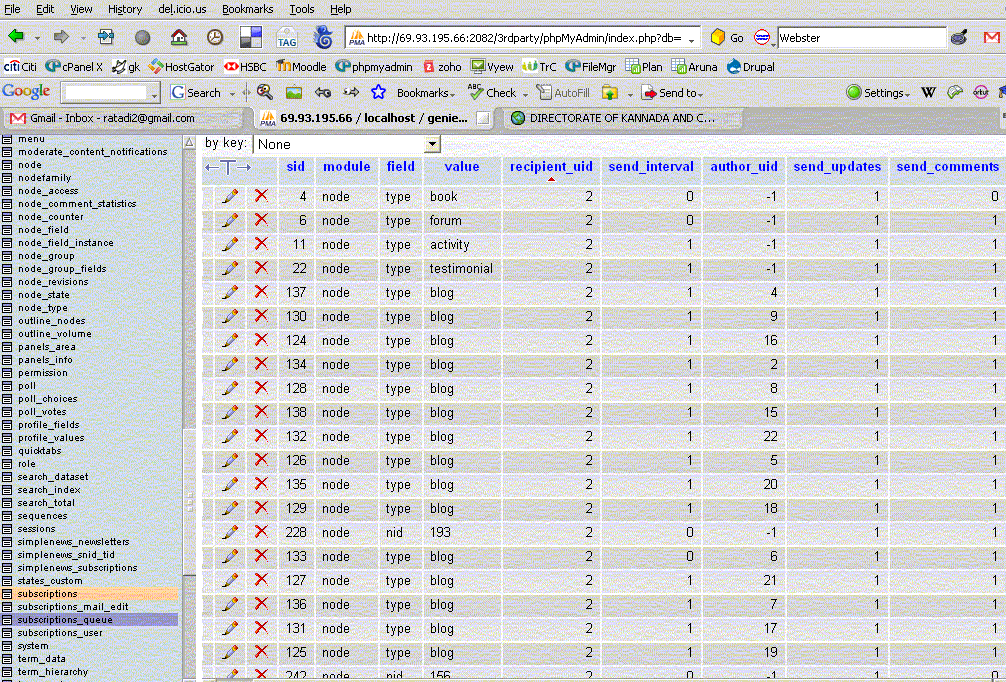
Also i checked subscriptions table and filtered for recipient_uid = 2 (which is my uid)
i got the setting mostly yes - as shown in the screen shot
so what is happening? or rather why not happeneing.
Comment #18
salvisBut there are circumstances under which entries are added to {subscriptions_queue}, aren't there? After all, some notifications were sent out, no?
You don't see any errors in the watchdog or on the screen, do you?
I'm running out of ideas here...
Comment #19
cozzi commentedSalvis,
It was your second comment in this thread (to enable Subscription Mail) that exposed my error (it's usually something simple aye :-)
This is a fantastic module, and I can see where you are headed with breaking it apart into separate sub-modules. This thing is going to be one very powerful puppy. I suspect you've not bound Subscription Mail to the base module incase someone wants to empty the queue via anther method?
Anyway, regardless of your vision, I do have one suggestion to help this from being a niggling problem:
Regarding this note:
Note: for standard Subscriptions functionality you need to enable the following modules:
* Subscriptions UI
* Subscriptions Mail (requires Mail Editor)
* Content Subscriptions
* Taxonomy Subscriptions
No doubt - I saw the Note, but for those of use that try to turn on as few things as possible, when I saw Mail Editor I figured, no need, I'm not concerned with the format of the message. I just want it to be sent. So, I didn't check it, and proceeded to pull out my hair for a while - then found this posting right at the top.
So, to address this oversight I would change this line:
* Subscriptions Mail (requires Mail Editor)
to read like this
* Subscriptions Mail (must be enabled to send via Drupal.mail)
Comment #20
salvis@cozzi: Thanks for writing. For other reasons I've changed the reminder to look as follows:
On admin/build/modules Subscriptions Mail is described as "Sends out mails with drupal_mail, relying on the separate mail_edit module."
I think that's about as much as I can reasonably do.
Comment #21
salvis@geniekids: If you don't get a record in {subscriptions_queue}, then you don't have a subscription that matches the content that you created. Or the node is unpublished. Or you have moderate_content_notifications turned on.
Try removing all rows from {subscriptions} (i.e. remove all subscriptions) and start from scratch. Then create a 'forum topic' subscription and create a forum topic. Then check the {subscriptions_queue} table — you should now see one entry, and after cron has run, it should be gone.
Comment #22
trevjs commentedBeen struggling with this myself, so I thought I'd share my solutions, and maybe it will apply. My problem involved getting subscriptions to work for existing forum topics, but by going through the following steps things seem to work. Here is a link to the tutorial for my users: How To Set Up Subscriptions. I've attempted to define all of the important options, please correct me if I misunderstood one of the features.
Again, I'm not sure if this will help with the particular issues people are having, but this is what I had to do to get everything to work for subscriptions to forums.
Comment #23
salvisHave you seen admin/settings/subscriptions/userdefaults? There should be no need to bother your users with setting their own settings, if you provide reasonable defaults for your site.
What is the problem that you're trying to solve?
This issue is about not enabling subscriptions_mail, not running cron, etc...
Comment #24
ratnesh aarohi commented@ Salvis
Well even after so many days (see #13, #15, #17)
i just do not get subscription notifications of
1. Any Blog entries - though i am subscribed to all blogs on the site
2. New forum postings
3. and few more
While I get subscription notification emails for
new book-page created by me or edited by me
Also i seem to get notifications randomly when others create or update - any node - say - a new book-page or other content types - while under content types - under my subscription - i have "ticked everything" - including all cck.
For most CCk i am NOT getting notification emails.
But i get for some!
Any pointers?
Comment #25
salvisI see your pain, but I don't know what to do.
The only recommendation I have left is to start with a core-only test site, install Subscriptions, and get it to run there. If it doesn't run out of the box, you'll have a controlled environment for finding out why it doesn't. And if it runs, you can add your other modules one by one and see where it breaks.
BTW, you didn't reply to my #21.
Comment #26
salvisUpdate to 2.3, which fixes a number of bugs. Maybe this will help...
Reactivate the issue if the problem persists.
Comment #27
ratnesh aarohi commentedHow does one update a module? (i am doing the first one) - does one simply uninstall the old one:
uncheck from the module list - then delete from the modules directory and upload the updated version?
Comment #28
salvisGiving you a complete answer is beyond what I can do here.
In short:
1. Have a backup of your site (including the data in your database) in case something goes wrong.
2. Take the site off-line.
3. Copy the new module files over of the old ones (DON'T just rename the old directory to something like subscriptions.old)
4. Run update.php from your browser
5. Put the site back on-line.
Comment #29
cozzi commentedTry the drush module. It's awesome for one step updates. It is command line, but I must say it is worth the learn.
Once you install drush simply go to your drush folder (via a command line ssh utility) and type ./drush.php. It will then display its help. a command command would look like this -
./drush.php pm update subscriptions
That's it. You would now have updated the module and would now only need to run update.php from the module page in your drupal install.
Note: I use putty to create a command line ssh session with my webhost area. Putty launches via my WINSCP secure FTP application.)
Comment #30
Anonymous (not verified) commentedAutomatically closed -- issue fixed for two weeks with no activity.
Comment #31
Blanc_Sanglier1452 commentedI am having an issue, but in my case when cron runs, anyone with a subscription is getting their notification email. I believe that those choosing hourly (and my cron is set to run hourly) are getting those fine (I have a test user account to check this), but my other account, which is set to daily is also receiving these notifications just as frequently, rather than once per day (or obviously the first cron run after a day has passed).
Is there a way to ensure that those choosing a longer interval, 3 hours, daily or weekly (which I added) do not get them more frequently?
Thank you.
NOTE: digest is checked and also I am running it on Drupal 7