

 The 2026 Drupal Business Survey is open. Your response will help shape the future of the Drupal business ecosystem.
Hi, thank you for your fabulous module!
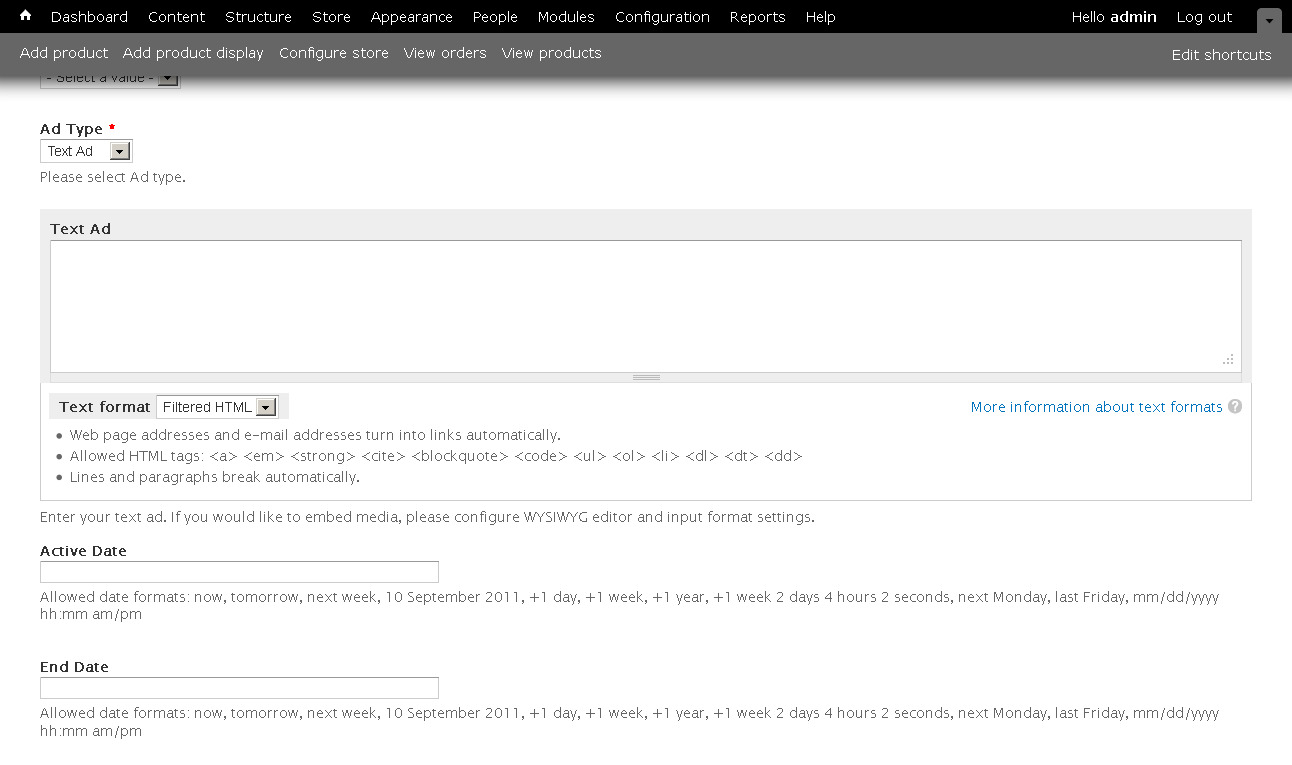
When I add a text add the 'url address' seems to disappear when I select 'text ad' although it shows when 'image ad'.
Am I perhaps missing something fundamental here?
see attached screenshot
| Comment | File | Size | Author |
|---|---|---|---|
| #2 | simpleads_text_link-1704606-2.patch | 2.45 KB | brenk28 |
| screenshot.jpeg | 137.64 KB | liliplanet |

Comments
Comment #1
smitty commentedI think, this is a real bug!
As a workaround you can change the Simple Ad Node to 'image Ad', enter the url address and then change back to 'Text Ad'. After Saving the node the url is displayed.
I could not find where in the code this could be changed. So somebody familiar with the SimpleAds module should have a look inside.
Comment #2
brenk28 commentedI think this occurs when your textarea is set to something other than plain text, basically to protect the user from themselves. However, I do think there are cases where you might want to let HTML in the textarea and still link it. simpleads.js and tjhe simpleads_preprocess_simpleads_text_element function in includes/simpleads.theme.inc need to be updated in order to allow this. This patch fixes the issue of the url field disappearing if you select Text Ad as the type, but also allows the user to enter HTML for text (which I think the module was trying to prevent).
Comment #3
duntuk commentedThank you for the patch.
This gotta be a bug.
It doesn't make any sense at all that the text ads can't do any click tracking--they only record impressions.
Tested this out with an html link and one with a url inside the image field and switching back to text via the describe above "workaround" @#1, which didn't apply any link (it simply showed text).
Comment #4
liliplanet commentedThank you! The patch works perfectly :)
Comment #5
jhodgdonfixing bug status.
Comment #6
minnur commented