

Closed (won't fix)
Project:
SimpleAds
Version:
7.x-1.x-dev
Component:
Code
Priority:
Critical
Category:
Bug report
Assigned:
Unassigned
Reporter:
Created:
18 Jul 2012 at 14:31 UTC
Updated:
9 Jun 2023 at 16:19 UTC
Jump to comment: Most recent, Most recent file

Comments
Comment #1
minnur commentedThose two fields should be on a node creation page.
Comment #2
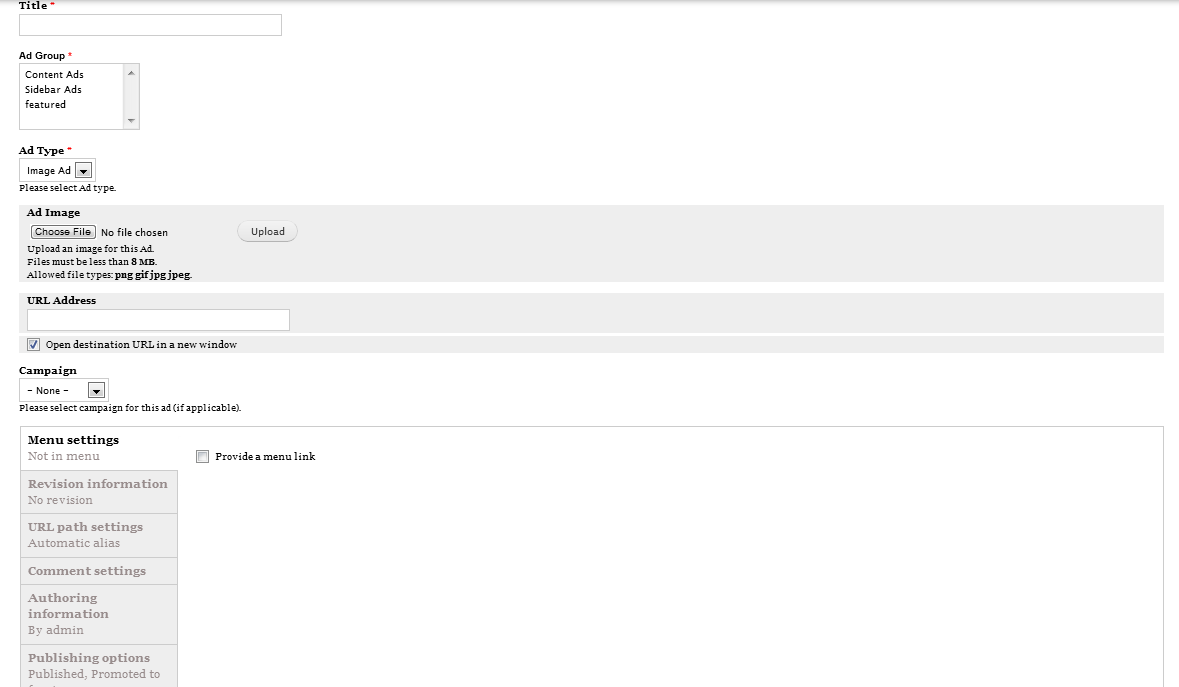
drupaler1 commentedthat is what i see when i open the create new content of type simplead from:
addcontent->simplead
that is a screenshot indicating what i say
Comment #3
minnur commentedYou are missing those fields. Something is wrong with your installation of SimpleAds.
Comment #4
drupaler1 commentedi have installed this module again and the result is the same any other suggestions?
Comment #5
aniebel commentedI have experienced the same thing however, it did not happen right away. It happened well after I installed. The fields were there and now they are not. I just disabled Campaigns and at least now the End Date field shows but still not the Image.
Comment #6
aniebel commentedFIXED!Uninstall ONLY Campaigns and not Simpleads module fixed it for me. Argh! Problem with this is that it disabled the Simpleads module. When I enabled it again, the image field goes missing again.Comment #7
aniebel commentedConfirmed that disabling the Simpleads module allows me to upload image and all other fields appear. After I do this, I just re-enable Simpleads module again.
Comment #8
minnur commented