

Simple content migration via cron scheduler
This module extends the core migration system to migrate the content from external database as source into Drupal nodes as destination.
Features of the module:
- Migrate the simple content from external database source into Drupal nodes.
- Migration of the content will be performed using hook_cron().
- It requires contrib modules migrate_plus (https://www.drupal.org/project/migrate_plus).
Installation Steps
1. Download the module (simple_content_migration_via_cron) and its dependencies module (migrate_plus).
2. Enable the modules - migrate_plus and simple_content_migration_via_cron.
3. Add the external database (to be migrated) config in the active settings.php file.
$databases['migrate']['default'] = array (
  'database' => 'source_db',
  'username' => 'root',
  'password' => '',
  'prefix' => '',
  'host' => '127.0.0.1',
  'port' => '3306',
  'namespace' => 'Drupal\\Core\\Database\\Driver\\mysql',
  'driver' => 'mysql',
);
4. Add the config of migration scheduler in the active settings.php file.
$config['simple_content_migration_via_cron']['migrations'] = [
  'content_migration' => [
     'time' => 3600, # To be executed every hour.
     'update' => TRUE, # To be executed with the --update flag.
  ],
];
5. Choose the scheduler time (here time = 1 hour) as mentioned in step 4 from Cron dropdown field (admin/config/system/cron) and save. Cron API which is built into the Drupal core is used to schedule the migration.
6. Source database fields content to be migrated:
- title (plain text)
- sku (plain text - primary key)
- price (plain text)
- valid_date (datetime)

7. Destination database(e.g. Drupal) fields of the content type product:
- title (plain text)
- field_sku (plain text)
- field_price (plain text)
- field_valid_date (datetime)
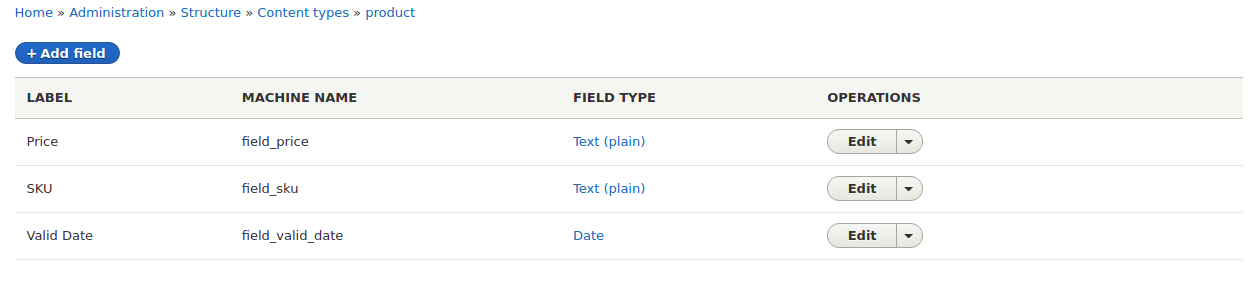
Note: If you have different machine name of content type, make sure to change the default_bundle in the file `simple_content_migration_via_cron/config/install/migrate_plus.migration.content_migration.yml`
8. Change the source fields for a table in the source plugin - `Content.php`
9. Map the source fields with destination in the file migrate_plus.migration.content_migration.yml
10. All setup is done now and content will be migrated as per the cron scheduled.
Project information
- Project categories: Import and export
 5 sites report using this module
- Created by jayprakash01 on , updated
 Stable releases for this project are covered by the security advisory policy.
Look for the shield icon below.


