

Closed (fixed)
Project:
Sheetnode
Version:
6.x-1.x-dev
Component:
Core
Priority:
Normal
Category:
Support request
Assigned:
Unassigned
Reporter:
Created:
29 Aug 2011 at 12:31 UTC
Updated:
28 Sep 2011 at 10:21 UTC
Jump to comment: Most recent file


Comments
Comment #1
infojunkieThe module "Sheetnode HTML" can import a table from an external HTML page. Is this what you're looking for? You need to formulate a QueryPath query (similar to jQuery) to find the right table to import.
Comment #2
ah0 commentedThank you lots for the quick support,
I went through the querypath site and tutorials but still unsure how I can formulate a querypath query for a table such as one in the example page above: http://finance.yahoo.com/currency-investing
Would you please bring an example of such path?
Thanks,
Comment #3
infojunkieI tried your example and found that the path was not obvious. I fixed the code to make the path simpler: with the latest dev (get it 12 hours from now or directly from git) you can now use
table#flat-rates-table.Comment #4
ah0 commentedThanks again for the help and the effort,
much much appreciated.
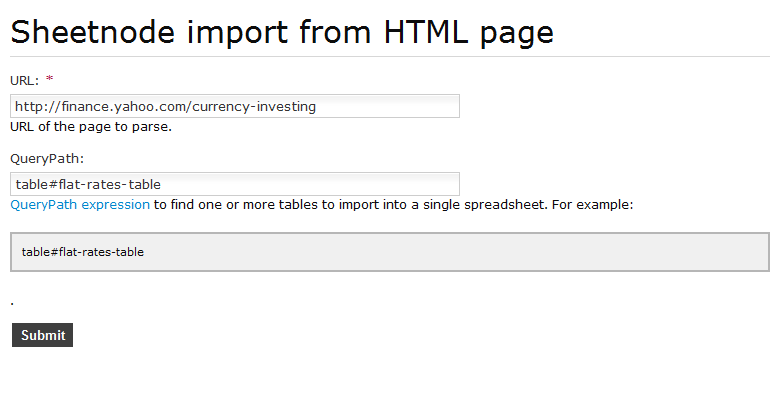
Please see attached screen captures. (.gif)
to test it out, this is what I did:
1)
Site Configuration > Sheettnode > General
and set the "View mode" to: HTML Table
and checked the: "Show toolbar in view mode"
2)
Content Management > Create Content > Sheetnode Import From HTML Page
and set:
URL: http://finance.yahoo.com/currency-investing
QueryPath: table#flat-rates-table
then the sheetnode content type gets created but all it shows is the title for that page which is:
"Currency, Currencies & Forex Currency Trading - Yahoo! Finance"
no table is imported.
Am I missing a step or doing something wrong?
Cheers,
Comment #5
infojunkieThat's weird :-) What version of the QueryPath library are you using? I've been using 2.1.0.
Comment #6
ah0 commentedI actually was using the QueryPath version 2.0 but then I just replaced the files with the new version 2.1.0.
But still the same thing happens; only the title of the page is shown.
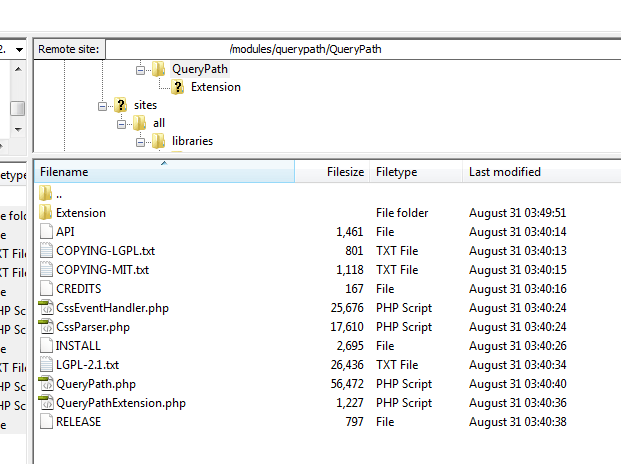
I cant think of anything... also the structure of QueryPath folder/files (screen capture attached)
any ideas?
thanks alot
Comment #7
ah0 commented- Installed the QueryPath module ( http://drupal.org/project/querypath )
- downloaded the MINI version 2.1.0 library from: ( https://github.com/downloads/technosophos/querypath/QueryPath-2.1-minima... ) and located the files under the domain.com/modules/querypath/QueryPath (THE SCREENSHOT AT POST #6)
is this the correct file locations?
any idea would be really helpful,
thank you,
Comment #8
infojunkieYes, your installation is correct, since the title is actually retrieved from the page (using QueryPath).
Can you make sure that:
a) there is an entry in the {sheetnode} table that corresponds to your newly-created node, and what are its contents?
b) there is no Javascript error that prevents the sheet from showing on screen when you view the node?
c) the import process fails on other URLs containing tables?
Comment #9
ah0 commentedThanks very much for the help,
It was all my fault , the path to the PHPExcel wasnt properly set.
All the best,
thank you,