This project is not covered by Drupal’s security advisory policy.
Semantic Duplicates finds pages on your site that say the same thing. It reports duplicated text and pages that compete with each other for the same topic, so you can decide what to merge, redirect or retire.
Large sites accumulate overlap. Two departments write their own version of the same guidance. An old page is copied to a new section and both stay published. A policy is restated across four pages, each slightly out of date. Visitors land on the wrong one, editors maintain the same content in several places, and search engines have to guess which page matters — a problem often called keyword cannibalisation.
This helps catching that overlap. It runs entirely on your own infrastructure: if you decide to use Ollama provider there is no content sent to a third-party service, and no API key or paid subscription is needed.
The module reports. You decide. Nothing is deleted, unpublished or merged automatically.
Features
Every page is compared against every other page, and each pair is given a plain-English label rather than a raw score:
- Duplicate content — the same text appears on both pages
- Competing pages — different words, same subject; the cannibalisation case
- Shared furniture — the pages share boilerplate such as contact blocks or disclaimers, not real content
- Similar — pages too short to be sure — flagged honestly rather than guessed at
- Unrelated
Detection uses two independent methods:
- Lexical fingerprinting compares the actual wording using word-group overlap and containment. This catches copied and partially copied text, and needs no AI at all.
- Semantic embeddings compare meaning rather than wording, using a local AI model through Ollama. This catches pages that cover the same topic in entirely different words.
The AI half is optional. With no provider configured, the module still runs and still reports duplicated text. Adding embeddings adds the competing-pages detection on top.
Other things worth knowing:
- Warnings while editing. When an editor saves a page, the node form shows whether it looks like existing content, and which other pages already cover the topic. The warning is advisory — it never blocks the save.
- No provider call on save. Save-time checks use wording comparison only, so editing never waits on an AI service that might be slow or down.
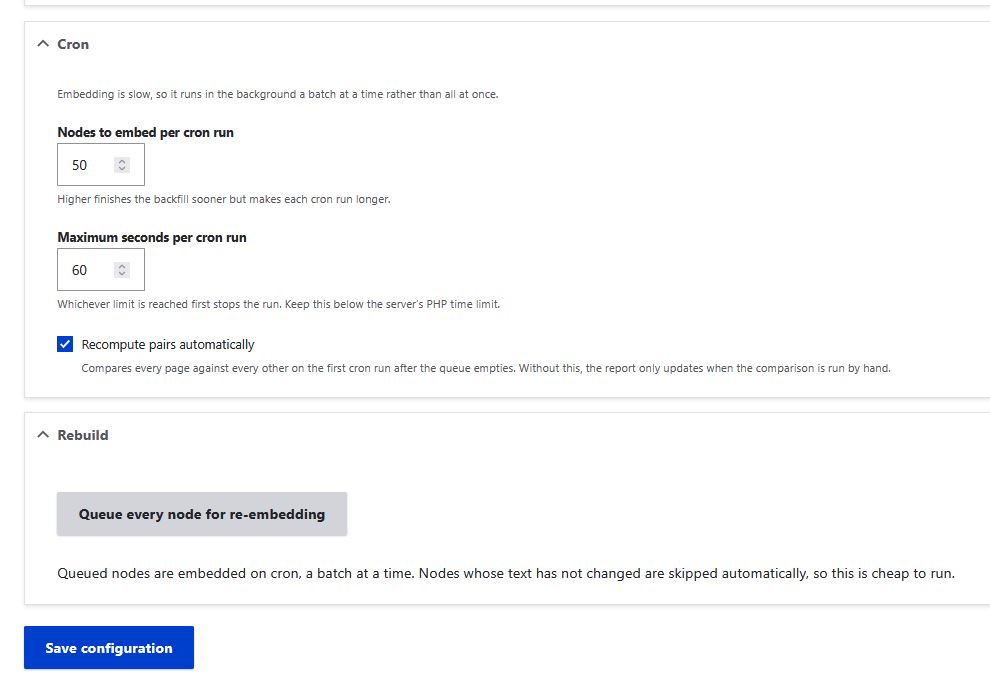
- Background processing. Embedding runs on cron in batches you control, not all at once.
- Interruption-safe. If a page fails to process, it is logged and skipped, and picked up on the next run.
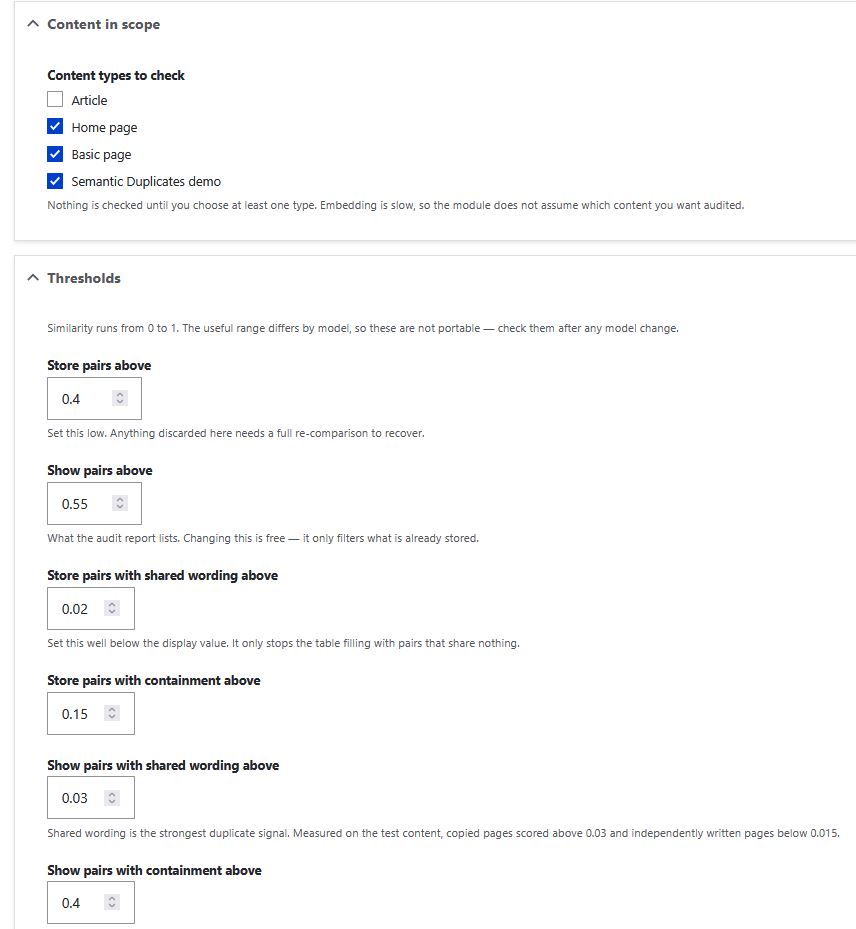
- You choose the scope. Nothing is analysed until you pick content types. The module does not assume which content matters to you.
- Demo submodule. An optional submodule installs twelve example pages covering each finding type, so you can see what the report looks like before pointing it at real content.
When would I use this?
- Auditing a site before a redesign or migration, to find what does not need to be carried across
- Large editorial teams where several people publish into the same subject area
- University, council, charity and other sites where departments maintain overlapping guidance
- Sites with an SEO cannibalisation problem and no budget or appetite for a hosted SEO platform
- Anywhere content cannot be sent to an external service for privacy, procurement or regulatory reasons
Post-Installation
There is no new content type and no text format to configure. The module adds a settings page, a report, and a warning on the node edit form.
1. Choose what to analyse. Go to Configuration › Search and metadata › Semantic duplicates (/admin/config/search/semantic-duplicates) and tick the content types you want checked. Nothing happens until you do — this is deliberate, because processing takes time and the module does not guess.
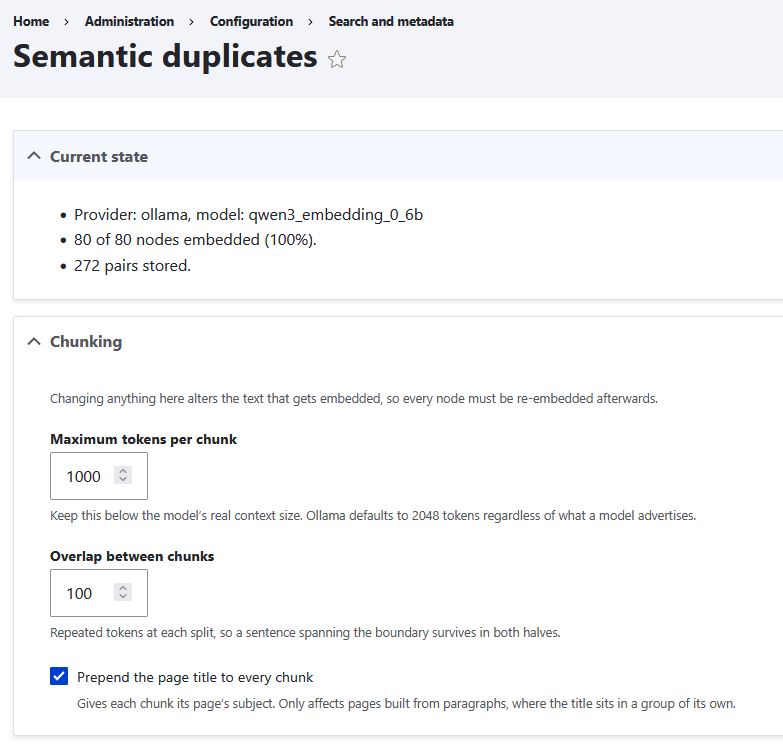
2. Leave the rest alone at first. Chunking, thresholds and cron batch sizes all have defaults based on measurement against real content. The settings page explains what each one does and when changing it means re-processing your pages.
3. Run cron. Pages are processed in the background, a batch at a time. The Current state panel at the top of the settings page shows progress. Once every page has been processed, the module compares them all and fills in the report.
4. Read the report and work through what it found.
Optional: enable local AI. To add competing-pages detection, install Ollama and the Ollama AI provider, then set Ollama as the embeddings provider under Configuration › AI › Settings. Full instructions are in the module's INSTALL.md.
Things to be aware of
- The first run on a large site takes a while, because every page has to be processed once. After that, only new and changed pages are handled.
- Similarity thresholds are not portable between AI models. If you change the embedding model, review the thresholds and re-process your content.
- The module stores its own vectors in its own database table. You do not need a separate vector database such as Pinecone or Milvus.
Additional Requirements
For duplicate text detection — nothing. Drupal core only. This half of the module has no dependencies.
For competing-pages detection, you also need:
- AI (
drupal/ai:^1.4) - An embeddings provider. Tested and documented with Ollama AI Provider (
drupal/ai_provider_ollama:^1.2.0-rc3). - Ollama installed on your own machine or server, with an embedding model pulled. The documentation uses
qwen3-embedding:0.6b, which gave the clearest separation between related and unrelated pages in testing. - Around 4 GB of free RAM for the model. 8 GB or more is comfortable. On a memory-constrained server the operating system may kill the model mid-run — the module handles this safely, but processing will be slow.
Other AI providers supported by the AI module should work, since the module talks to the AI module's embeddings API rather than to Ollama directly. Only Ollama has been tested. If you use a hosted provider, be aware that your content is then sent to that provider.
Recommended modules/libraries
- Semantic Duplicates Demo (included submodule) — installs example content demonstrating each finding type. Useful for evaluating the module before running it on real content. Uninstall it afterwards.
- Redirect — once you have decided which of two competing pages to keep, you will want to redirect the other rather than delete it.
Similar projects
Most existing options fall into two groups, and this module sits between them:
Exact-match and field-level duplicate prevention. Several modules stop editors creating a node with a title or field value that already exists. These work at save time on a single field and catch only exact matches. Semantic Duplicates compares the whole body text of every page against every other, and finds partial copies and rewordings as well as exact ones.
Similarity for recommendations. Modules built on taxonomy overlap or on Search API's vector support surface related content to visitors — "you may also like". They are designed to find useful neighbours, not problems. Semantic Duplicates is an editorial audit tool: it is looking for overlap you probably want to remove, and labels it accordingly.
Hosted SEO platforms report cannibalisation from crawl and search-console data. They are thorough and they cost money, and your content goes to a third party. This module works from your own database, on your own infrastructure, for free — including on content that is not publicly reachable.
Supporting this Module
This module is developed and maintained by Steady Drupal.
The most useful way to help is to run it on a real site and report what it gets wrong. False positives and missed duplicates are both worth an issue — the labels and thresholds are based on measurement, and more measurement makes them better. Please say roughly how large the site is and what kind of content it holds.
Community Documentation
Installation instructions, including full Ollama setup, are in INSTALL.md in the module.
A note on what this module can and cannot tell you
Two pages covering the same topic are not always a mistake. A summary and a detailed guide should overlap. A page written for applicants and one written for staff may say similar things for good reasons. The module cannot tell the difference, and does not try to.
What it does is narrow thousands of possible page pairs down to a short list worth a human looking at, and explain why each pair is on the list. The decision stays with you.
| Attachment | Size |
|---|---|
| Logo | 223.37 KB |
| Compare Nodes General Report | 141.11 KB |
| Similarity Summary on each Node | 43.56 KB |
| Settings Screen 1 | 59.11 KB |
| Settings Screen 2 | 63.41 KB |
| Settings Screen 3 | 55.96 KB |
Project information
- Project categories: Search engine optimization (SEO)
- Created by bluehead on , updated
 This project is not covered by the security advisory policy.
Use at your own risk! It may have publicly disclosed vulnerabilities.