

 Come together with the global Drupal community in Rotterdam, 28 Sept – 1 Oct 2026. Sessions, contribution, connection, and Early Bird savings until 8 June.

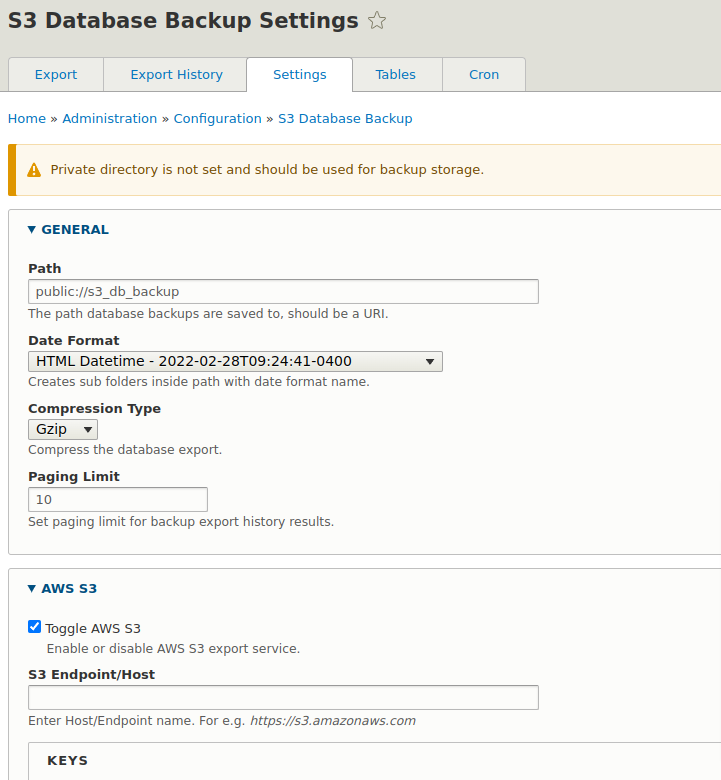

This module provides a database backup solution and exports to the AWS S3 storage system. Backups can also be exported to local file system or downloaded remotely.
Features
- Keeps a history of database backups and can be accessed via interface.
- Allows backups to be exported to AWS S3 storage system.
- Allows for configurable endpoint in AWS S3 storage system.
- Allows for sub-folders in AWS S3 storage system.
- Allows backups to be stored in private or public file system. Private is recommended.
- Allows backups to be downloaded remotely via interface.
- Backups can be generated via Drupal cron and interval can be configured.
- Drush command available to help generate database backups via cli.
Backup Features
- Supports sqlite, mysql, pgsql and dblib.
- Supports compressions gzip and bzip2.
- Supports a large option set as found in mysqldump.
- Supports stored procedures.
- Select which tables are included or excluded on export.
Required
- AWS S3 account - (https://aws.amazon.com/s3/)
- AWS S3 Key & Secret Key
Composer Dependencies
This module depends upon Composer to install it's dependencies. See below for the libraries used in this module.
- mysqldump-php library - (https://github.com/ifsnop/mysqldump-php)
- aws-sdk-php library - (https://github.com/aws/aws-sdk-php)
Module Dependencies
The Key module (https://www.drupal.org/project/key) is required for storing AWS S3 access and secret keys securely.
Both keys can now be stored on one key using the Key AWS S3 module (https://www.drupal.org/project/key_aws_s3). It will store the access and secret key data in it.
AWS S3 access and secret keys are managed through the use of the Key module.
Keys can be setup and managed here:
/admin/config/system/keys
Once the keys are setup, you can link them up here:
/admin/config/s3-db-backup/settings
Install/Usage
If installing via composer, see the command below:
composer require drupal/s3_db_backup
- Install module like any other contributed module. Installing through composer will pull in all required dependencies as required.
- Setup access & secret keys using the key module:
/admin/config/system/keys - Once installed, setup configuration at:
/admin/config/s3-db-backup/settings - If storing or exporting to local, please setup or use the private directory instead of public.
- Now you are ready to start exporting your database backups:
/admin/config/s3-db-backup
Drush Command
Once the module is configured and setup. Database backups/exports can be generated via drush command. Please keep in mind that the export links are only made available in Drupal admin back-end, for security reasons.
drush s3-db-backup:export
Supporting organizations:
Project information
 Maintenance fixes only
Considered feature-complete by its maintainers.- Project categories: Administration tools, Developer tools, Import and export
 21 sites report using this module
- Created by geoanders on , updated
 Stable releases for this project are covered by the security advisory policy.
Look for the shield icon below.

