

Closed (fixed)
Project:
Related links
Version:
master
Component:
Code
Priority:
Normal
Category:
Bug report
Assigned:
Unassigned
Reporter:
Created:
12 Dec 2006 at 23:30 UTC
Updated:
23 Jan 2007 at 18:51 UTC
Jump to comment: Most recent, Most recent file


Comments
Comment #1
Zen commentedPHP version?
-K
Comment #2
Kevin Ott commentedI get the same error. I'm using Drupal 4.7.4. PHP version is 5.1.6.
Comment #3
Kevin Ott commentedIt looks like the second argument is null. I changed two occurances of this:
$links = array_merge($links, $node->relatedlinks[$type]);to this:
and the problem goes away.
Comment #4
Zen commentedCommitted to HEAD (which is 4.7 and can be downloaded from the project page). A new release for 4.7 should be coming RSN.
Please test and reopen if necessary.
Thanks guys.
-K
Comment #5
Anonymous (not verified) commented1.46 works for me, thanks!
Comment #6
Anonymous (not verified) commentedActually, the errors are gone, but I can't make the block for discovered links to show up either. Parsed links block works, though. The admin panel shows the active link type "parsed links" only. It is unclear to me how to add another link type (e.g. discovered links) and how to make them show up in a block. The block section only has one block available, for parsed links.
Thanks for the help,
Stephan
Comment #7
Anonymous (not verified) commented1.48 is displaying those PHP errors, so I tried both 1.46 and HEADS. Althoughte the PHP errors are gone, I too can't figure out how to display the block.
Also I had a hard time understanding what the whole "Link Types" option in the admin section. Do they control the different types of link blocks? And is the link type "m" the default Related link block? Then shouldn't the discovered links block also be there?
Thanks
Comment #8
Anonymous (not verified) commentedMarking bug as 'active' again, since title mentions 'block not shown', too, which has been confrmed by three people. I've forgotten to mention the php version I'm running: 5.0.4 on FreeBSD
The block I'm able to display is "Related links: Parsed links". It is unclear to me how to make the block displayed which lists links of related taxonomy terms. The related links admin note says: "These are the controls for specific link types." Since it uses the plural (types) I expect I am able to "add" a link type, but I don't know how. Switching the tab to "discovered links" allows me to configure criteria etc. but no option is either shown on this page nor on the previous page which makes another block available in the block admin menu. Furthermore, taxonomy related links are not shown in the parsed links block (which sounds reasonable).
Thanks for your help!
Stephan
Comment #9
Zen commentedCan you please provide the following:
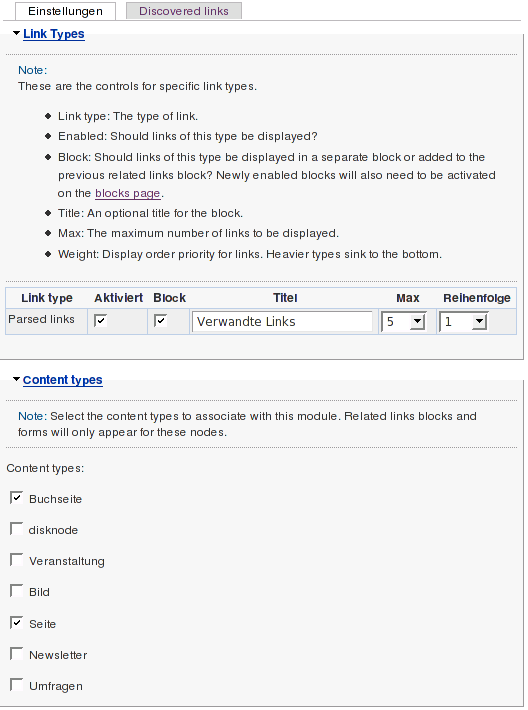
a) A screenshot of your admin/relatedlinks settings page.
b) From the variables database table, please extract the contents of any variables beginning with "relatedlinks". Please use code tags while pasting.
To fix this issue, you will very likely just have to delete the
relatedlinks_typesandrelatedlinks_node_typesvariables from your variables database table. But before doing that, please provide the requested information.Cheers!
Comment #10
Anonymous (not verified) commentedMySQL returned an empty result set. Screenshot of settings page attached (German).
Thanks a lot!
Comment #11
dwoodwoo commentedI ran into this error as well. The bug fix noted in comment #3 fixed it for me. Thanks guys!!!
Comment #12
Zen commented@rickauer:
should be
Thanks,
-K
Comment #13
Anonymous (not verified) commentedStupid me.
in relatedlinks_node_types
a:2:{i:0;s:4:"book";i:1;s:4:"page";}in relatedlinks_types
in relatedlinks_discovered
Thanks!
Comment #14
Anonymous (not verified) commentedI've now deleted
relatedlinks_typesandrelatedlinks_node_typesvariables from the database but the block still doesn't show up. Any help is highly appreciated. Thanks.Comment #15
Zen commentedDid you re-setup your relatedlink types in admin/relatedlinks (and enable the appropriate block in admin/block) after you deleted those variables? Please let me know.
Cheers :)
-K
Comment #16
Anonymous (not verified) commentedhehe, now I did exactly that and everything works. Perfect. Thanks a lot!
Stephan