I have a block with the following Quicktabs code:
$view_result = views_get_view_result('award_recipients', $display_id = "default");
        foreach($view_result as $item){
            $node = node_load($item->nid);
            $tabs[$node->nid] = array(
              'title' => $node->field_year[0]['value'],
              'type' => 'freetext',
              'text' => '<h1 class="title">' . t($node->title). '</h1>' . t($node->body),
           );
        }
        $quicktabs['qtid'] = 'award-recipients';
        $quicktabs['tabs'] = $tabs;
        $quicktabs['style'] = 'Navlist';
        $quicktabs['ajax'] = FALSE;

        print theme('quicktabs', $quicktabs);
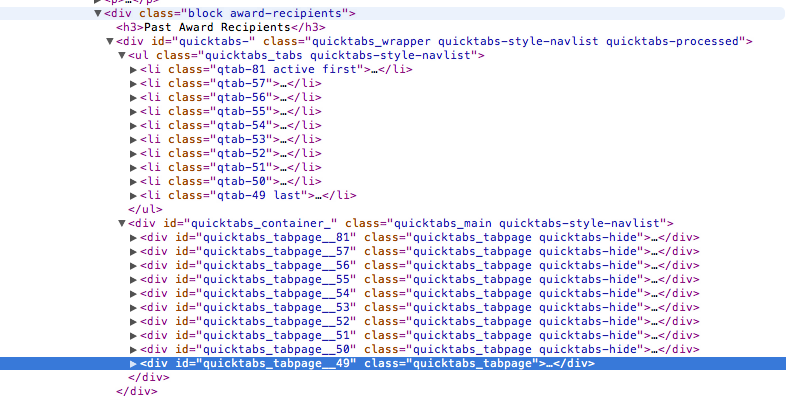
My block works fine in all browsers except Chrome where the order is reversed. See screenshots of the source code from Chrome and Safari.
Note that in Chrome the active tab "qtab-81" activates the tabpage__49, NOT tabpage__81 like correctly displayed in all other browsers.



Comments
Comment #1
adamdicarlo commentedI just tracked this down after seeing the same issue.
The problem is in how Quicktabs's JavaScript works; unfortunately, I believe the code has a major flaw. Snippet:
This code is relying on iteration of object properties to be in the same order as those properties were added to the object. Unfortunately, while apparently most/all browsers happen to provide that characteristic, it is specifically not guaranteed:
ECMAScript® Language Specification for for-in loops
My guess: V8 recently implemented an optimization or slight change that causes code that makes this incorrect ordering assumption to break.
Comment #2
netw3rker commentedComment #3
avpadernoI am closing this issue, since it's for a Drupal version no longer supported.