

 The 2026 Drupal Business Survey is open. Your response will help shape the future of the Drupal business ecosystem.
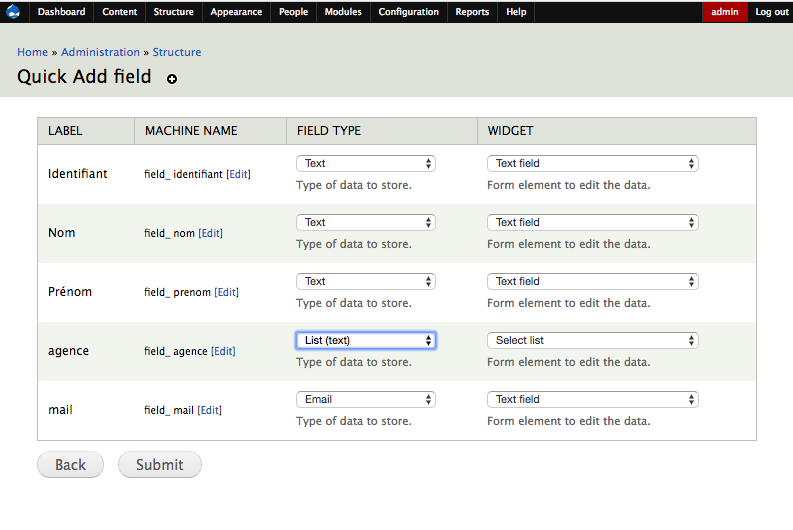

This module allows you to quickly create multiple fields from excel,
It generates automatically feeds for your import easily. and also create new views with those fields. It also gives you a preview of the available fields
1/ select your entity, support User, node, taxonomy, field collection, paragraphs, data
2/ copy and paste your header (row or column)
3/ select module you want generate automatic (support search api, Views, feeds)
4/ select your type and widget
5/ submit


Import csv
After creating an entity and files, if you want to import data from a csv file. Go to Help / Quick Add Field Data (admin/help/quick_data) then select the type of entity you want to import. It will ask for column mapping (automatic if it's the same name)
Do you like this module? Show your appreciation by buying me ☕.
Supporting organizations:
Project information
 Maintenance fixes only
Considered feature-complete by its maintainers.- Project categories: Administration tools, Content editing experience, Access control
 10 sites report using this module
- Created by lazzyvn on , updated
 Stable releases for this project are covered by the security advisory policy.
Look for the shield icon below.
Releases
2.0.7
released 23 March 2025
released 23 March 2025
Works with Drupal: ^9 || ^10 || ^11 || ^12
Install:
Development version: 2.0.x-dev updated 17 Jun 2026 at 13:55 UTC
8.x-1.4
released 28 October 2022
released 28 October 2022
Works with Drupal: ^8.8 || ^9 || ^10
Install:
Development version: 8.x-1.x-dev updated 22 Apr 2022 at 21:53 UTC


