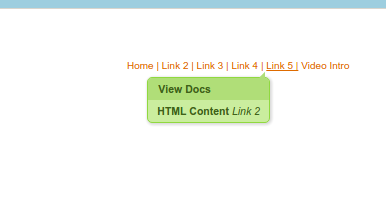
When I set-up qtips with html content on different links (top-right hand navigation menu), I get the same tooltip displayed on every link:
My HTML
<div id="gp_two_comlumns_layout">
<div id="gp_two_column-1">Welcome Victor Lee</div>
<!-- Top Right Nav Link 1 -->

<div id="gp_two_column-2"><a href="http://demo.povertysdemise.org/drupal/recipient_home" style="color:#de6b00;">Home | </a>

<!-- Top Right Nav Link 2 -->

<a class="qtip-link" href="#" style="color:#de6b00;">Link 2 | </a>

<div class="qtip-tooltip" data-qtip-instance="gp_tip_bottom_left" data-qtip-title="View Docs" id="hidden"><span><strong>HTML Content</strong> <i>Link 2</i></div>

<!-- Top Right Nav Link 3 -->

<a class="qtip-link" href="#" style="color:#de6b00;">Link 3 | </a>

<div class="qtip-tooltip" data-qtip-instance="gp_tip_bottom_left" data-qtip-title="Find Help" id="hidden"><strong>HTML Content</strong> <i>Link 3</i></div>


<!-- Top Right Nav Link 4 -->

<a class="qtip-link" href="#" style="color:#de6b00;">Link 4 | </a>

<div class="qtip-tooltip" data-qtip-instance="gp_tip_bottom_left" data-qtip-title="Help Others" id="hidden"><strong>HTML Content</strong> <i>Link 4</i></div>

<!-- Top Right Nav Link 5 -->

<a class="qtip-link" href="#" style="color:#de6b00;">Link 5 |</a>

<div class="qtip-tooltip" data-qtip-instance="gp_tip_bottom_left" data-qtip-title="Get Involved" id="hidden"><strong>HTML Content</strong> <i>Link 5</i></div>

<!-- Top Right Nav Link 6 -->
<a class="qtip-link" href="#" style="color:#de6b00;">Video
Intro</a>

<div class="qtip-tooltip" data-qtip-instance="gp_tip_bottom_left" data-qtip-title="Video Intro" id="hidden"><strong>HTML Content</strong> <i>Link 5</i></div>
</div>
</div>
the result is that HTML Content Link 2 content is displayed for every tooltip in the menu.
Also on the sample page, the example tooltip made after creating a qtip instance does not display.


Comments
Comment #2
bocaj commentedDuplicate of #2555369: Same Tooltip on Different qTip Links