

Closed (fixed)
Project:
Protected Node
Version:
7.x-1.0
Component:
Miscellaneous
Priority:
Normal
Category:
Support request
Assigned:
Unassigned
Reporter:
Created:
8 Oct 2015 at 12:49 UTC
Updated:
3 Jan 2016 at 14:24 UTC
Jump to comment: Most recent, Most recent file



Comments
Comment #2
grimreaperHello,
On the protected node admin form you can configure for which view mode to apply the protection.
Otherwise if the view mode is protected, the node will be rendered with a link to the password page. And the user will be able to see it on your homepage. Maybe you can configure a redirection to the homepage when the user will enter the password if you don't want him to see the full content.
Changing you view from view mode to fields will prevent the behavior of the node protection. So even protected nodes will appear without restriction.
Comment #3
grimreaperHello Faab,
Did the previous comment respond to your question?
Comment #4
Faab commentedWell, no actually! Sorry, i've been a tad busy.. Not much time to try it out yet. But i just had a look and it does not work as you describe if i'm correct.. I've configured the module so it should work on full view mode, but it doesn't in my view.. I just don't see the protected posts at all. Am i doing something wrong? The first post on http://www.fonkelig.nl/hometest (a test view with no css) is protected and isn't visible when logged out.. On the current home http://www.fonkelig.nl (view with fields instead of full content) you see the first protected post.
What i need is that when a post is protected the title and password field are showing. This is on a per post basis, not 1 password field for all the protected posts.
Comment #5
grimreaperHello,
Ok thanks for the explanations.
Currently you can't do that sorry...
When using the view modes, If a node is not protected, it will be indicated something like : "protected node" with a link to the node so you will be redirected to the protected node form page.
Once the password entered for a node if you come back to the list, you will now see the node.
You don't have to filter your view on the protection status of the nodes if you use the view modes.
Comment #6
Faab commentedHmm.. That might be ok enough for now, but i still can't get this part working! " When using the view modes, If a node is not protected, it will be indicated something like : "protected node" with a link to the node so you will be redirected to the protected node form page. "
I just see a white bar of the content field with nothing in it. Any suggestions? Hmm, i'll try to get is working again.
Comment #7
Faab commentedMight it have something to do with the fact that i'm using display suite to control the fields in full content mode?
Comment #8
Faab commentedHere's the code. The first post is protected, the rest isn't. There is something visible of the post in the code, but nothing is showing..
Comment #9
Faab commentedHere's the code. The first post is protected, the rest isn't. There is something visible of the post in the code, but nothing is showing..
Comment #10
grimreaperHello,
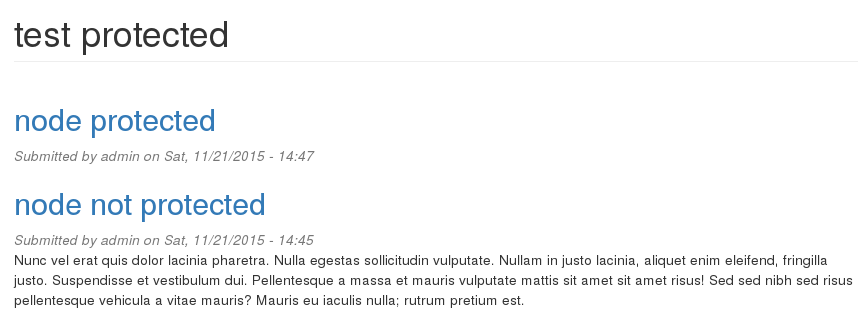
I have set up a small view listing node on view mode teaser (display suite is not involved).
As you can see on the screenshot in attachment when the node is protected there is only the title that is displayed.
Sorry, I didn't remember the exact behavior, I thought that there was a text saying that the node is protected.
I think it is possible to display a such message using the hook_protected_node_hide() to add in the renderable array $node->content the message.
Comment #11
grimreaperHello,
Without response I mark the issue as fixed.