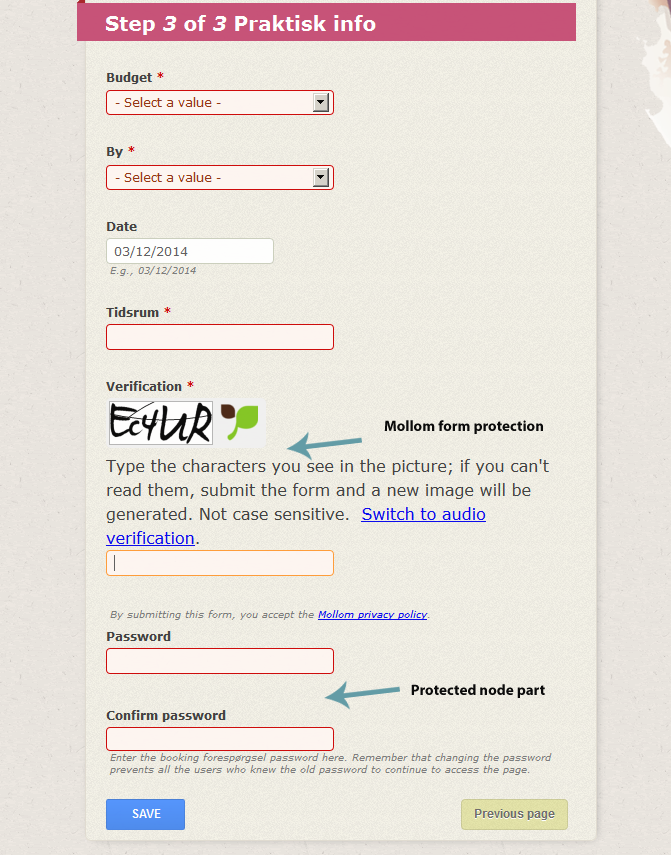
How can I move the placement of the password field in my form...
It seems it's fixed as the last element, but since I also use Mollom on that form I obviously want mollom to be the last thing...
i found this thread https://drupal.org/node/437790 but none of that seems to work for D7?
I have field group module and diplay suite installed, dont know if the protected node field was supposed to show up in my "manage fields" but nonetheless it's not there
i tried to alter the weight in:
/**
 * Add the Protected Node fieldset to the CCK.
 */
function protected_node_content_extra_fields($type_name) {
  $extra = array();

  $extra['protected_node'] = array(
    'label' => t('Protected node'),
    'description' => t('Protected node module form.'),
    'weight' => 20,
  );

  return $extra;
}
But it doesnt do anything....


Comments
Comment #1
grimreaperI will see that this weekend.
I think I will see pathauto on how to do that.
Comment #2
izus commentedHi,
actually, protected_node does not provide a field.
Are we really talking about the protected node options that we can set in the vertical tab ?
if so this is not specific to protected node but the question is "How to rearrange vertical tabs in Drupal in general ?"
if so, may be you can try https://drupal.org/project/node_vertical_tab_elements or implement a hook_form_alter or may be https://drupal.org/project/rel (I found this one in http://drupal.stackexchange.com/questions/12979/how-can-i-change-the-ord... searching on Google)
but this is not an issue of protected_node.
Please feel free to reopen if i misunderstood it
Thanks
Comment #3
acoustika commentedWell actually I hae used css to hide those vertical tabs because, why use vertical tabs as default if you are not using vertical tabs in the form for the end user?
Im talking about the styling of a "create a node" for the users of the site... Maybe I get the structure of protected node wrong....
But I have a node type for which anonymous user can create nodes, And all I need protected nodes for is to protect the edit page...
Anyone can see the node, just not enter the edit page without the password....
As you can see in the image, the protected node part and the Mollom part would be kinda more stylish and intuitive if I could switch their positions
Comment #4
izus commentedoki
i think that one of the suggested solutions in #2 may help.
Comment #5
acoustika commentedWell i will try, but think I will end with some css hack cause The first module depends on panels, which I dont use. Kinda overkill to install panels to rearrange 2 form elements, the other one seems very little supported....
Would problably best to do a hook alter, but don't think I will be able to manage to do that with my drupal and php skills....
Comment #6
acoustika commentedHaha.....
i actually started searching for help with a hook alter, and found the solution... *GG*, pretty damn easy
In the "manage fields" page, I clicked "show row weights" and set the mollom to 100... That did the trick...
So, so far it's fixed :-)
Comment #7
izus commentedcool :)
and thank you for sharing the solution, so that people that have the same issue will be habby to find it here :)