

This project is not covered by Drupal’s security advisory policy.
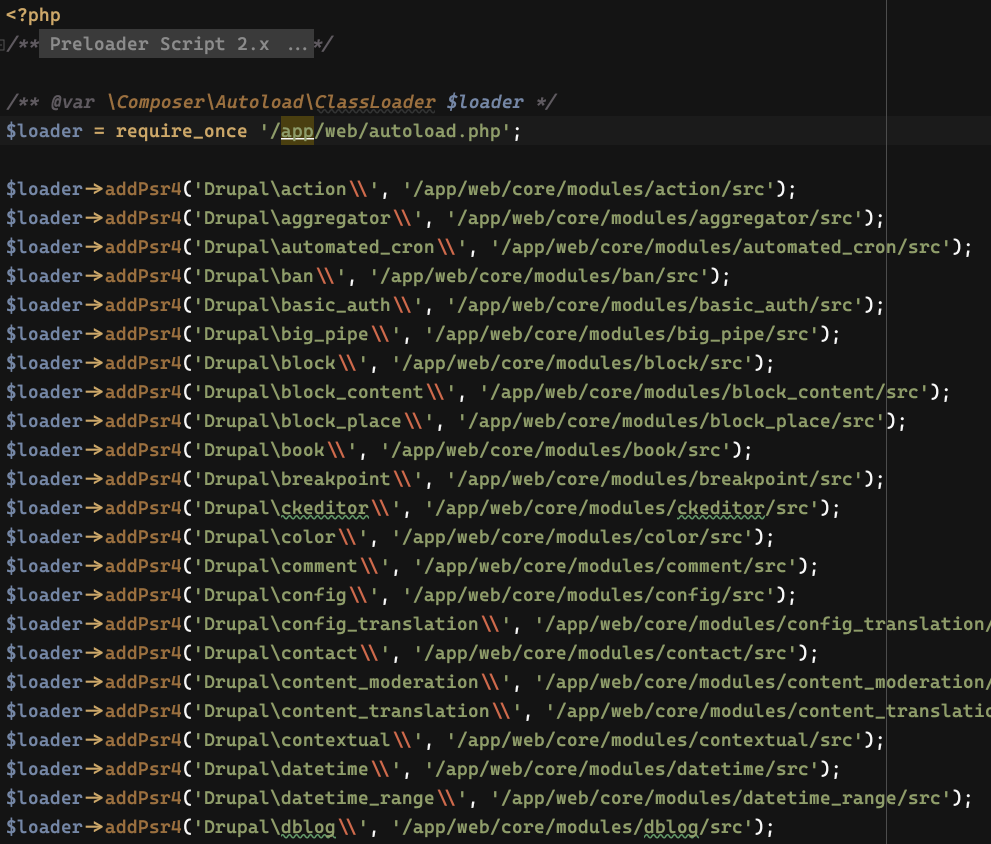
Generate a preload script for PHP 7.4's opcache.preload setting.
Introduction
PHP 7.4 supports preloading files on server start. With this feature, the PHP server runs a script on server setup and any files loaded by this script gets cached in opcache. PHP doesn't load these files for any of the following requests.
To use preloading, set the absolute path of the script to the opcache.preload setting in your php.ini. Depending on your PHP installation, you would also need to set the opcache.preload_user setting to the user of your web server. This is usually www-data but could be something else in your case.
IMPORTANT: Once you set the opcache.preload setting, any changes in files which are preloaded won't be picked up by PHP. This means that you won't see changes in any of your module upgrades or edits during development. You would have to restart the web server, or the PHP-FPM process after an upgrade. This also means that it is not a good idea to configure the opcache.preload setting while development. You can leave the module enabled.
Requirements
Given the bugs in PHP for opcache.preload, I would recommend to use at least PHP 7.4.7. It is safer to run the latest version possible. This is not a hard requirement, but expect bugs on lower versions of PHP. Look at the changelog at https://www.php.net/ChangeLog-7.php#PHP_7_4 to understand the types of bugs related to preloading.
Installation
Install this module via composer as normal.
$ composer require 'drupal/preloader:^1.0'
See this link for more details: https://www.drupal.org/docs/develop/using-composer/using-composer-to-ins...
Configuration
After enabling the module, go to admin/config/development/preloader to configure settings and generate the script. Here, you can specify a list of directories you want to exclude from preloading. The paths of these directories are relative to the Drupal root (not the same as your project root). For example, to ignore all custom modules, include this in the list of your paths
modules/custom
The target filename is randomly generated by default and placed in your public files directory. It is better to move this file out of your web root. When you click "Save and generate", the module will report the absolute path of the generated script which you can set to your opcache.preload setting. Remember to restart the server after setting this option.
As this module generates the script after analysing the opcache statistics, you may not get best results when generating the script on a freshly started server. I would suggest that you generate the script after the server has handled typical load on your server. At that point, the opcache statistics will show most used files and make the preloading more effective.
Conflicts / Known issues
There are intricacies in how PHP optimizes the preloader script and maintains its internal symbol table. This makes preloading unsuitable for scripts which have side effects (scripts that run functions or perform other actions). The module tries to remove all such scripts from the preloader, but some may still make it through. Here are the known issues and workarounds.
Issue when using Drush
Drush 9 onward uses Chi-teck/drupal-code-generator and you might see errors such as these.
Warning: Cannot declare class DrupalCodeGenerator\Twig\TwigEnvironment, because the name is already in use in /app/vendor/chi-teck/drupal-code-generator/src/bootstrap.php on line 44
To fix this, make sure you are using the latest version of the package (at least 1.32.1). To upgrade, run
$ composer update Chi-teck/drupal-code-generator
Project information
- Project categories: Performance
 3 sites report using this module
- Created by hussainweb on , updated
 This project is not covered by the security advisory policy.
Use at your own risk! It may have publicly disclosed vulnerabilities.

