After updating, I'm seeing a problem where Panels no longer picks up the Zen Theme background setting for the panel background. Please see http://happycattech.com
Attachment one is before, attachment two is after. I read through the included documentation in the update and found nothing covering this.
The theme is a Zen child theme, with the panel background setting set in /sites/all/themes/happycattech.com/css/panels-styles.css
/**
* @file
* Panels Styling
*/
#totd-panel {
background-color: #CCFF99;
}
------------------------------------------------------
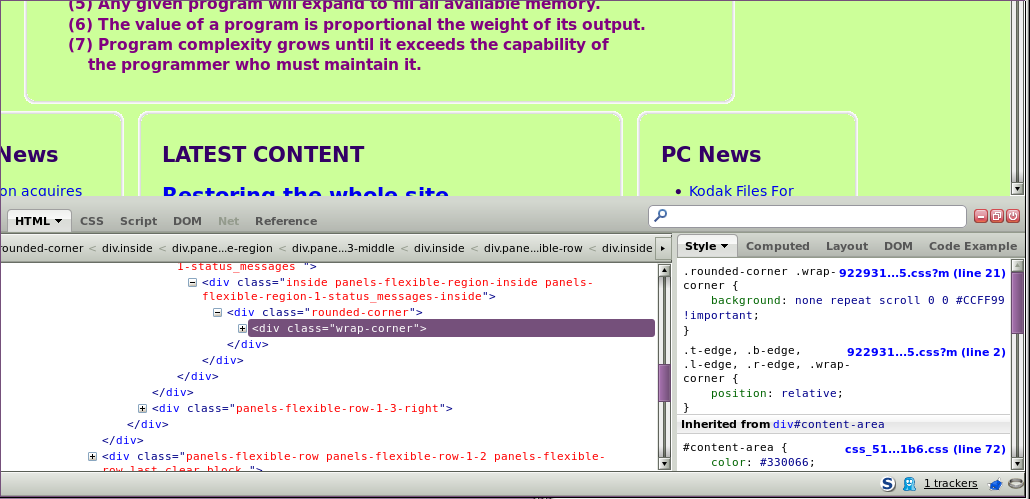
The two pertinent CSS lines from inspection of the elements in the attachments:
Before: (expected)
.rounded-corner .wrap-corner {
background: none repeat scroll 0 0 #CCFF99 !important;
}
After: (actual)
.rounded-corner .wrap-corner {
background: none repeat scroll 0 0 #FFFFFF !important;
}


Comments
Comment #1
Letharion commentedHello alreaud!
This could just be because I'm not very good with theming, but I don't see how this relates to Panels?
Please explain your setup, and how it relates to the CSS above.
Comment #2
alreaud commentedLets see if I can. Prior to changing to Panels 3.10, I was using panels 3.9.
Attachment 1, full page from the testing server, operating correctly.
Panels, Mini-Panels, and Panel Modules enabled, version 6.x-3.9
Zen Sub-Theme version 6.x-2.1, HCT
Security update flag visible.
Attachment 2, full page, on-line site, or available at http://happycattech.com.
Panels, Mini-Panels, and Panel Modules enabled, version 6.x-3.10
Zen Sub-Theme version 6.x-2.1, HCT
Security update flag not visible.
All modules and core are up to latest versions on both sites. There are slight differences in the server configurations, but document root is mirrored exactly on both sites other than settings.php and .htaccess which are necessarily different between on-line and testing server.
I've used 3.10 now on two sites, http://coloradoan-anti-censorship.net, and http://happycattech.com. In the first instance, I'm using the Garland theme, with a white background, so there is no issue. However, in the second site, I'm using a Zen sub-theme with the background set to #CCFF99. I've also modified the corner png files to make the background #CCFF99, as can be seen in Attachment 2.
For the Panels/Theme combination to work correctly, Panels has to pick up the Zen theme setting for the panel background color, which used to be in the file panel-styles.css in the theme. If that doesn't happen, then the area between the panel content and borders has the wrong or default color. Debugging why, all I came up to is the fact that the background color isn't being imported any more after updating to 3.10. Sadly, I don't know enough as to how Panels picks up this value in 3.9 to effectively debug the issue.
The reason I placed the bug report in Panels is that there has been no changes to the site other than updating Panels from 3.9 to 3.10. Anything you need to help, just ask. Any suggestions would be welcome.
Comment #3
alreaud commentedResolved! One change in one line in rounded_corners.inc, which was modified in the update. It would be nice to have a system where local changes are detected to the prior revisions, so that they are flagged. This would be useful across Drupal, not just in Panels.
diff panels-3.9/plugins/styles/corners/rounded_corners.inc panels-3.10/plugins/styles/corners/rounded_corners.inc
Comment #4
merlinofchaos commentedInteresting! In theory you should be able to put a more specific rule in your theme (also using !important) to override that so you don't have to modify the css.
Failing that, you could also copy the style into a custom module and name it 'our_rounded_corners' or something. That way you don't have to worry about changes from updates.
In general it's always good to try and find a way to avoid hacks for exactly this reason. You can't always, and if you do you should create patch files and keep them in a safe place so that when you update you can re-apply your hacks in a sane way.