Closed (cannot reproduce)
Project:
Panels
Version:
6.x-3.9
Component:
Mini panels
Priority:
Normal
Category:
Support request
Assigned:
Unassigned
Reporter:
Created:
9 Dec 2011 at 19:54 UTC
Updated:
8 Jan 2012 at 21:27 UTC


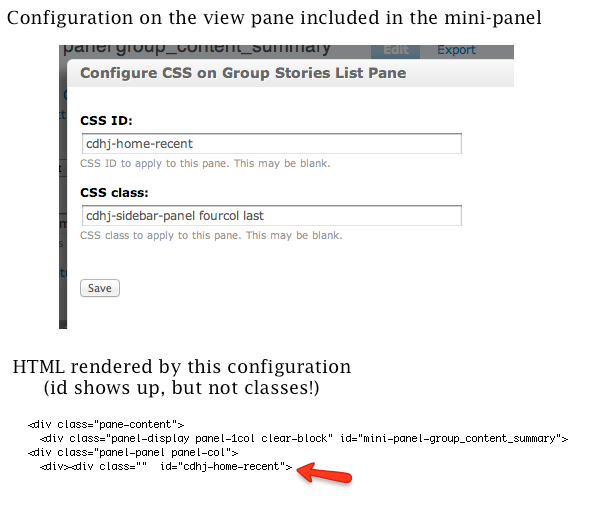
I have a view panel that I am using in a mini-panel. I have set the css id and css-class via the "css properties" item in the dropdown while editing the content of the minipanel. On my resulting page that uses the mini-panel I see the css-id applied, but NOT the classes. I have included images of the configuration and the HTML generated.
Digging in a bit more, I put a printout at the end of the the template_preprocess_panels_pane function of panels.module, and can see that the "$content->css_class" is set correctly (to "cdhj-sidebar-panel fourcol last" just as my config UI screenshot indicates). However, if I printout inside the panels-pane.tpl.php file, the $classes variable is empty.
The same thing happens when I try to set a css-id and css-class on a pane I use in a panel. I searched for a while but didn't see any related post about this.
| Comment | File | Size | Author |
|---|---|---|---|
| details.png | 40.67 KB | rahulbot |

Comments
Comment #1
rahulbot commentedI'm still confused why this didn't work, but I was able to fix this in my theme by overriding panels-pane.tpl.php and changing:
to
Comment #2
Letharion commentedSounds like a bug. Could you provide a way of reproducing the problem? Exporting the view and the panel would be a good way to do that, just make sure they can be imported into a clean site, or provide whatever information, fields for example, is necessary to import them.
Comment #3
Letharion commented