Closed (fixed)
Project:
Pageroute
Version:
4.7.x-1.x-dev
Component:
Miscellaneous
Priority:
Normal
Category:
Bug report
Assigned:
Unassigned
Reporter:
Created:
8 Dec 2006 at 13:38 UTC
Updated:
5 Feb 2007 at 20:31 UTC


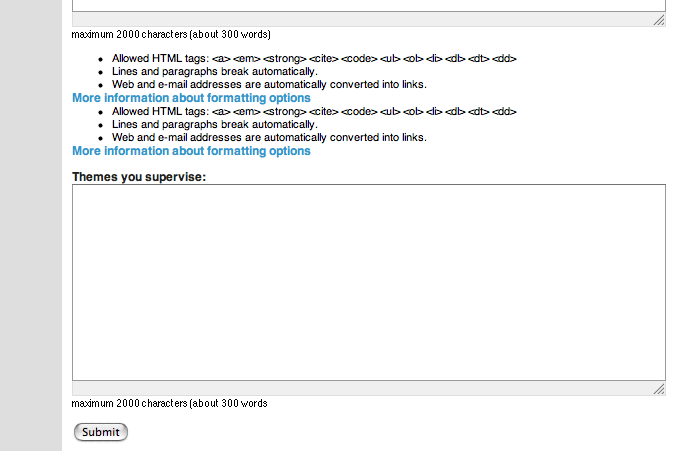
If you have a page route page that contains a text field on the bottom of the page, the input format information that normally runs under the textfield is pushed on top of the textfield. That is especially awkward if on top of the textfield is another textield. This field on top behaves normally and carries its input format information on the bottom. You then end up with two blocks of input format description (see image)
xl
| Comment | File | Size | Author |
|---|---|---|---|
| pageroute_input_type.gif | 17.48 KB | Axel_V |

Comments
Comment #1
Axel_V commentedI've realised now that it does not only happen on the bottom. I have another page route page with various little text fields, among them two with formatting options text. one of those texts again is pushed to the top of the relating field. I cannot really see a clear pattern behind this.
Comment #2
fagohm, sry I can't reproduce this.
I've tested two input fields at the bottom - works like expected.
Comment #3
Axel_V commentedmaybe just try two or three textfields more and make them quite big. Maybe it is a question of the overall height of the page?
xl
Comment #4
fagohm, I can't get it.. Could you play around a bit and try to determine which change is causing this?
Comment #5
Axel_V commentedI've played around with it a bit and I can see a clear pattern emerge
- the input format info that switches is always on the bottom of the list of several fields
- if one field switches on the bottom the following will as well
- it seems to be related to the amount of rows of a text field. Eg: if you have two textfields with 15 rows each they are okay but the next field with 15 rows will switch. 4 textfields with 5 rows each are fine as well, the next field with 5 rows will switch as well.
- once the field on the bottom has switched it will stay like that even if you delete other textfields on top of it.
I hope you can reproduce it on basis of this information, fago. Good luck
xl
Comment #6
fagohm, no I can't. Could you try to change the theme to a default theme shipped with drupal? e.g. bluemarine. Sounds like a theme issue.
Comment #7
fagoI suppose it is a theme issue.
Comment #8
Axel_V commentedsorry I didn't react earlier. I'm using bluemarine.
Comment #9
(not verified) commented