When trying to create a new rule in Open Atrium, I found out this is completely impossible.
Some Javascript stuff breaks the autocomplete for data selection and blocks the collapsible fieldset also for data selection.
Even after switching to Seven as Admin theme, this did not change.
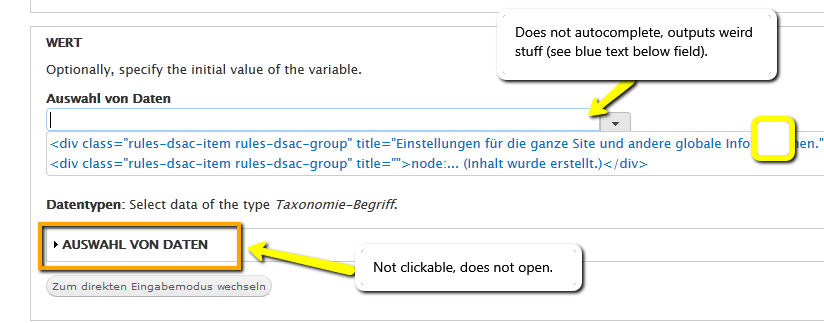
The collapsible fieldset is not clickable and does not open, though it holds all the correct data. (one can see that in the page source code).
The Autocomplete only outputs some weird HTML, as seen as blue text below the field.
Sorry the text is in german, but the elemens should be recognizable.



Comments
Comment #1
eigentor commentedComment #2
eigentor commentedIt appears there is normally an anchor Element surrounding the field set title, which is missing.
So the fieldset is of course not clickable. Still, this must be caused by open atrium.
For anybody stumbling upon the same issue: a workaround is to unhide the collapsible fieldset inside the "Data selection" manually in firebug by removing the "display: none" style.
Comment #3
Argus commentedStrictly speaking this is not an OA2 bug because OA2 doesn't ship with Rules. Mind if I change this to Feature request?
Comment #4
mpotter commentedThe Rules module has problems with different versions of jQuery: #1810656: Rules UI does not work with JQuery 1.7+. Open Atrium 2 uses v1.7 via jQuery Update. Later versions such as 1.8 still cause problems in the Views UI last time I checked. And v1.5 is too old for many different javascript libraries.
So you'll need to bug the Rules guys to get their module working properly with jQuery 1.7. Maybe someday there will be some agreement on what version of jQuery module devs should be using in Drupal 7, but often it is constrained by the external javascript libraries being used.
In any case, not something I can fix in OA2, sorry.
Comment #5
olak commentedlamer's workaround:
because this is something that only devs deal with, when i actually need to open a collapsible field, i select it through firebug and change the class from "collapsed" to "collapsible".
for the list, i got used to it, and see only the (parenthesis) and the text between them.
Comment #6
eigentor commented@olak: thanks for the workaround. This works best. I tried removing the "display:none" in firebug but then any other text gets printed over the list.
Removing the "collapsed" class works great.