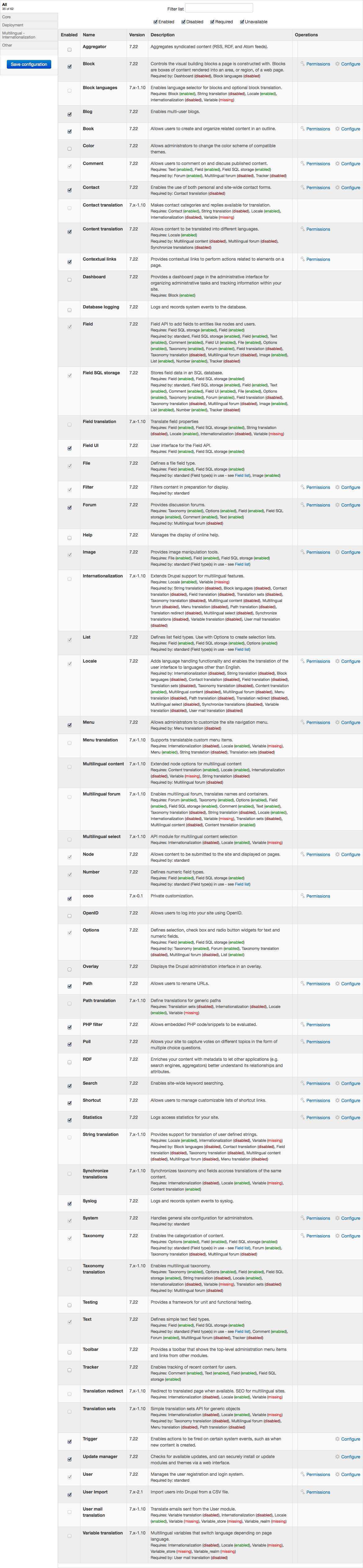
Problem: can't install 'i18n' module because it has 'Variable' module as dependency and I can't install this last one because it's already activated in OA but not seen as activated by Drupal module system nor listed on system module page (as for all other OA modules).
Context: on a fresh error free OA install, I ran straight after in a couple of problems. Just after activating and selecting OA Radix theme, the theme wasn't any more found (blank page with just the page title). I could get things back by moving the theme from profiles/openatrium/themes to sites/all/themes. I had to do the same for all libraries (as documented somewhere).
My question: how can I manage new modules dependencies if Drupal core doesn't see OA's modules on system module page (admin/modules) ?
Thanks for any kind of help ;)


Comments
Comment #1
phKU commentedComment #2
phKU commentedComment #3
phKU commentedComment #4
mpotter commentedSomething is wrong with your installation. All of the OA, Panopoly, etc modules should be shown on the admin/modules page. The fact that you are missing all of the OA-related modules tells me that something else happened to your installation and Drupal is no longer seeing the modules in the profiles/openatrium/modules directory.
You shouldn't need to move the theme files. This is related to the same issue. If Drupal is not seeing the themes in profiles/openatrium/themes then somehow you didn't install open atrium as a profile.
Comment #5
phKU commentedThanks for your reply mpotter, but I followed the normal OA distribution steps: I uploaded openatrium-7.x-2.0-core.zip to my host, unzipped it, navigated to the site base url, choose OA as distribution package and launched the install process which took up to 20 minutes to conclude.
If I should reinstall OA, I can't figure out what else to do for not going in the same trouble…
Is there anything I can do to have drupal be aware of the profiles theme and module directories ?
Thanks for anymore help :)
Comment #6
mpotter commentedTry clearing cache to see if that helps. If you went through the install process then you should have all of the modules. I just ran that process here without any trouble (my modules page shows everything) so I'm not sure what else to suggest.
Comment #7
phKU commentedThanks mpotter, according to your input and the fact nobody else on the web seems to have the same problem, I tried a new fresh install. This time, there's no problem with the themes or the modules, just a small set of modules reported as needing an update (which I won't do willing to rely only on OA updates for consistency purpose).
I think I can now imagine what went wrong in the previous install and I share it here for the community: I tried several install from Firefox which each one hanging somewhere in the batch process, every time at a different step. Before each retry, I flushed of course the database. Then I went to Safari (mac) and the install succeeded at first try without any error. But I think what I didn't consider is in the OA install process, the file structure is certainly also updated. Since I didn't restore as well the OA file structure, there was obviously a file update failure which has not been reported when the install finally seems to succeed.
My conclusion: don't use Firefox (mac) for installing OA and before each install, be sure to flush as well the database than to restore original OA distribution file structure (erase + unzip again).
Thanks again, hope this post will also help others :)
Comment #8
phKU commentedComment #9
phKU commentedComment #10
Argus commentedTagging for documentation purposes.