Closed (fixed)
Project:
OG User Roles
Version:
5.x-2.2
Component:
Code
Priority:
Normal
Category:
Bug report
Assigned:
Reporter:
Created:
8 Aug 2007 at 23:38 UTC
Updated:
6 Sep 2007 at 19:28 UTC
Jump to comment: Most recent file


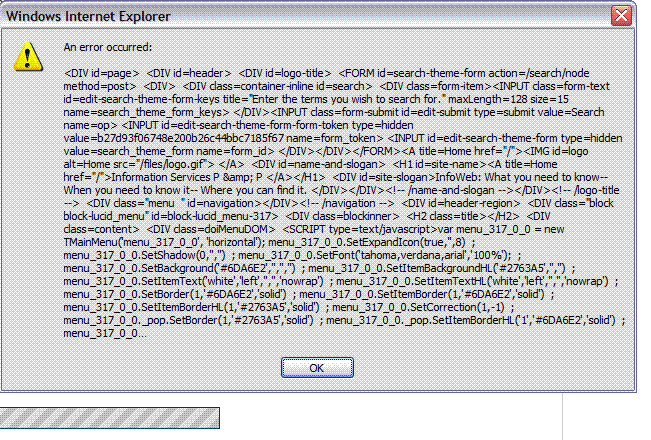
the error still pop up, but the file attaches now. Prior to v2.1 the file didn't attach. I couldn't find the original issue I saw this mentioned, but I think the original poster had trouble b/c of buddylist. I'm don't have buddylist loaded. Attached is the screen shot of the error. if you need anything else let me know.
| Comment | File | Size | Author |
|---|---|---|---|
| #16 | og_user_roles.user_.module.5.2_0.patch | 1.4 KB | somebodysysop |
| #15 | og_user_roles.module.5.x-2.3_0.patch | 3.64 KB | somebodysysop |
| #6 | testdata.xls | 49.99 KB | WorldFallz |
| #5 | og_user_roles.module.5.x-2.2_0.patch | 6.8 KB | somebodysysop |
| #4 | og_user_roles.module.5.x-2.2.patch | 0 bytes | somebodysysop |

Comments
Comment #1
somebodysysop commentedI don't know what this error means or what causes it.
Just for the heck of it, switch back to the default "Garland" theme and see if you get the same error on file attachment.
OG User Roles doesn't do anything other than tell OG to set a group context on this page so that if you have OG user roles permissions to attach files, you can do so. I have no explanation as to why that would cause this screen to pop up. But, it's worth exploring.
Also, use the og_user_test table to see what roles are calculated using the file attachment. http://drupal.org/node/164038
Comment #2
WorldFallz commentedsorry I was so brief yesterday, but it was very late and I had to leave before I got locked in, lol.
Ok I did some more testing. Theme seems to have no effect. I get the error on any theme anytime I try to upload a file on a group context page without sitewide file upload permissions. The second I give sitewide file upload, message vanishes.
I checked the logs and i get an "access denied error" as follows:
Type access denied
Date Wednesday, August 8, 2007 - 19:35
Location http://swbiswiki01v/upload/js
Referrer http://swbiswiki01v/node/ognodeadd?type=page&gids[]=11
Message upload/js
Severity warning
I took a look at update.js and that's where the popup comes from. It also doesnt matter what content type, it happens on all content created from withing a group context without the sitewide file upload permissions. And I did try to unload / reload the og user roles module as well as run the update script. I don't want to completely reinstall it, because I can't reset all my users/groups/roles until there is nothing else to try. 8(
hope that helps some... i'll continue to try and troubleshoot and post back any additional info I find....
Comment #3
somebodysysop commentedNeed you to do three things:
1.
2. a)If you don't already have it, download and install "Database Administration": http://www.drupal.org/project/dba.
b) Go to: Admin->Site Building->Database
c) Click on cache_page table. See what urls are cached in this table. See if one of those urls is "upload/js". If it is, delete it (the entry, NOT the table).
3. In fact, turn off caching altogether to see if that has an effect: Admin->Site Configuration->Performance
Comment #4
somebodysysop commentedYou're in luck! I was able to duplicate your error -- not consistently, but one time. I believe I discovered the problem. It is a page caching error. You shouldn't get it if you have page caching turned off.
Apply this patch to 2.1 release. It should resolve the problem whether you have caching on or off.
Comment #5
somebodysysop commentedOK, one more time...
Comment #6
WorldFallz commentedwow thanks for the amazingly fast response. I've been stuck in meetings all day so I just got to check this.
1. output from test table attached
2. Unfortunately, this site is still in "beta" and I hadn't enabled caching yet. cache_page is blank at the moment.
I won't get to test the patch until tomorrow morning, but Ill try it first thing and report back on whether or not it made any diff even tho caching is not enabled.
From a quick look at the test file attached, when the update.js code is called, my role definitely reverts back to "authenticated user" without the group context roles.
anyway.. thanks again for such a quick response... i post back patch results first thing in the am (ET USA).
Comment #7
WorldFallz commentedI am working on this , i've been having trouble getting the patch to work-- i keep getting a completely blank screen. Gonna try to patch manually.
Comment #8
somebodysysop commentedTry this patch:
http://drupal.org/files/issues/og_user_roles.module.5.x-2.2_1.patch
Again, against clean version of release 2.1.
If you still get the blank screen, then there's some error that's being reported in your /var/log/httpd error logs. You'll need to find out what that is.
Comment #9
WorldFallz commentedthat file patched perfectly, but I'm still getting the popup error. And I forgot to take the output from the test table with me before I left for the weekend. Ill post back with it on monday am. I wonder why no one else is having this problem, seems odd. but thanks for trying. worse comes to worse ill just have to give a sitewide file upload permission and keep an eye on the amount of files uploaded.
Comment #10
somebodysysop commentedIt looks like this problem is not resolvable for the time being. Documented here: http://drupal.org/node/166566
Will need some input from the Drupal gurus in order to get to the bottom of this.
Comment #11
WorldFallz commentedNo worries, as this is an intranet site I'm not terribly concerned about giving site-wide file upload to all users, it just forces me to keep a closer eye on the files directory.
If and when you have more code you'd like me to test out just let me know. I appreciate your effort in trying to resolve the issue--- if there's anything else I can do to help, just let me know.
thanks again.
Comment #12
somebodysysop commentedYou are welcomed. Keeping this issue open for the time being. Got to be some way to solve it.
Comment #13
somebodysysop commentedWorking on a theory that this problem is caused by some sort of caching. It may be the caching in user_access() function, or in a cache file, or both. Need to test it out.
If you are having the file upload problem described here: http://drupal.org/node/166557, then please download and install the Database Administration module: http://drupal.org/project/dba.
Once installed, go to Database page and select "cache_menu". On the "cache_menu" page, click on "empty".
Next, log in as the user having the file upload problem and see if it persists.
Please advise. Thanks.
Comment #14
WorldFallz commentedI'm away from the office till Monday, but I'll give it a try when I get back and post back here. Thanks for the info.
Comment #15
somebodysysop commentedAfter extensive study, I found that the problem here is that the user_access() function caches permissions so that when the user attempts to attach a file, the permissions returned are likely those from when he logged in, and not the ones current to his group.
I also found that deleting the cache_menu record for the user also helped in resolviing the problem. I don't know why, it just does.
I also discovered that I could not do one or the other, but had to do both in order to attach and upload files without error.
Apply the attached patch to release 2.2 of OG User Roles. This patch will empty the cache_menu record for the user. It will also delete the permissions cached by user_access(). It will do this in hook_init.
The latter functionality will require a patch to the user.module, which is in the following comment. I am also submitting this new patch to be accepted in Drupal core as it adds the ability to reset the user_acces() static $perm variable (i.e., empty the cache). Currently, there is no way to do this in Drupal core.
Comment #16
somebodysysop commentedThe attached patch should be applied against the user.module. It adds a reset functionality to the user_access() function. I have submitted this patch to be added to Drupal core here: http://drupal.org/node/170524
Comment #17
WorldFallz commentedOk, tried emptying cach_menu, and that didn't work. I actually think I might have tried that already if that's the same thing as the "Empty Cache" item on the devel module menu.
Will load up the patches as soon as I get a chance and let you know how that goes. Thanks for working on this.
Comment #18
WorldFallz commentedSorry I haven't gotten to this sooner-- I'm probably going to get to it this week-- one question though:
Do I have to apply this patch to version 2.2 or should I download and install v2.3? In other words-- does v2.3 include this fix?
Comment #19
somebodysysop commentedVersion 2.3 includes this fix.
Comment #20
somebodysysop commentedCode works for me.
Comment #21
WorldFallz commentedSorry it took me so long to test out the code-- i had some time sensitive work by users on the server and they couldnt afford having to upgrade/backout of a fix if it didn't work. I jtust upgraded to v2.3 this morning and I can confirm that the problem has been resolved. Excellent work. Thanks for such a prompt fix.