Hi all,
I used Nodequeue without problems on my local server. When I uploaded my website for testing on the real server it wasn't working properly...
The line, where the user can "add content" is not working.
When I'm trying to add content it is giving me this message:
Notice: Undefined offset: 1 in nodequeue_arrange_subqueue_form_add_submit() (line 1033 of /home/alonk/public_html/modules/nodequeue/includes/nodequeue.admin.inc).
Please enter a valid node title.
It is working properly only if the "Aggregate JavaScript files" under Bandwidth optimization is checked.
I have tried everything. fresh installation, fresh data base, fresh nodqueue, permissions, browsers.
Thanks.



Comments
Comment #1
amateescu commentedDo you see any javascript errors on that page before enabling js files aggregation? The output of the Firebug console would be great to investigate this further.
Comment #2
alonk27 commentedThanks.
I'm not seeing any errors. The message appears when I'm trying to "add content". The line is not active and it not responding. like it's not functioning. Again, it is all working very good ones the Aggregate JavaScript files is on.
Hope you can help.
Thanks.
Comment #3
amateescu commentedThen it's probably an incompatibility issue with some other module.
What do you mean by "the line"? Can you post some screenshots before and after you try to add a node? Preferably with a firebug console open when you do that operations.
Can you try this with a clean D7 install with only Nodequeue enabled? And if that works, you could try to disable some of your modules on the existing site and see if the error goes away.
Comment #4
alonk27 commentedI have tried everything. fresh installation, fresh data base, fresh nodqueue, permissions, browsers.
Thank you.
Comment #5
amateescu commentedAre you trying to add a node that's already in the queue? That won't work because of: #593468: adding the same node more than once to a queue causes bad behavior.
And when you type some letters in the autocomplete box, can you see the autocomplete functionality? From what I see in those screenshots, you just enter the node title by hand, but the autocomplete functionality also prints a
[nid: 12345]at the end of the title.Comment #6
alonk27 commentedIt doesn't matter if the node is already in the queue. It will do it for any node. The autocomplete functionality is not printing anything. It is like its turned off... This is the reason that I need enter the node title by hand...
Thank you.
Comment #7
amateescu commentedOk, then the problem is not in nodequeue, it's the Drupal autocomplete widget that's not working for you.
Can you give me a list of all modules installed on that site? And I really can't believe this is not working with a clean Drupal install and only the nodequeue module, can you please try that again?
Comment #8
alonk27 commentedHere it is:
-clean install of drupal 7.9
-clean data base
-clean Nodequeue 7.x-2.0-beta1
Didn't do anything except enabling the module. I have created two nodes (on the front page).
I have created a new "Test queue" and when I try to "add content" it is not working. It is giving the message that I pasted in my first post.
It is working properly only if the "Aggregate JavaScript files" under Bandwidth optimization is checked.
http://www.alphawebst.com/filez/drupal/
Here is the username and the password:
username: alon
password: test
I hope that someone would help me. I have been working on it for three weeks
Thank you very much.
Comment #9
amateescu commentedAh, that test site was great for figuring out the error. Here it is:
This file seems to be missing from your Drupal install:
http://www.alphawebst.com/filez/drupal/misc/jquery.cookie.js
I tried to access http://www.alphawebst.com/filez/drupal/misc/jquery.js and it's there, so you have to check out why there's no jquery.cookie.js :)
Comment #10
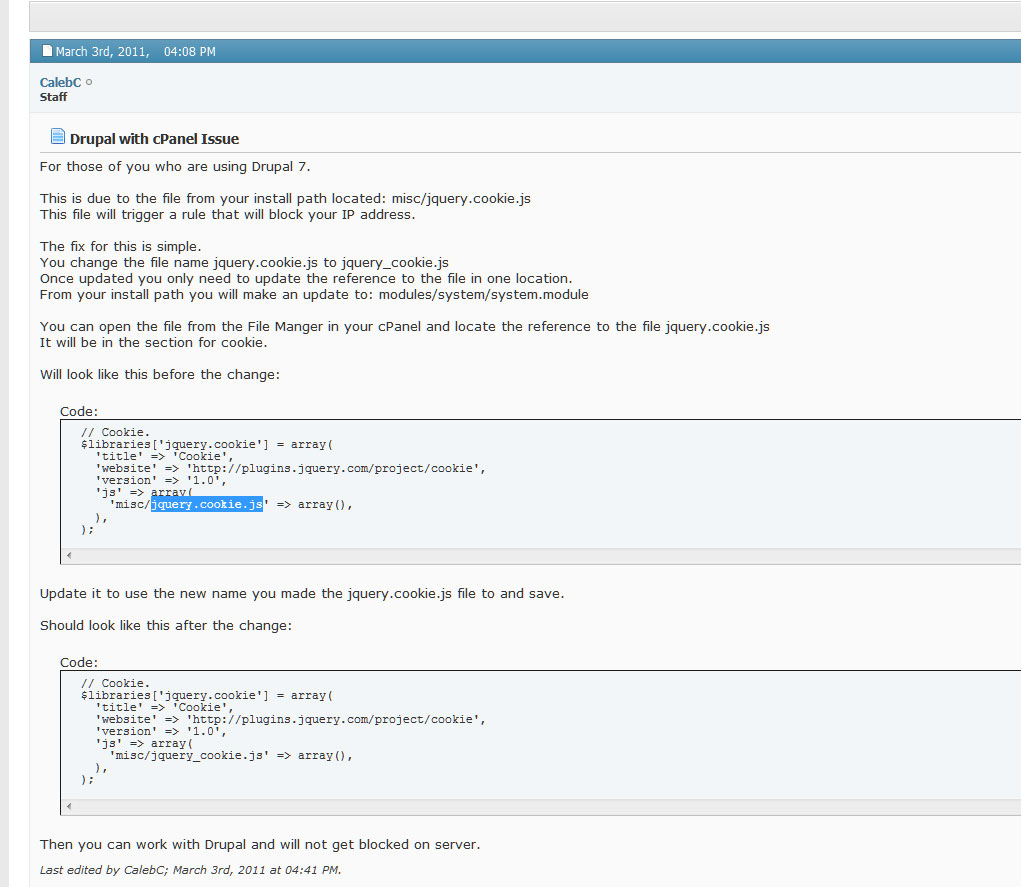
alonk27 commentedThank you so much. I have fixed it thanks to you. Cpanel and Drupal7, that was the problem.
When moving the site to the real server it is doing something to the file "jquery.cookie.js". it was there, but blocked...
Here is the fix:
http://forum.hostek.com/showthread.php?446-Drupal-with-cPanel-Issue
Hope it will save some time for other users. It took me three weeks to get to it :-)
Thank you very much for your help :-)
Comment #11
amateescu commentedI'm glad I could help :)
Comment #13
b8x commentedthank you.
Comment #14
aarsic commentedI am having the exact same problem. I left the hosting company that had a cpanel to another (better) hosting company w/out it - ftp and it does have php admin - I hope I can figure this out as well. I've been working on this as well for awhile. The auto content finder isn't working any more.
Antoinette
Comment #14.0
aarsic commentedDd