

Closed (cannot reproduce)
Project:
Node-level Blocks
Version:
7.x-1.x-dev
Component:
Code
Priority:
Normal
Category:
Bug report
Assigned:
Unassigned
Reporter:
Created:
23 Apr 2013 at 11:29 UTC
Updated:
5 Jul 2013 at 13:19 UTC
Jump to comment: Most recent file


Comments
Comment #1
voloda86 commentedI tested it better and find, that how many blocks are showing in Node-level blocks, while Im creating content type blok, I get the same number of errors. No change in front-end for block region position.
The error shows even I set actual region.
I think module cannot owerwrite drupal block region arrange.
Comment #2
Johnny vd Laar commentedOk I hope you can provide me some more details. At line 144 is this function:
Just to make sure we have the same version.
Can you tell me (var_dump) what is inside the $blocks variable?
Comment #3
voloda86 commentedPlease, can you give me a direction how to get this.
Here is node-level-block info file:
name = "Node-level Blocks"
description = "Allows node editors to assign blocks to regions on a node base."
dependencies[] = block
dependencies[] = node
core = 7.x
; Information added by drupal.org packaging script on 2013-04-05
version = "7.x-1.0-beta1+9-dev"
core = "7.x"
project = "node_level_blocks"
datestamp = "1365168156"
I install devel and theme developer and click on block made by nodeblock in frontend. Than looking for block in drupal themer and find this:
block (Object) stdClass
∞ (Recursion)
I dont know if it is what you want.
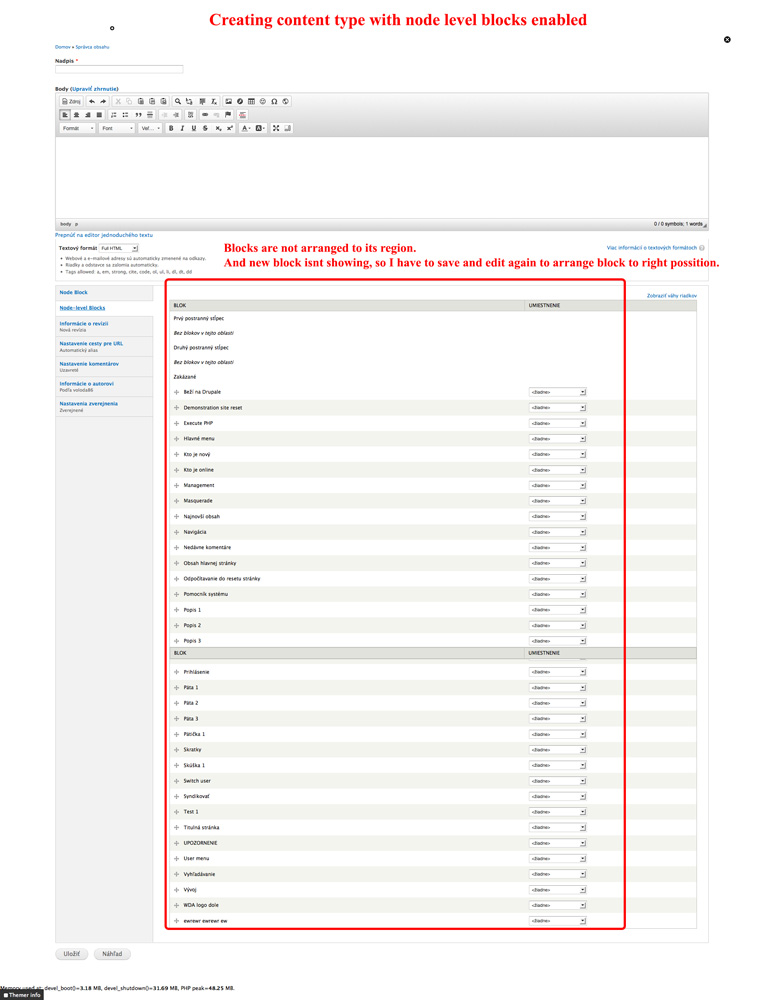
I found another thing. Node level block under edit content (with nodeblock) not showing exact position of displayed blocks. All are disabled. When I move som to another position it shoves error above.
Comment #4
lmeurs commentedI ran into the same problem while testing this module through http://simplytest.me/project/node_level_blocks (7.x-1.0-beta1).
I enabled the module for the Basic page content type and selected a region and some modules. Then I created a new node without selecting blocks or anything. All still fine, but after editing and saving the node, still without setting blocks, the following errors appear:
When you edit the content type and select only modules that do not have any blocks defined, the errors never appear.
Also turning off the core Overlay module helps.
Comment #5
lmeurs commentedProblem seems solved in the 7.x-1.x-dev version.
Comment #6
voloda86 commentedI dont have error in overlay module. My error direct to node_level_blocks.module line 144.
I update node level blocks to 7.x-1.0-beta1+10-dev, and still getting error: Notice: Trying to get property of non-object v node_level_blocks_block_list_alter() (riadok 144 z /.../sites/all/modules/node_level_blocks/node_level_blocks.module).
Please see JPGs
Comment #7
Johnny vd Laar commentedYou seem to be having the same table twice in the first jpg. This is a very odd problem. Can you completely remove and uninstall the module and then install the latest dev version?
Comment #8
voloda86 commentedI looked into the dbx and no table was twice. I also disable, uninstall and install the latest dev module node level blocks. The error still appear.
I found path level blocks. Before I didnt setup it. And Im confused how and why to use it.
I write you what I want to do with node level block. I created demonstration site and I want to demonstrate user how to manage drupal site. Only problem I have is with block management access. I try Block Access, but It dont work. So Im looking another sollution, and try to manage node level blocks, but I dont know if it is the right modul for this.
Comment #9
Johnny vd Laar commentedPerhaps you can mail me your database + drupal website structure such that I can see what is happening. Because currently I have no clue what is causing this.
I have sent you a mail via the contact form so you get my mailaddress.
Comment #10
Johnny vd Laar commented