I import a file of approx. 20 fields, with 101 records.
The file is CSV tab delimited.
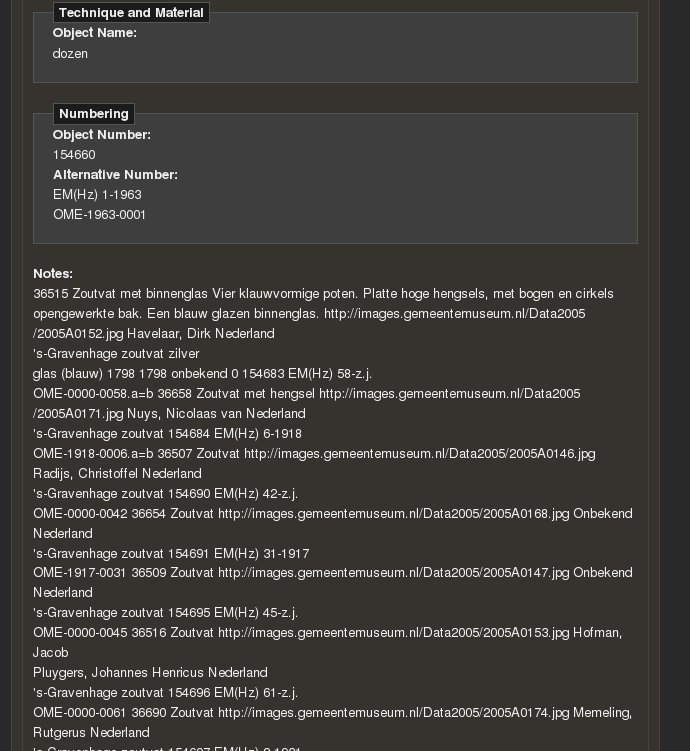
It stops after 79 records and puts ALL the remaining 22 records inside the last field (Notes field, which should be empty in the CSV) - with no stopping, commas or anything, just a dump of all the remaining records into the last field of record #79...
I see it also in the preview - when I asked to see preview of 150 records...
I try to reduce the size and then it does the same just after less records (like 15 or so).
I try to load it with Open Office and save it and it still didn't help...
Attached is a screenshot of the preview. The bug appeared in rc4 and in the dev version.


Comments
Comment #1
tierecke commentedI made sure that the last field (notes) is not empty (put asterisk instead) and then the import went fine.
Without it - it still stops after exactly 79 records out of 101, even if I change the order of the records.
Comment #2
coloryan commentedI've imported over 1500 taxonomy terms, parent/child structure, as well as a few hundred terms/definitions, with no issue. Without looking at your import, I'm tempted to say that it's a local issue, not a bug.
Comment #3
tierecke commentedI've also imported 3000 records with no problem.
But do like this: put a last columns in your CSV and populate it very sparesly and see what happens.
I suspect you'll face also something like that. Try it - I'm curious to know if it occurs also to you.
When I made sure that all the values in the last field are not empty, it went smoothly.
Without it - I tried saving it with Excel, Open Office, changed with VI, did with Java, swapped records - nothing helped. The records that were imported well in the 1st import because they were in the front, didn't import when when they were in the back.
Comment #4
coloryan commentedAh, I understand now. I occasionally had the same issue. I resolved it by putting a '-' in every empty cell. It's not the ideal solution, but it worked for me.
Comment #5
juicytoo commentedyou can also set up default values before data population.
that should also help the parser.
Comment #6
tierecke commentedI don't want to have any default value. I want that an empty cell will remain empty.
I imported it with * in the empty cells and then changed it inside Drupal,
but it's a major bug and it took me over a day to realize what to do.
Comment #7
coloryan commentedI imported 15 stories this morning, with several empty cells (weight, things like that), and I didn't have any errors associated with them.
Sorry, I'm not sure I can help any more as I can't get the error to replicate.
authored on,weight,Published On
,2009-07-28 05:30:45,,2009-07-28 05:30:45
Comment #8
tierecke commentedcoloryan, try importing a tab delimited file, with no text delimiter, and leave the last field empty...
I am quite sure it'll make you reproduce the bug.
Comment #9
MixologicI am having the exact same issue. I kept splitting my file, reordering the file to no avail. It alwasy stopped about 19 records short of the eof. Thanks a *BUNCH* for figuring this one out tierecke. This is definitely a bug. Its not just "any empty cells", its when the *very last* field is empty in the csv file. Im pretty sure it will happen if the input line *ends* with a delimiter.
Whew.. I thought I was gonna have to debug this one myself..
Comment #10
kruser commentedThis issue should have a big red asterisk next to it. I spent the last 2 hours combing through my csv file looking for problems when there wasn't a problem at all. Node Import stops importing if the last field in the current row is empty! So i'm adding a "IF(1<2,'***','') as last_column_filler" to make a generic last column in all of my import scripts.
Comment #11
kruser commentedComment #12
Syg commentedI have the same problem here :
a;b;c => works well
a;;c => is also good
a;b; => error because the line ends with a ';'
I added a debug column at the end of the csv file which is never empty, waiting for a fix.
a;b;;debug_value
Comment #13
herpderp commentedSubscribing.
Comment #14
soxofaan commented(Subscribing)
I also lost hours investigating this issue. Thanks for the workaround with adding a dummy last column.
In attachment an example file illustating the bug:
header + 20 entries (two columns "Title" and "Body")
importing results in only 18 new records
18th imported records consumes, apart from 18th entry from CSV, also 19th and 20th entry in its body
Comment #15
Robrecht Jacques commentedFixed in -dev. Will be included in -rc5.