

This project is not covered by Drupal’s security advisory policy.
Node expire patterns is an addition to Node expire module.
It is performing patterns (sets) of multiple various actions with different date/time shift against node expiry date.
For example:
Publishing an ad use-case.
- Publish an ad (node) (3 months before expiry).
- Send 1-st warning email with offering to extend the ad (1 week before expiry).
- Send 2-nd warning email with offering to extend the ad (2 days before expiry).
- Unpublish the ad and send confirmation email with offering to extend the ad (on expiry).
- Send a follow-up email with offering to extend the ad (1 week after expiry).
Announcing an event use-case.
- Promote an event (node) to front page (2 months before event date - expiry).
- Send 1-st notification email (2 weeks before expiry).
- Send 2-nd notification email (3 days before expiry).
- Send 3-rd notification email (1 day before expiry).
- Unpublish the event (on expiry).
Creating an appointment use-case.
- Send 1-st notification email (2 weeks before appointment date/time - expiry).
- Send 2-nd notification email (3 days before expiry).
- Send 3-rd notification email (1 day before expiry).
- Unpublish the appointment (on expiry).
To use the module:
- Install and enable the module. Modules required:
- Node expire >= 7.x-2.2,
- X Autoload >=7.x-5.0,
- Uuid
- In Administration -> Structure -> Content types -> {Your content type} -> Publishing options
- Set checkbox "Enable Node Expire Patterns".
- Set necessary Actions count.
- For each Action set:
- Human-readable name.
- Weight (initially keep it 0, it can be used to reorder Actions, if necessary).
- Date/time shift - Interval in relation to Expiry date.
- Action to do.
- Tag. This is an arbitrary action-related string and has no relation to Taxonomy.
- Also UUID is automatically set to each Action.
- UUID and Tag of the Action are passed with Node to Rules event "Content expire action" as parameters.
- Run cron and see how actions are executed.
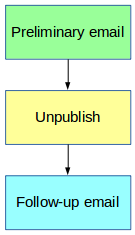
For each Node, where Node Expire Patterns are enabled and Expiry date is set and saved, Actions History is shown in Publishing options, something like:
Actions history:
1. Preliminary email, to be executed 02/19/2016 23:05, executed 02/19/2016 23:20,
2. Unpublish, to be executed 02/20/2016 23:05, executed 02/20/2016 23:23,
3. Follow-up email, to be executed 02/21/2016 23:05, not done yet.
Project information
- Project categories: Content editing experience
 8 sites report using this module
- Created by Nafes on , updated
 This project is not covered by the security advisory policy.
Use at your own risk! It may have publicly disclosed vulnerabilities.


