I am currently trailing an upgrade of our site to drupal 7, and in that process i need to convert some nodes.
We have a large selection that are under the Ubercart product category, i have created a new content type for them and attempted to migrate them using node convert.
The nodes all have an image attached, which does get selected during the node conversion, and is visible on the converted nodes page. However if i then attempt to edit the new converted node the image doesn't show up, i just have the blank image selection dialogue. This leaves us unable to modify any of these nodes as the image is compulsory, and when you try and save it doesn't think there is an image attached. It also leaves us unable to remove the existing image as it doesn't appear anywhere on the edit node page.
I am using the latest dev build of ubercart, but the recommended version also does the same.
Any ideas as to what could be causing this or a way around it?
Many thanks!
Gareth


Comments
Comment #1
reg commentedI'm getting the same. I still don't know exactly why. My guess is that somehow a reference to the file is missing since there always needs to be one (I think drupal self-references files so they always have one when needed, or something like that) so file_update (from node_save()) is deleting it since the file looks unused.
I would be happy to supply a patch for that as well but I need a little help on where to start. I don't know if you could add a line and it would all be fixed or if your API needs to be used for the image module like you do for a few other modules or what but I figure there's probably enough information there for you to at give a direction.
The other issue is of course going from an image field of one node type to another where each has their own prescribed file path which means moving the image file as well if it's to be done fully correctly. I don't know if that needs extra coding or if just the normal fix will handle that.
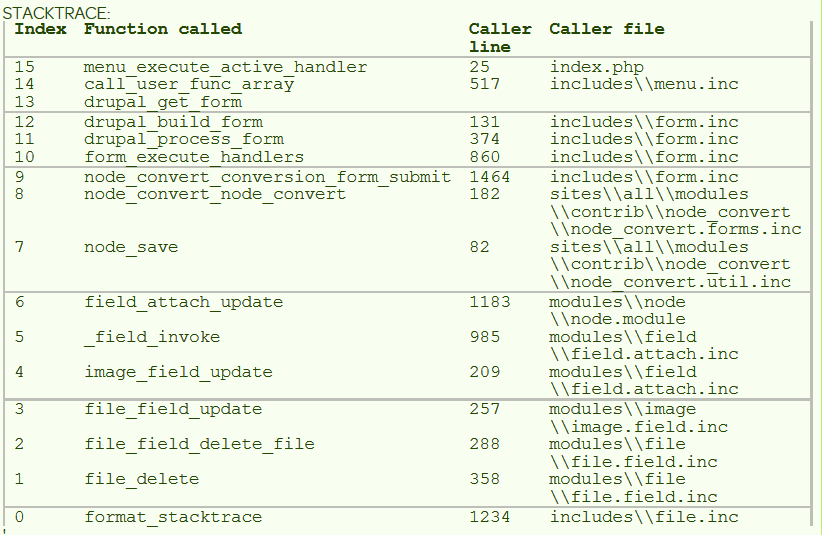
Attached is the stacktrace from where the file is being deleted, node_save() being the call that starts it all.
Comment #2
reg commentedI think that this issue is related looking through the code https://www.drupal.org/node/1483736 but that still doesn't help with knowing the proper fix. Been digging in, don't think this is it anymore.
Comment #3
alcroito commentedI can't reproduce your issue.
Can you be more specific about your content types, fields, and the version of Drupal and Node convert you are using?
I created two new content types (type1 and type2), with a shared field_image (type: image, widget: image). Created a node of type 1, uploaded an image, converted to type2, and the image remained, both on view and on edit.
I also created a different field_image_2 field, so they are not shared, converted to it, and the image still remains.
This is all done with the latest dev version of Node Convert and Drupal 7.23.
Comment #4
reg commentedI did pretty much the same. The only thing I might suggest is that in each node type put a different path for the images to be uploaded to. Perhaps that's the deciding difference. I have been using Drupal 7.22 which I am sure is close enough.
On my system content type 1 has a path like images/companies and content type 2 has a path like media/images so the file has to be moved for the image fields to be correct. Perhaps there's a check somewhere that says "see if image is there" and in type 2 the check is failing and therefore the field gets removed. This is all supposition as I haven't yet been able to trace the exact cause.
Even if that wasn't the cause for the image to be removed I suspect that is a bug in itself because I see no code anywhere that would move the file to it's proper location. Perhaps if you could throw in a bit of code to fix that the original issue would also become resolved. That's all I got so far but still looking around.
Comment #5
alcroito commentedI honestly haven't been able to reproduce this. I've added the image paths like you did, and upon conversion, the image shows up fine, both in edit and view.
Maybe you have some module that is intervening with the field api operations? Can you list what modules you have installed?
Also, I don't think that not moving the file is a bug, but rather a feature request.
If for example you upload an image to a default path, and then go to manage fields to change the file path and save, all the files aren't automatically moved to the new location, they stay where they were, and only new files are affected. So you could say its default behavior.
Comment #6
reg commentedFound it. It was a cache clearing issue. On the latest release of Drupal, 7.29, they added a little bit of text above the field_attach_update() function that gave me the clue.
You might not use extra caching like we do, such as memcached, at least that would account for the difference in behavior.
Attached the patch plus I added an idea from one of your other issues which I found useful on labeling.
I didn't check to see if your code would move files to the correct directory when switching node types but if it doesn't could we trouble you to add in a little code for that? I'm hoping to clean up our file system as well as consolidate node types.
Comment #7
johnvThe symptom from OP also occur if the language of the field differs from the node's language.
Comment #8
reg commented@johnv: This definitely sounds like it's own issue, can you create a new issue with a little more detail.
Comment #9
johnvSorry, that was just a hint from previous experience, that might help. I have no problems myself.
Comment #10
reg commentedAlways happy for a helpful hand, thanks! We don't use the multi-language features either so I'm don't have the problem either.
Comment #12
alcroito commentedIt's weird because even with memcache and/or with entity cache, I still can't reproduce the issue. But I guess clearing the cache before saving the node shouldn't break anything, at least a couple of tests haven't shown any regression for me.
Comment #13
johnvOPs do not state this drupalversion they use, but perhaps they suffer from this error introduced in 7.29. That explains why it is not reproducable.
#2305017: Regression: Files or images attached to certain core and non-core entities are lost when the entity is edited and saved
Comment #14
alcroito commentedThat issue seems to affect only fields attached to taxonomy terms and file entities, which is not the case regarding node convert.
Also @Reg, I've pushed the code you requested regarding moving field files to their new folders specified in the field settings. It works for files and image fields. Once a new development snapshot is generated, you can try it out. Alternatively you can git clone and get the changes now.
Comment #15
reg commentedJust wanted to let you know everything works like a charm so far. Thanks!
Comment #16
alcroito commentedGlad to hear it.