

 Come together with the global Drupal community in Rotterdam, 28 Sept – 1 Oct 2026. Sessions, contribution, connection, and Early Bird savings until 8 June.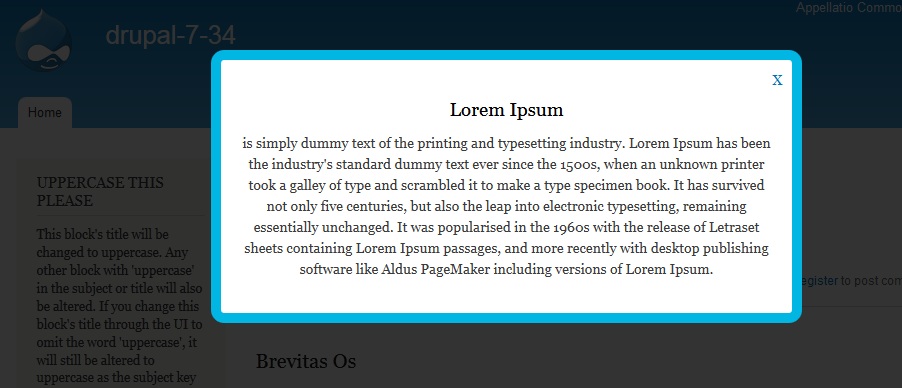


This project is not covered by Drupal’s security advisory policy.
Description
Display a nice popup message in users browser.
Configuration
Go to admin/config/user-interface/nice_popup and option for enable /disable Pop-up , set pop-up boarder color, set pop-up width in percentage and add custom text in pop-up body.
Go to admin/people/permissions and set permissions.
Features
1. Plug and play module to any Drupal 7.x website.
2. Popup enable /disable option . Set frequency of popup [off/always/once/daily/weekly].
3. Set popup boarder color.
4. Set popup with in percentage . Always use popup with in percentage to fit in any responsive layout.
5. Text area to add pop-up message, with HTML support.
6. Browser Cookie to manage pop-up display frequency in any browser (until user delete the browser cookie )
7. Popup is not fixed in any location , so work in responsive design.
8. For adding close button inside pop-up message use id="close-popup" with any HTML element. Example : <a href = "javascript:void(0)" id="close-popup" >X</a> or Use Image as close button by adding ID : <img src ="/sites/all/modules/nice_popup/popup-close-button.png" alt="Close" id="close-popup" >
9. Source code is validated with coder and pareview.sh for coding standard.
Setting up repository
git clone --branch 7.x-1.x https://git.drupal.org/project/nice_popup.git
cd nice_popup
Project information
- Project categories: Content display
- Created by rabithk on , updated
 This project is not covered by the security advisory policy.
Use at your own risk! It may have publicly disclosed vulnerabilities.

