Closed (fixed)
Project:
MySite
Version:
4.7.x-3.5
Component:
- Type plugin
Priority:
Normal
Category:
Bug report
Assigned:
Reporter:
Created:
2 Jan 2007 at 19:10 UTC
Updated:
3 Jan 2007 at 14:43 UTC
Jump to comment: Most recent file


I'm trying to set up mysite so that the users can pick a category term and display all nodes associated with that term on their mySite page.
The "terms settings" form doesn't appear in the admin page, even when trying to go to the user admin/settings/mysite/term (as described i the help)
I compared it with the 5.0 version, there it's working fine -- in a sub form.
I even tried entering the setting ``mysite_term_vocabularies'' directly in the database to see if at least it picks it up but it doesn't.
I might be able to fix it if you'd please give me a hint...
thanks
great module by the way!
| Comment | File | Size | Author |
|---|---|---|---|
| #1 | term.png | 81.54 KB | agentrickard |

Comments
Comment #1
agentrickardI have reproduced this error. It has to do with how the Menu hook functions, and I will have to figure a patch for it.
Some notes to help you until then.
1) There is an error on the help page. The proper path is /admin/settings/mysite/type/term.
2) The submenu depends on the modules that you have installed, and whether those modules have settings pages for MySite. You must have at least 2 active modules for a submenu to appear. This is a flaw in the menu hook.
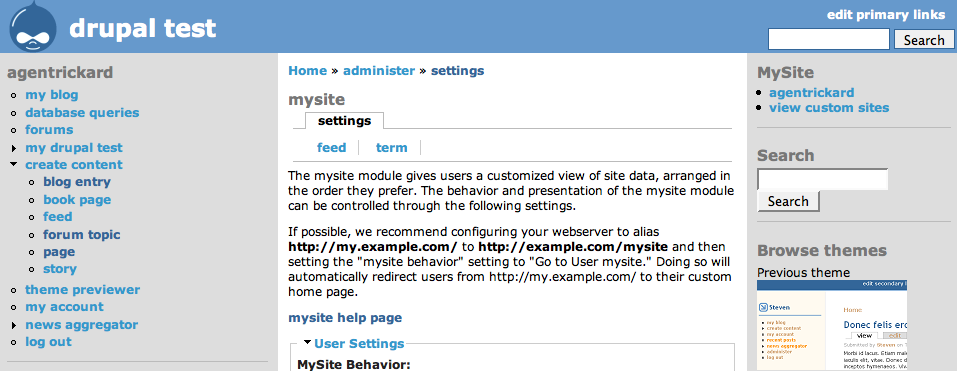
In testing, I always have Aggregator and Taxonomy turned on. This gives me the menu items shown in the screenshot attached. (I have changed this title to reflect this issue.)
You can set the Taxonomy module by going directly to:
http://example.com/?q=admin/settings/mysite/type/term
One question: In Drupal 5, do you have Aggregator and Taxonomy turned on?
Comment #2
agentrickardThe same problem occurs in Drupal 5 (MySite 5.x.1.5) if only one submenu item exists.
Comment #3
agentrickardI have patched this for both 4.7.x.3.dev and 5.x.1.dev. Still waiting on more Drupal 5 bugs before an official release.
Temporary fixes:
In version 5.x change line 118 to:
In version 4.7.x, change line 120 to:
Sadly, this fix removes the submenu tabs. We are left with a single line of settings menu tabs.
Comment #4
Sic-1 commentedon the 5.0 site I had aggregator , blog and taxonomy enabled, whereas on the 4.7 site I only had blog and taxonomy
so there were at least two modules enabled
thanks for the quick fix, I'll give it a shot
Comment #5
agentrickard