As discussed in #1992166: New UI proposal, here's a first start on adding an ajax file form allowing to edit files quickly.
There's still some bugs:
- thumbnail display when loading form
- buttons on loaded form which have to be overridden to avoid redirection.

Comments

camdarley’s picture

Status: Active » Needs review
camdarley’s picture

After playing a little with that I'm not sure anymore that it's the good way to proceed.
Instead of a file form, it could be better to have a file summary, with preview, file usage and others... Later we could have an edit button which turn the summary into a file form.

camdarley’s picture

Title: Ajax loaded file form when clicking on a file » Ajax loaded file summary when clicking on a file
Status: Needs review » Needs work
camdarley’s picture

StatusFileSize
new42.6 KB

Here's what I was thinking:
file_summary

camdarley’s picture

StatusFileSize
new3.97 KB

Here is a working patch. There is still a few enhancement to add before committing it:
- Inspector use the "full" view mode... maybe the right way would be to create a new file view mode, called "inspector"
- There is a bug when the file is loading, the size of the media item on which we just click became wrong. It come back normal when loading is finished.

Despite that, it's pretty awesome: I have websites with videos and I can preview it directly inside the library. Also, it will became easier to display size, owner and file usage!

camdarley’s picture

StatusFileSize
new11.81 KB

Much much better: using a view block instead of a rendered file allows greater flexibility with displaying files metadatas.

camdarley’s picture

Status: Needs work » Needs review
das-peter’s picture

Status: Needs review » Needs work
StatusFileSize
new42.58 KB

@camdarley Awesome, another really nice idea realized!
While testing it following things came to my mind:

  • Could we toggle the inspector? Similar to the Operations in the toolbar patch #2030375: Toolbar style exposed filters.
  • Do we need a max-width / fixed width for the inspector area? Currently the width changes all the time mainly depending on the preview display style of the file entity
  • When selecting an file the file item changes it's width - at least in my setup / admin theme (latest Ember - see screenshot

And I've found some coding-standard nitpicks:

+++ b/js/media_browser_plus.js
@@ -99,6 +99,21 @@
+    
+    // Add the inspector event
+    $('.mbp-file-list').find('li').each(function(index, item){
+      item = $(item);
+      var $media_item = item;
+      //alert(item.attr('id'));
+      
+      var file_id = item.attr('id').replace(plugin.options.fileIdRegexp, '$1');
+      new Drupal.ajax(item, $media_item, {
+        url: Drupal.settings.basePath + Drupal.settings.pathPrefix + 'admin/content/file/ajax/' + file_id + '/getForm',
+        settings: {},
+        event: 'click tap'
+      });
+      
+    });

+++ b/views/media_browser_plus.views_default.inc
@@ -17,6 +17,9 @@ function media_browser_plus_views_default_views() {
   $views[$view->name] = $view;
+  
+  $view = media_browser_plus_views_inspector();
+  $views[$view->name] = $view;

@@ -417,3 +420,134 @@ function media_browser_plus_views_management() {
+  $view->disabled = FALSE; /* Edit this to true to make a default view disabled initially */
+  
+  /* Display: Master */
+  $handler = $view->new_display('default', 'Master', 'default');
...
+  $handler->display->display_options['arguments']['fid']['summary_options']['items_per_page'] = '25';
+  $handler->display->display_options['arguments']['fid']['specify_validation'] = TRUE;
+  
+  /* Display: Inspector */

Has trailing whitespaces.

+++ b/media_browser_plus.module
@@ -306,6 +321,23 @@ function media_browser_plus_move_file_callback($file, $folder) {
 /**
+ * Return the file summary.
+ *
+ * @param stdClass $file
+ *   The file object to show.
+ *
+ * @return array.
+ */
+function media_browser_plus_get_file_form($file) {
+  $display_id = 'inspector';
+  $view = views_get_view('media_browser_plus_inspector');
+  $view->set_display($default_id);
+  $view->set_arguments(array($file->fid));
+  $commands[] = ajax_command_replace('#mbp-file-inspector', '<div id="mbp-file-inspector">' . $view->render() . '</div>');
+  drupal_json_output($commands);

No full stop needed, but do we've a return at all?

+++ b/views/media_browser_plus.views_default.inc
@@ -417,3 +420,134 @@ function media_browser_plus_views_management() {
+}
\ No newline at end of file

Missing single blank line at the end of the file.

chr.fritsch’s picture

Status: Needs work » Needs review
StatusFileSize
new15.79 KB
  • Fixed width to inspector and add overflow scroll, because of very long file paths
  • Add media query to inspector to hide it on small screens
  • Fixed bug with width changing on selecting an item
  • Fixed CS issues
das-peter’s picture

Status: Needs review » Needs work
StatusFileSize
new2.49 KB
new14.77 KB

Gave this another try.
Here my findings :)

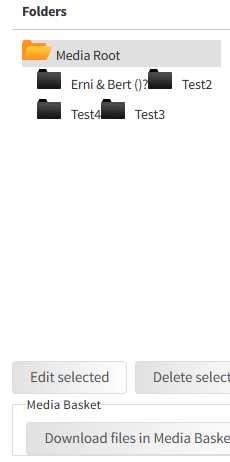
  • Folder tree layout seems to be broken :|
    folder_tree.png
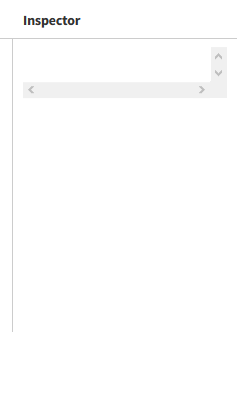
  • The inspector area shows scrollbars all the time - alt least for me Win8, FF22.
    inspector.png
  • Add media query to inspector to hide it on small screens

    That's great, however I'd still like to have a way to toggle the display of the whole inspector area. How about making the "Inspector" text clickable and use JS to toggle the area the same way as the media query does? We could even add a cookie to remember the last state.

Coding-Nitpicks ;)

+++ b/js/media_browser_plus.js
@@ -99,6 +99,21 @@
     }
+    
+    // Add the inspector event
+    $('.mbp-file-list').find('li').each(function(index, item){
+      item = $(item);
+      var $media_item = item;
+      //alert(item.attr('id'));
+      
+      var file_id = item.attr('id').replace(plugin.options.fileIdRegexp, '$1');
+      new Drupal.ajax(item, $media_item, {
+        url: Drupal.settings.basePath + Drupal.settings.pathPrefix + 'admin/content/file/ajax/' + file_id + '/getForm',
+        settings: {},
+        event: 'click tap'
+      });
+      

Has some trailing white-spaces in the empty new lines and leftover debugging code.