

Closed (cannot reproduce)
Project:
Magnific Popup
Version:
8.x-1.x-dev
Component:
Code
Priority:
Normal
Category:
Support request
Assigned:
Unassigned
Issue tags:
Reporter:
Created:
24 Mar 2017 at 13:48 UTC
Updated:
13 Sep 2017 at 13:28 UTC
Jump to comment: Most recent, Most recent file


Comments
Comment #2
eric115 commentedHi, I will need a few more details about your setup and which configuration options you are using to help you debug this. Can you please provide some more information?
Side note: Support requests like this are _not_ considered critical :)
Comment #3
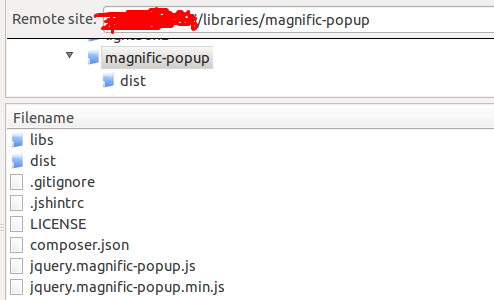
david.qdoscc commentedI had the same issue. Checking the status report it showed that the library was not installed. The problem was the /dist folder in the library. I moved the JS files out of the /dist folder and placed them so that it was DRUPAL_ROOT/libraries/magnific-popup/jquery.magnific-popup.js etc. and it worked.
Comment #4
Elido commentedIt says the magnific library is installed in the status report. And the files are placed correctly.
It looks like the magnific javascript is not initialized at all.
And Eric115, I consider it critical when the module is not working at all. :)
Comment #5
Elido commentedIt says the magnific library is installed in the status report. And the files are placed correctly.
It looks like the magnific javascript is not initialized at all.
Comment #6
Elido commentedI consider it "critical" when the module is not working at all and not giving any errors.
Comment #7
Elido commentedI have reinstalled the module and the whole library by deleting folders and reinstalling again - still not initializing.
I use bootstrap theme.
Comment #8
Elido commentedAlright here I have fixed your module which is not working at all at any themes or installations of drupal 8.
Here is the fix:
---------------------------------------------------------------------------
1. Add two lines into viewElements function in the file:
src/Plugin/Field/FieldFormatter/MagnificPopup.php
-----------------------------------------------
js/magnific-popup.js is the following:
--------------------------------------------------------------------
Comment #9
Elido commentedComment #10
eric115 commentedHi Elido,
Thank you for your contribution. Would you kindly consider creating a patch (https://www.drupal.org/node/707484) with your changes in it so that I can properly test it against the code base?
I think the issue you are experiencing may be related to #2857287: Incorrect path for magnific library.
I would also strongly encourage you to read the issue queue etiquette here: https://www.drupal.org/node/1839650 :)
I am going to mark this as a duplicate for now, but please re-open the issue with a full description and steps to reproduce your issue, along with any errors you are seeing if you are still having trouble.
Thank you
Comment #11
Elido commentedThis is not a dublicate, because the library is installed correctly and I have tried your patch and it still doesn't work
Comment #12
jay.dansand commented@Elido: Thank you very much for bringing an issue to our attention! That said, in #10 Eric115 kindly requested that if you re-open the issue, you provide steps to reproduce your issue. Are you working on writing those steps? It may seem superfluous, but it's not: steps to reproduce are critical because the module works for us™ and works for over a thousand other sites; something is clearly different in your setup, and we need to be able to figure out what it is.
Side note 0: Read Drupal's issue queue etiquette. It's a really short list and I'm sure you'll have a happier Drupal experience if you take the 5 minutes to read it.
Side note 1: When supplying a patch, please supply a patch. We're volunteering our time around actual day jobs, and really can't afford the time to figure out manually merging your changes against git.
Side note 2: You may be unaware, but when you change issue status or post small messages 5 times in a row, it spams our email boxes; please try to keep everything as consolidated as possible.
Side note 3: Purely pedantic, but cccording to Drupal's issue priority policy, "support requests should never be marked 'critical' or 'major'."
TL;DR: We're volunteering out of our happy hearts to provide something at no cost to you. We want to help, but you need to help us help you (provide steps to reproduce, proper patches, following issue queue etiquette, etc.). Reopen with complete steps to reproduce, please. Thanks!