

Postponed (maintainer needs more info)
Project:
JSON:API
Version:
8.x-2.1
Component:
Code
Priority:
Normal
Category:
Support request
Assigned:
Unassigned
Issue tags:
Reporter:
Created:
14 Feb 2019 at 07:12 UTC
Updated:
21 May 2019 at 14:09 UTC
Jump to comment: Most recent, Most recent file


Comments
Comment #2
gabesulliceI attempted to replicate this. I gave the anonymous user the
administer blockspermission so that I would have permission toPOSTa new block without any authentication.I got the following response:
Once I gave the anonymous role the "Use the Basic HTML text format" permission, I was able to successfully create the new block.
Does your user have that permission?
Comment #3
wim leersIt's interesting that it's a 422 instead of a 403 though. That's interesting.
Did some digging.
Turns out this is a consequence of
\Drupal\filter\Plugin\DataType\FilterFormatdoing this:IOW: the options available are limited to those for the current account. But that is a semantically different thing:
disallowed_format_nameis a settable option, it's just not settable by the current user. If you'd passnonsenseas the format, it should be a 422, if you passdisallowed_format_name, it should result in a 403.Comment #4
schlaukopf commentedThank you for you fast response, I'm using the cookie session from the admin (uid=1), so it should have all permissions, anyway I tried adding those permissions to the anonymous user, but I'm still getting the same error, and as I mentioned before the error appears even without body. Also I'm able to create article with basic_html format, and no issues, the problem is just with block:content entities.
You can take a look here testingjsonapier9bvqszma.devcloud.acquia-sites.com.
Comment #5
wim leersOh, interesting! If that’s what’s happening, it would be very easy to add a failing test to
JsonApiRegressionTest. There are lots of examples in there already. Could you add a test for this use case? 🙏Comment #6
schlaukopf commented@Wim leers I found what is the issue, it was failing because there was already a block with the same name, lol, I tried different things, but I never thought that it could be the name. so is this expected? or Is a code when the entity already exists?
Comment #7
schlaukopf commentedNow I tried using the basic auth module instead of the cookie session, and now I can see the error response(json), when I used the session cookie I just got error but no response. that's why it wasn't clear for me exactly where was the error
Comment #8
schlaukopf commentedAlso I found using the http basic auth and trying to create the block with the same name.
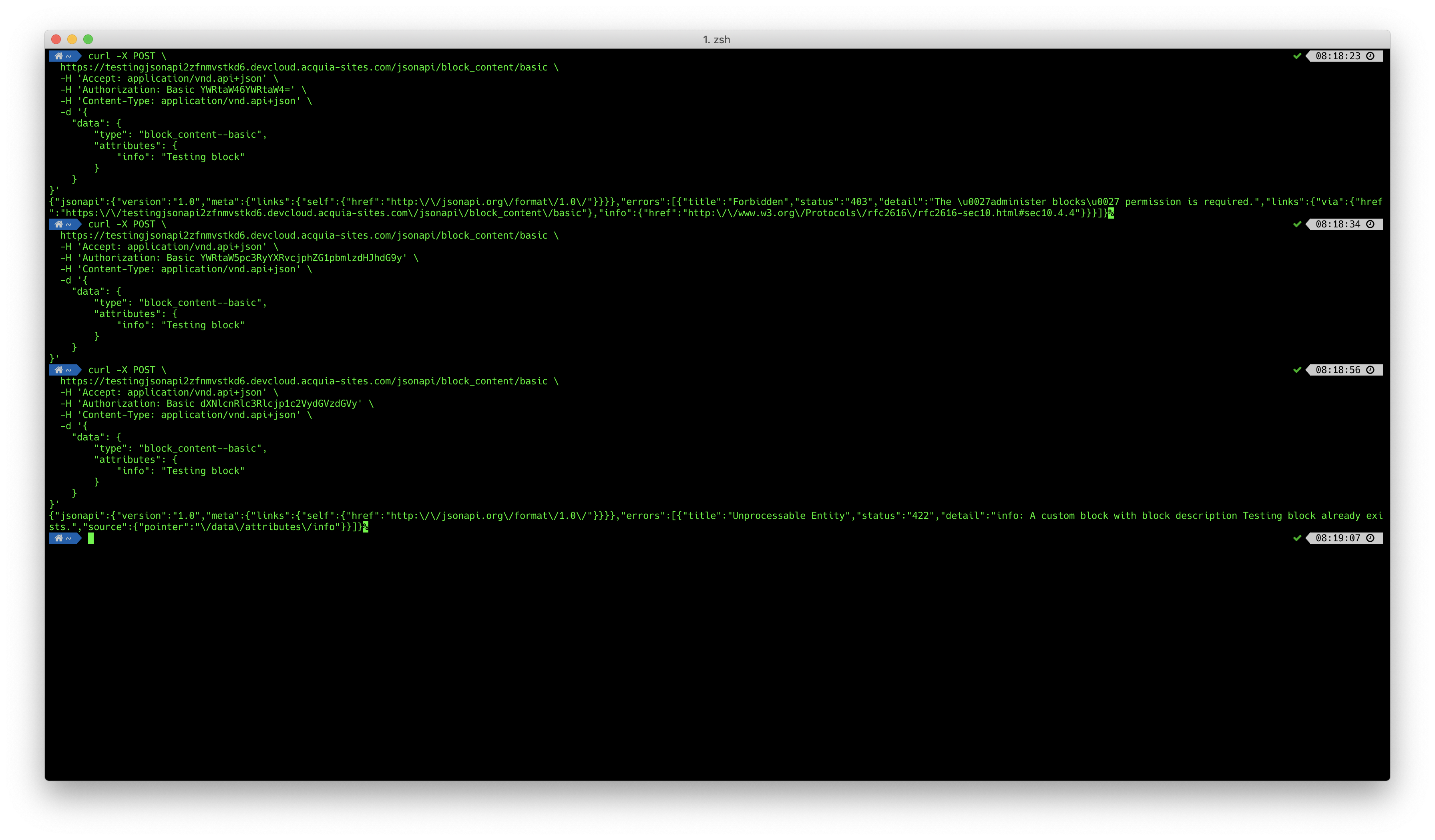
-When I use the user 1, I got 403 with the error response (json) "The 'administer blocks' permission is required.".
-When I create a new user and assign the rol administrator, I got 422 but without body (content length 0)
-When I create a new user with a new rol and with the administer blocks permission, I got 422 with the error response (json) info: A custom block with block description xxx already exists."
shouldn't get the two first scenarios the same response as the third one?
Comment #9
wim leers#6:
If that's really what's going on here, then that would be an important bug to fix, because if that's truly what's happening, you're getting the wrong validation error. Because
\Drupal\block_content\Entity\BlockContent::baseFieldDefinitions()contains this:Which means you should get
\Drupal\Core\Validation\Plugin\Validation\Constraint\UniqueFieldConstraint's error message, which is very different.But in #8 you are getting that error response. So are you sure you're reporting things accurately here?
#8: That too sounds very strange. And indeed in all three scenarios you should get the same error message as that third scenario. Could you please add that scenario to
JsonApiRegressionTest?Comment #10
schlaukopf commentedI will try to add them to the regression test.
So for recap, in all scenarios I should get this error,
But depending of which user and auth method, I'm getting different results as shown below.

From these 6 scenarios, I'm a little worried about the first one, I don't understand, why I need to add that permission to the anonymous user as described in #2, if I'm logged as user 1. Or am I missing something?
Comment #11
wim leersIt doesn't make sense to me either that the first scenario would behave differently. The only reason I can think of that that would happen is that you have some contrib or custom module installed that does something special for
uid=1.It'd be great to know if you can reproduce this with "vanilla Drupal" (i.e. just Drupal core + JSON:API). If you can, it should also be easy to write a regression test (which I will then be able to do for you, unless you want to of course!).
Comment #12
schlaukopf commentedSorry I have been so busy last weeks, that I haven't had time to write the regression test. I will try next weekend, so if you can help me before, that would be awesome, but anyway I just spin off an env to test it with the latest Drupal (standard profile) and enabling additionally just jsonapi.
Same behavior as described before.
Comment #13
schlaukopf commented@wim-leers Sorry for the delay, this Is the scenario
Comment #14
gabesulliceThanks for providing a regression test!
Comment #15
wim leersIndeed, thanks!
Looks like the answer is clear though: one includes a stack trace, the other doesn't. They both result in the exact same error — fortunately! And they also both have an
errorobject.The problem you're running into is just that the block descriptions need to be unique.
However, you said that the
errorobject was missing in some cases. Well … I think that just got fixed: #3042124: [regression] Empty response body when user is an administrator and an exception is thrown; some traces cannot be encoded because of recursion detection.. Could you please update to8.x-2.x, commit52534b2381c098a002075e4f3fadd9c998e0de8dand try again? Thanks!Comment #16
wim leersIt's now looking like this won't need an upstream bugfix.