

 Come together with the global Drupal community in Rotterdam, 28 Sept – 1 Oct 2026. Sessions, contribution, connection, and Early Bird savings until 8 June.
The Image Extended module allows you to add files with extensions like eps, svg, pdf or tiff on your website fully integrated into the image module.
Instead of having a form with at least two fields, an image field and a file field for pdf, eps, tiff, svg, this functionality is integrated into one field.
If you upload a file, you can have a preview in the upload section as well as an image linked to the source in a new browser tab for each format.
You can choose which format is available, the size of the file, if private or public like the core image module.
The decision to use formats like svg despite the insecurity of this format lies in your hands.
All available opportunities are in this image:

Here the result, each linked to its source in a new tab (original, not here):

Prerequisites
This module can only be used by people who can configure their environment or have the following libraries installed:
- ImageMagick > 7.0
- pdftoppm
ImageMagick is used to convert files with svg, eps or tiff to create jpg files.
pdftoppm is a smaller library, faster with better performance than ImageMagick to create jpgs from, you guess it, pdf files.
Installation
First install the module ImageMagick.
Then configure @ ... admin/config/media/image-toolkit.
Should look like this:
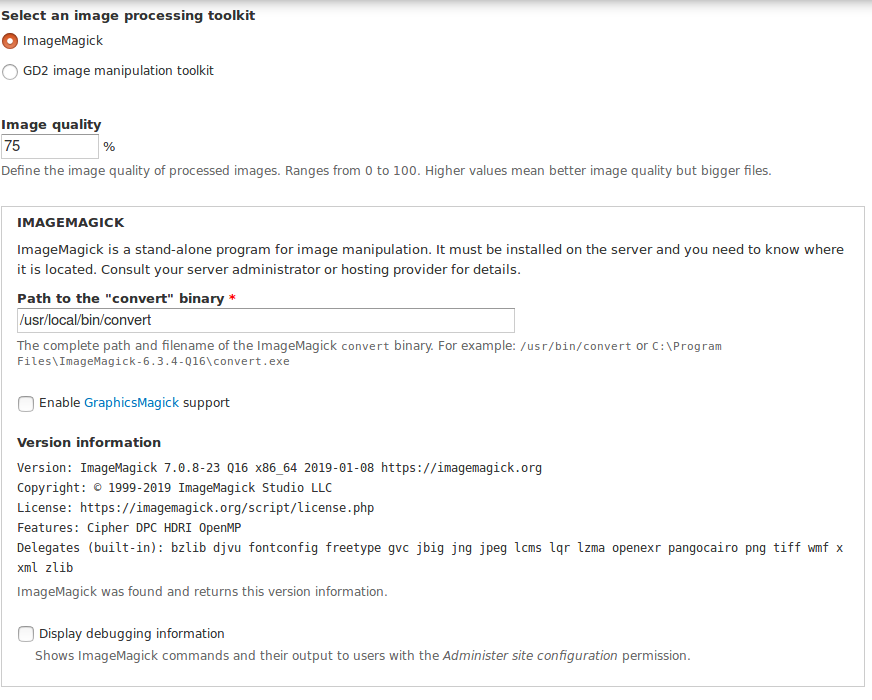
Beware the version of ImageMagick!
Then, after installing "Image Extended", go to ... admin/config/media/img_ext.
This should look like this:

This has to bet set! No known problems with different versions!
Then create a field with Image Extended just like the core module image. It's upt to you which formats are possible!
Here is the key in field formatting, the rest is the same like the image module:

Project information
 Maintenance fixes only
Considered feature-complete by its maintainers.- Project categories: Content editing experience, Content display
- Created by maen on , updated
 Stable releases for this project are covered by the security advisory policy.
There are currently no supported stable releases.




