Active
Project:
Imagefield Crop
Version:
7.x-1.1
Component:
Code
Priority:
Major
Category:
Bug report
Assigned:
Unassigned
Reporter:
Created:
18 Apr 2014 at 17:49 UTC
Updated:
18 Apr 2014 at 18:07 UTC
Jump to comment: Most recent


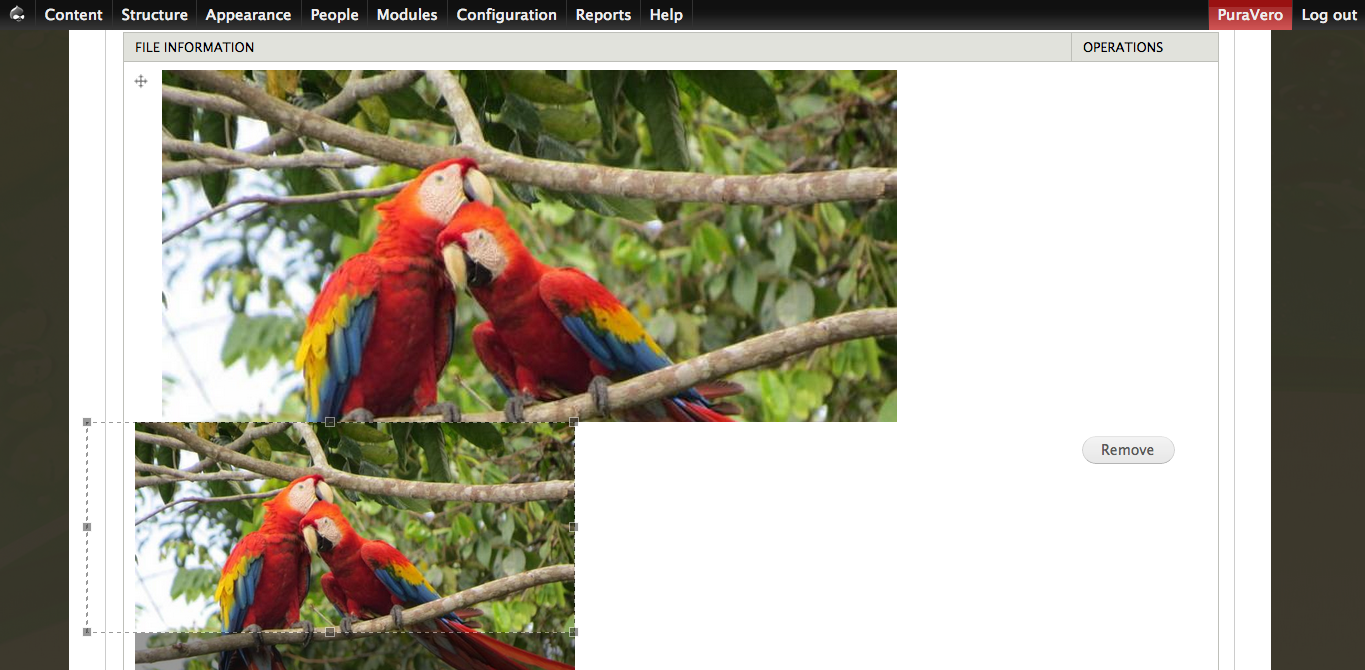
In the image attached "Edit.png" - see the selection area on the left - it is too big.
When saved, the extra region looks black - See image "View.png".
This behavior can be prevented if not choosing the option "Enforce minimum crop size based on the output size" but this option is desired in my case.
Please note that when the image is lower - that is, its height is smaller - this unwanted behavior does not occur.
Configuration values:
Collapsible behavior: Collapsible, expanded by default.
The resolution to crop the image onto: 740x320
Enforce crop box ratio: True
Enforce minimum crop size based on the output size: True
The resolution of the cropping area: 400x0 (tried many other options, none of them helped)
| Comment | File | Size | Author |
|---|---|---|---|
| Edit.png | 977.79 KB | amir simantov | |
| View.png | 600 KB | amir simantov |


Comments
Comment #1
amir simantov commentedAdding configuration values - might be a good idea ;)