Hello Andy. Moving this to a new issue, as you requested. Forgive me, but I'm a long-time dev, but new to Drupal. Here are your instructions from our previous conversation:
Generally, for the "User created by HybridAuth" condition you should provide the user account object. Then, you should use the tokens of HybridAuth data in the Rules actions to set the needed fields. Please open a new issue if you still have questions on the Rules related functionality.
I've set this up:
Event: After saving a new user account
Condition: User created by HybridAuth, Parameter: User: [account]
Action: There are no [account:hybridauth:*] tokens available here. If I type them in anyway I get a validation error.
Thanks for your help.
-Scott


Comments
Comment #1
duozerskScott,
Welcome to the Drupal land :)
First of all, please update the module to the 7.x-2.8-rc1 release - https://drupal.org/node/2047489 - or the 7.x-1.x-dev release.
Then please import this Rule and try to login through one of the providers - you should see a message with information from tokens.
This should ensure that the tokens work fine.
Then you should understand what tokens you have available to you on certain events. If you have an event that provides the user account object (like "After saving new user account") - then you should use smth like [account:hybridauth:firtsName] as the event provides you with the user account object called "account" - it may also be called smth else (you should check what Rules lists under the available tokens).
In the example above I have used the [hybridauth:firstName] token as the "User logged in through HybridAuth" event provides the HybridAuth data object (along with the "hybridauth-user" object of type user; so we could also use the [hybridauth-user:hybridauth:firstName]).
The last part of the token (firstName, birthMonth, etc.) - you can see all the possible strings for this part if you open the HybridAuth tab of any account that has a linked HybridAuth under a user with "administer users" permission; there you should see a table with all the tokens.
Hope it helps.
Thanks
AndyB
Comment #2
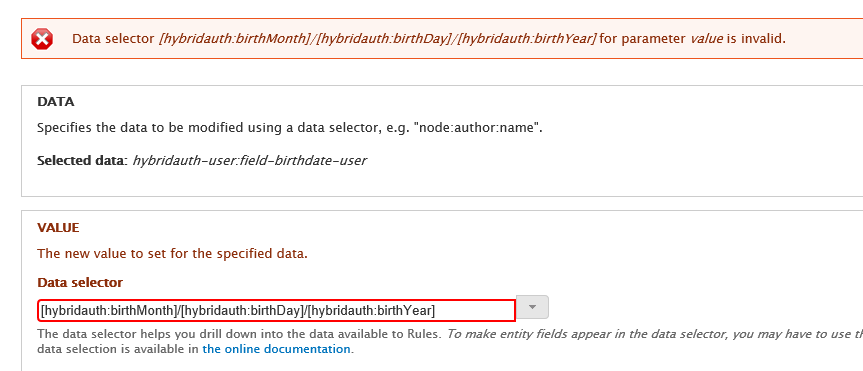
rawk1971 commentedThanks Andy. I'm getting closer. Got first and last name to come over. Having trouble with Birthdate. Our target field is a Date field. See screenshot. Any suggestions?
Comment #3
duozerskScott,
The date field requires date as a Unix timestamp. All the information from HybridAuth comes as strings. You should use the action from the HybridAuth module to provide you with the timestamp of the supplied year, month and day. This action will provide you with a variable you can use to set as a value of the date field.
Thanks
AndyB
Comment #4
duozerskScott,
Did you manage to get the birthday data to the date field?
AndyB
Comment #5
rawk1971 commentedCan you elaborate a little bit? I get why it's not working, but I don't quite get how to implement it as an action. I'm still a newbie. :) Thanks.
Comment #6
duozerskScott,
You should go to your rule that sets the first and last names and then add an action "Create date from day/month/year" - this action is under the HybridAuth label in the select. This action allows you to set the day, month and year and get the Unix timestamp variable. You should use the tokens coming from HybridAuth for the day, month and year and then use this created variable to set the Date field value (using the "Set a data value" action).
Hope it helps.
AndyB
Comment #7
duozerskScott,
Please set back to active if you need more help with this.
AndyB
Comment #8
rodrigo21 commentedHi rawk,
HybridAuth tokens are working for me too, but could you please guide me how to pre-populate a user profile field with Rules?
Comment #9
robbm commentedI had an issue with this too. So here's what worked for me, in case anyone else ends up here....
Comment #10
ghulamakbar14 commentedHi AndyB,
I am newbie in drupal. Can plz help me "How i can save all this social login info (i.e fname, lname, dateofbirth, country, gendar etc) from social site into my druap site...?". I will appreciate I you can refer me some blog tutorial.