Closed (fixed)
Project:
Hierarchical Select
Version:
5.x-3.0-rc6
Component:
Code - Taxonomy Views
Priority:
Normal
Category:
Support request
Assigned:
Reporter:
Created:
5 Nov 2008 at 17:47 UTC
Updated:
6 Dec 2008 at 14:32 UTC


Hi,
I've installed Hierarchical Select 5.x-3.0-rc6 and jQuery Update 2 and Views 5.x-1.6. and Hierarchical Select Taxonomy and Hierchical Select Taxonomy Views. !JQuery Interface is uninstalled!
But still it says in the /logs/status:
"Hierarchical Select Views Taxonomy The Views module is outdated.
The version of Views that you have installed is either older than May 11, 2008, or doesn't have the obligatory patch applied. Please apply the patch or update to a newer version of the Views module!"
Would the patch work here? Even that I've got the newest version of the views module? What do I have to do with the patch? Sorry for asking that. I'm a rookie and have no clue what to do with it... Where and what do I do with it?
In my views on the main page it says:
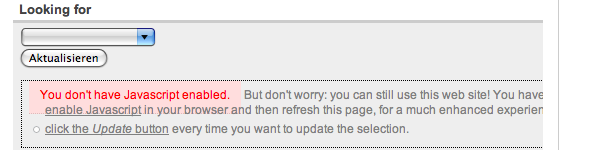
"You don't have Javascript enabled"
But I've got it enabled, of course. See the whole message in the attached file.
But altogether: Thanks for this module!!! It's wicked!!! (If it would work again... ;-) )
| Comment | File | Size | Author |
|---|---|---|---|
| Javascript-Problem_nah.png | 17.45 KB | The_Dude-1 |

Comments
Comment #1
The_Dude-1 commentedIt's me again... perhaps it's interesting to know that everything works where the user adds their articles (".../node/add"), but not where the users look at the nodes where also the views are enabled.
Comment #2
wim leersAbout the status report: you could also just install the latest 5.x-1.x-dev release of Views, as it says. That's easier :)
Then, the JS problem: please use Firefox + Firebug and then check if any JS errors occur. Probably there's another piece of JS conflicting with HS's JS code.
Comment #3
The_Dude-1 commentedHi,
thanks for your reply! I've added firebug and started it, but I've got no clue how to use it. What do I have to click for looking for a JS problem?
When I start search and double click on the section of the HS which doesn't work, the following message is shown in HTML:
Oceania (30)
But I guess that was wrong... as it says nothing of JS.
!!!!Thanks for your support!!!!
Comment #4
wim leersJust start Firebug and look at its console. JS errors will show up right there.
Comment #5
The_Dude-1 commentedI did so, but can't find any problem. Perhaps you could have a quick look?
http://traveldudes.org/de/accommodations
There is the left drop down menu and the user should be able to choose a continent and then a country and after that a region...
If you choose a continent, it stops and nothing works anymore. If you then refresh the page, there is a quick message with the Javascript message.
Comment #6
wim leersI don't have that problem.
Probably your browser can't handle this piece of invalid HTML:
You should fix that first! :)
Comment #7
apasaja commentedHi,
How to make the "Looking for" section like in your website (http://traveldudes.org/de/accommodations)?
Thanks in advance.