

Closed (fixed)
Project:
Galleria
Version:
6.x-1.0-beta3
Component:
Code
Priority:
Normal
Category:
Feature request
Assigned:
Unassigned
Reporter:
Created:
10 Feb 2009 at 18:05 UTC
Updated:
8 Apr 2009 at 21:40 UTC
Jump to comment: Most recent file

Comments
Comment #1
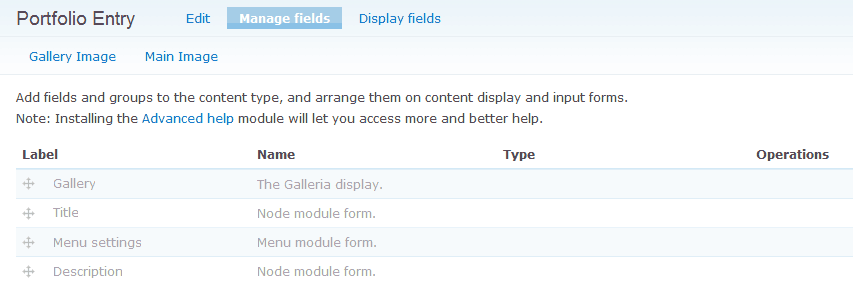
Mark Theunissen commentedIf you edit your content type, and go to "Display fields", you can drag and drop to reorder the Galleria to be below the node body.
The warning is there for a reason... you should never be displaying a Galleria as a teaser.
Comment #2
Mark Theunissen commentedComment #3
Mark Theunissen commentedComment #4
doomed commentedHello,
I'm using 6.1.0-beta3.
My question is similar to the one posted by sandy-jr.
I get this message on every post that has no pictures attached:
Invalid Galleria: there are no attachments.
How can i solve this?
Comment #5
Mark Theunissen commentedAttach your image files to the node. Please read the README.txt for instructions on how to use the module.
Comment #6
Mark Theunissen commentedComment #7
doomed commentedSorry, i do not want to attach the images.
Why should it be compulsory to have images attached to every node?
Comment #8
Mark Theunissen commentedIt's compulsory because that's the way the module works! Please read and follow the instructions exactly before posting issues. They are on the front page of this module and in the README.txt file.
Comment #9
Mark Theunissen commentedComment #10
Naat commented"If you edit your content type, and go to "Display fields", you can drag and drop to reorder the Galleria to be below the node body."
unfortunatelly I can't find this... When I go to Administer ---> Content types ---> Galleria - edit
all I see are:
identification
submission forms settings
workflow setting
comments setting
image (the module) attach setting
there is no "Display fields" setting :(
where is it? what i'm doing wrong?
thanks in advance for advice :)
Comment #11
Naat commentedComment #12
smithn.nc commentedNaat,
You are describing the "Edit" tab for your content type. There is another tab on the same menu titled "Display Fields". In this area, you can drag the galleria to a different position in the display.
Comment #13
car3oon commentedI'm pretty new to drupal and I have the same problem as Naat. Can't find tab titled "Display Fields". So smithn.nc my question is if need some extra module to see it?
Comment #14
smithn.nc commentedAh! It appears I was mistaken on what is standard on a Drupal install. Apologies; I have a set of modules that I always install before doing anything.
Anyway, to change the default order, you need the Content module; search the Drupal site for "CCK" and you should find it. In general, you'll probably want this module for the other stuff it offers as well; I can't picture ever doing a Drupal site without it. Hope that helps!
Comment #15
car3oon commentedI figured it out by myself. Naat You just have to install CCK module, and then You'll be able to manage those fields.
Comment #16
doomed commented> It's compulsory because that's the way the module works! Please read and follow the instructions exactly before posting issues.
> They are on the front page of this module and in the README.txt file.
Mark,
I give you all the merit for having a great looking module and giving it away for free for the community.
But..
That answer isnt satisfactory.
Why make it compulsory, when you can make it optional?
Let's say the user has a Page node or a Story node where he doesnt need pictures, so he wont upload any. He knows this, he doesnt need to get the red warning bar.
And I dont see whether reading all the readme.txt's in the world will make any difference in this.
Comment #17
Mark Theunissen commentedDoomed, I didn't understand what you originally were asking for.
The reason it's there, by the way, is because there are more support requests from people when they don't get feedback on why their Gallerias aren't working.
Your particular use-case where you want a Galleria node type that must sometimes be empty, is definitely an exceptional one.
Comment #18
Mark Theunissen commentedComment #19
Mark Theunissen commentedComment #20
Mark Theunissen commentedFixed in new beta. There is now an option in the Galleria settings to switch off ALL warning and error messages.
Comment #21
bohz commentedThis is very helpful also when you want to display only the teaser of a Galleria node type without the warning message.
Thanks a lot!