This project is not covered by Drupal’s security advisory policy.
Fluent is a Drupal module that significantly improves the developer's experience by simplifying access to fieldable entities, such as Nodes, Media, Taxonomy Terms, Paragraphs, and others. A significant feature of Fluent is its ability to utilize "dot notation" for field access and its seamless integration with Laravel Collections for multi-value fields.
Enhanced Methods for Fieldable Entities
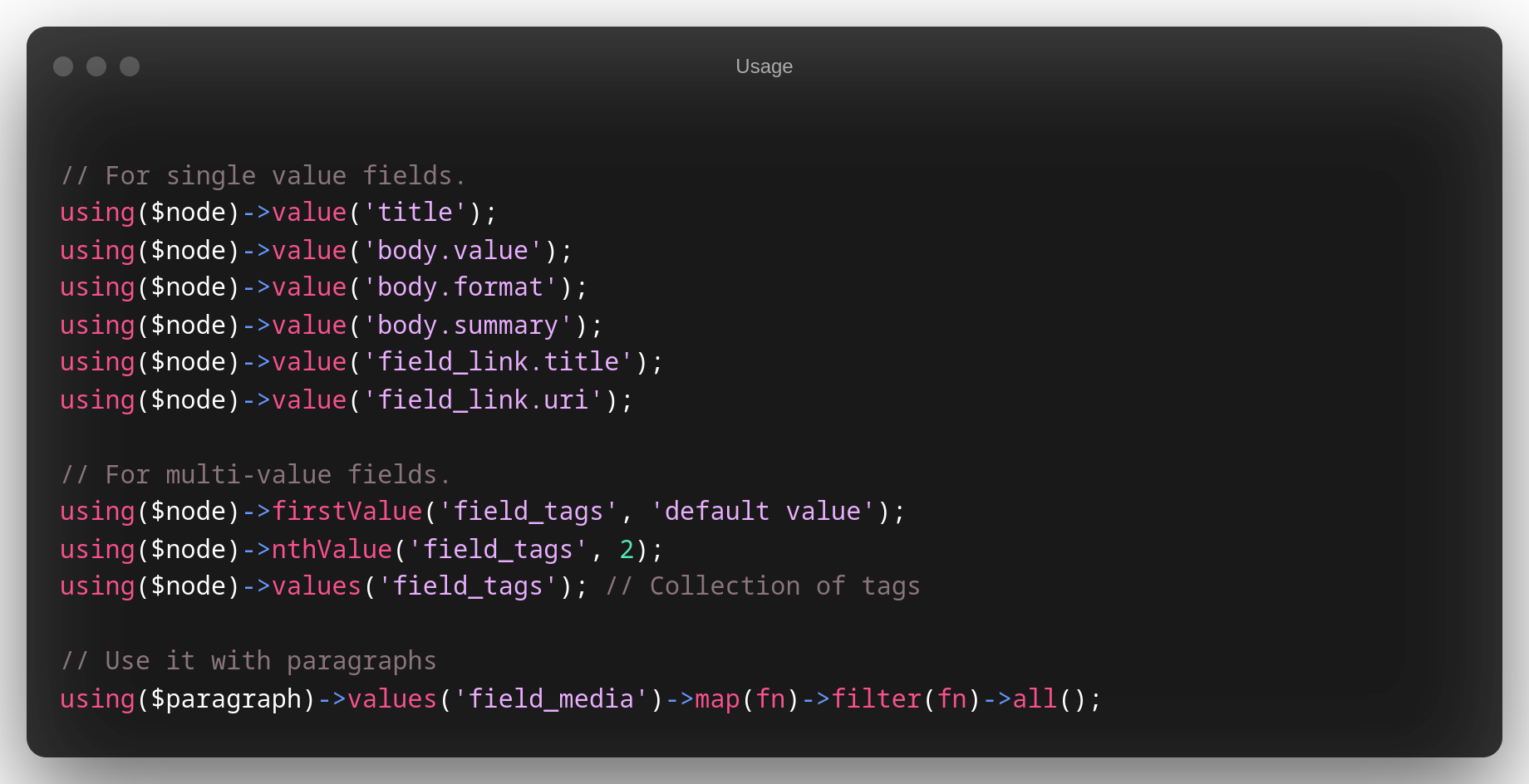
The Fluent module introduces a streamlined way of interacting with fieldable entities in Drupal. These methods offer a more intuitive syntax for retrieving field values, both for single and multi-value fields, as well as for paragraphs.
Retrieving Single Value Fields:
using($node)->value('title');
using($node)->value('body.value');
using($node)->value('body.format');
using($node)->value('body.summary');
using($node)->value('field.link.title');
using($node)->value('field.link.uri');
Dot Notation
In Drupal, fields within entities can reference other entities, creating a hierarchy. Fluent introduces the dot notation as a concise and intuitive way to navigate through this hierarchy and retrieve values.
Dot notation strings together a sequence of field names, separated by dots (.), to access nested fields.
Example:
field_media.uid.email
In the above expression:
field_mediarefers to the primary field we're accessing.uidsignifies the user ID field withinfield_media. Notably, when Fluent encounters auid, it recognizes this as a reference to the User entity and automatically loads the associated User based on the field definition inherent in Drupal.emailthen accesses the email attribute within the loaded User entity.
Thus, the entire expression navigates from the field_media to the user associated with it and then retrieves that user's email address.
This feature of Fluent provides developers with a streamlined way to delve into and retrieve values from nested fields without requiring extensive code or queries.
Fluent Data Type Conversion
In Drupal, data types returned from entities may not always align with their underlying database representation. For example, while the node ID is an integer in the database, it's often returned as a string when accessed via $node->id().
Fluent simplifies data handling by offering data type conversion, ensuring that you work with data in its expected format. Here are the key data types Fluent can convert:
- Boolean: Fluent seamlessly manages boolean fields, ensuring that values are treated as true or false as appropriate.
- DateTime: When dealing with date and time fields, Fluent converts values into
DateTimeobjects making date manipulation straightforward, and also support the DateRangeItem - FloatItem: For fields containing floating-point numbers, Fluent performs the necessary casting, ensuring precision.
- Integer: Numeric values like IDs are cast to their natural integer data type by Fluent.
- Link: Fluent simplifies complex link objects, providing easy access to the link's URL, title, and attributes.
- ListItem: Fields with lists of items are converted to arrays or collections, allowing for easy iteration and manipulation.
- Timestamp: For timestamp fields, Fluent converts them into
DrupalDateTimeobjects or timestamps for consistent handling.
With Fluent's data type conversion, you can work with data consistently, regardless of how it's stored in Drupal's database. This feature simplifies data operations and ensures that you interact with data in a way that matches your expectations.
Handling Multi-Value Fields:
In Drupal, fields can often contain multiple values, especially when dealing with complex content structures. Processing each of these values individually can become cumbersome. Enter Fluent.
Fluent's Integration with Laravel Collections:
Fluent seamlessly integrates with Laravel Collections, a robust tool that simplifies data manipulation. This integration allows you to elegantly transform and operate on multi-value fields, enhancing readability and maintainability of your code.
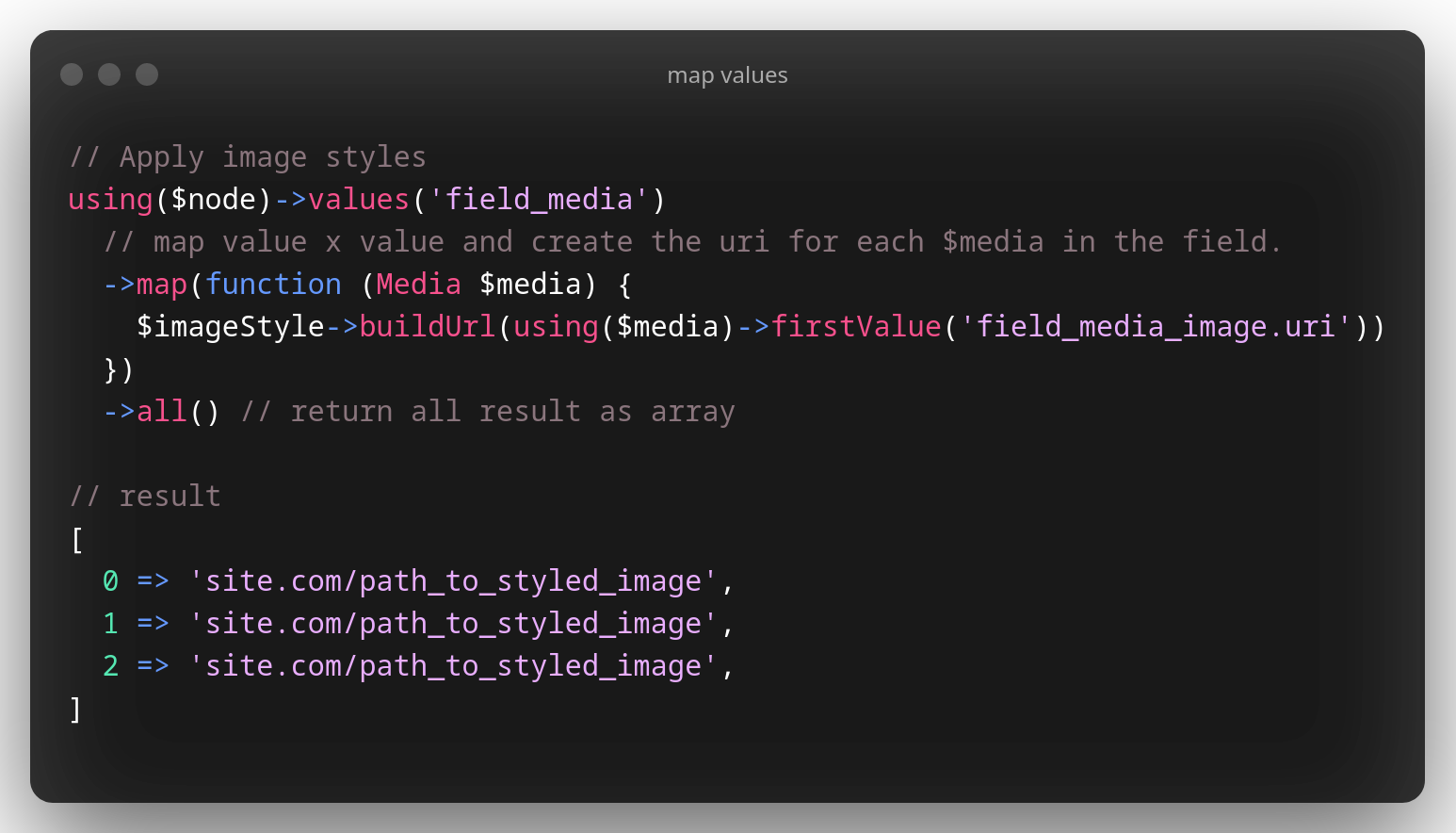
Example: Applying Image Styles
To illustrate, let's look at applying image styles to a multi-value field:
// Retrieve all values from 'field_media'
using($node)->values('field_media')
    // Map over each media item and generate the respective styled image URI
    ->map(function (Media $media) use ($imageStyle) {
        return $imageStyle->buildUrl(using($media)->firstValue('field_media_image.uri'));
    })
    ->all(); // Fetch the results as an array
Result:
[
    'site.com/path_to_styled_image',
    'site.com/path_to_styled_image',
    'site.com/path_to_styled_image',
]
With Fluent's integration of Laravel Collections, each value in a multi-value field can be effortlessly transformed, in this case, into styled image URIs, using concise and intuitive syntax.
Retrieving Multiple Fields Values in a Single Call with Fluent
Fluent simplifies data retrieval by enabling you to fetch multiple fields in one go. This can streamline your code and enhance readability. Here's an example:
$fieldData = using($node)->values([
  'time'       => 'field_date_time',
  'media_names'=> 'field_media.label',
  'term_urls'  => 'field_tags.url',
  'id'         => 'nid',
  'title',
])->all();
[
  "time" => Drupal\Core\Datetime\DrupalDateTime {#1373},
  "media_names" => [
    "Image 1",
    "Image 2",
    "Image 3"
  ],
  "term_urls" => [
    Drupal\Core\Url {#1540},
    Drupal\Core\Url {#1547},
    Drupal\Core\Url {#1548}
  ],
  "id" => 1,
  "title" => "title Boolean"
]
Fluent's behavior varies based on the field type. If a field doesn't have custom behavior specified, Fluent returns the raw value by default.
Examples:
$latestRevision = using($node)->value('vid');
Result:
Drupal\node\Entity\Node {#1966}
Fetching All Revisions of a Node:
$allRevisions = using($node)->values('vid');
Drupal\fluent\Collection {
  #items: [
    Drupal\node\Entity\Node {#1811},
    Drupal\node\Entity\Node {#1820},
    Drupal\node\Entity\Node {#1967}
  ]
}
Fluent provides a versatile and intuitive approach to data retrieval in Drupal, making it an essential tool for developers seeking efficient data operations.
Working with Paragraph Fields
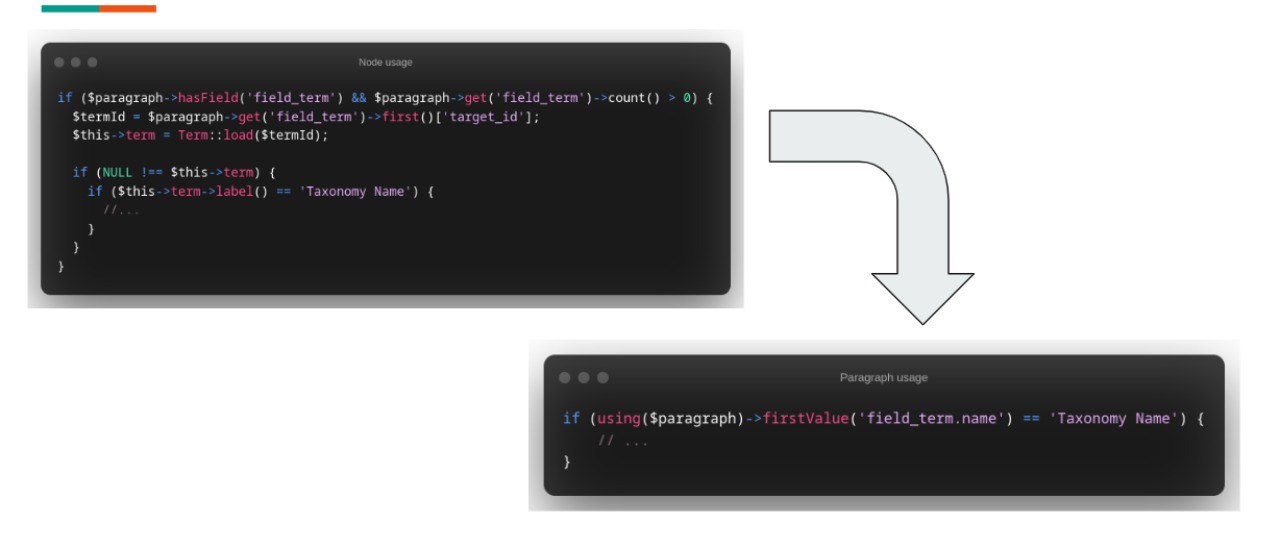
The Drupal Paragraphs module enables developers and site builders to create flexible and composite content. Using Fluent with Paragraph fields provides an elegant approach to access and manipulate paragraph data.
Accessing Paragraph Fields
To access a specific paragraph field, use the paragraph field name in the dot notation. If a node has a paragraph field named field_paragraph, and within that paragraph there's a text field named field_text, you can access it as:
$textValue = using($node)->value('field_paragraph.field_text');
Iterating Over Multiple Paragraph Items
If your paragraph field allows multiple values, you can iterate over them using Laravel's Collection methods:
$paragraphItems = using($node)->values('field_paragraphs');
$paragraphItems->each(function ($item) {
    $textValue = using($item)->value('field_text');
    // Process each text value.
});
Working with Nested Paragraphs
Sometimes, Paragraphs can be nested within other Paragraphs. Fluent makes it straightforward to access nested Paragraphs:
$nestedParagraphValue = using($node)->value('field_paragraph.field_nested_paragraph.field_text');
To iterate over multiple nested paragraph items:
$mainParagraphItems = using($node)->values('field_paragraphs');
$mainParagraphItems->each(function ($item) {
    $nestedParagraphItems = using($item)->values('field_nested_paragraph');
    $nestedParagraphItems->each(function ($nestedItem) {
        $textValue = using($nestedItem)->value('field_text');
        // Process each nested text value.
    });
});
Accessing Fields in a Specific Paragraph Bundle
If you have multiple paragraph types (bundles) and you want to process fields from a specific bundle, you can conditionally access them:
$paragraphItems = using($node)->values('field_paragraphs');
$paragraphItems->each(function ($item) {
    if (using($item)->bundle() === 'specific_bundle') {
        $textValue = using($item)->value('field_text');
        // Process the text value for the specific bundle.
    }
});
Informative Error Handling
Mistyped the name of a field? Don't fret! Fluent helps developers by just returning a NULL when the field doesn't exist and report the error to the Drupal Logs.
Highlighting Typos: If there's a typo in your field name, Fluent points it out.
Listing Available Fields: If a field doesn't exist, Fluent provides a comprehensive list of valid fields to guide you in making the correct selection in develop mode.
Examples
Accessing Basic Entity Fields
Easily fetch fields from any entity, be it a Node, Media, Taxonomy Term, or any fieldable entity:
$title = using($node)->value('title');
$langcode = using($node)->value('langcode');
Working with Media Fields
Fetch various properties of media entities like alt text, title, width, and height:
$alt = using($media)->value('field_media_image.alt');
$width = using($media)->value('field_media_image.width');
Handling Multi-Value Fields
Fluent's integration with Laravel Collections makes operations on multi-value fields simpler:
$values = using($node)->values('field_color_multi')->toArray();
Fetching Date and Date Range Values
Quickly retrieve date, date-time, and date range values:
$creationDate = using($node)->value('created');
$startDate = using($node)->value('field_date_range_all_day_single.value');
$endDate = using($node)->value('field_date_range_all_day_single.end_value');
Accessing Boolean Fields
Determine if a boolean field is true or false:
$isTrue = using($node)->value('field_boolean_single');
Working with Color Fields
Fetch color values and their respective opacities:
$color = using($node)->value('field_color_single.color');
$opacity = using($node)->value('field_color_single.opacity');
Retrieving Email and Link Fields
Extract email addresses and links, as well as associated properties like titles:
$email = using($node)->value('field_email_single');
$linkTitle = using($node)->value('field_link_single.title');
$linkUri = using($node)->value('field_link_single')->getUri();
Handling Timestamps
Get timestamps or convert them to a DrupalDateTime instance:
$timestamp = using($node)->value('field_timestamp_single');
Dealing with Numeric Fields
Fetch integer, decimal, and float values:
$integerValue = using($node)->value('field_number_int_single');
$decimalValue = using($node)->value('field_number_decimal_single');
$floatValue = using($node)->value('field_number_float_single');
Handling Nonexistent Fields
In case a field doesn't exist on the entity, Fluent returns a null:
$nullValue = using($block)->value('field_doesnt_exist');
Pending tasks
- Documentation for module developers, the fluent plugin system
- Detect methods that are not compatibles between laravel collections and Drupal Entities and make it compatibles
| Attachment | Size |
|---|---|
| Map values with Fluent | 202.3 KB |
| Field not found.png | 154.92 KB |
| Difference value with values.png | 217.74 KB |
Project information
- Project categories: Developer tools
 25 sites report using this module
- Created by dmouse on , updated
 This project is not covered by the security advisory policy.
Use at your own risk! It may have publicly disclosed vulnerabilities.