

Closed (fixed)
Project:
Flexifield
Version:
6.x-1.x-dev
Component:
Miscellaneous
Priority:
Normal
Category:
Bug report
Assigned:
Unassigned
Reporter:
Created:
16 Jan 2009 at 18:34 UTC
Updated:
16 Feb 2011 at 05:26 UTC
Jump to comment: Most recent file

Comments
Comment #1
vm commentedUm? flexinode hasn't been an active module since 4.7.x
Comment #2
fatcrobat commenteddamn sorry for this typo =/ mean flexifield...
Comment #3
vm commentedComment #4
jrefano commentedI have the same issue. Imagefield / Filefield images do not work with Flexifield. When you specify an image and hit upload, it does not show a preview/thumb of the image as it should. The images get uploaded to the server but nothing gets saved to the node.
Comment #5
robloachHit this today.....
Comment #6
BoozyMondango commentedSame prob. Anyone have any idea what the progress is on this bug? Love the module, it does exactly what I need but I need it to work with images, and there are no alternatives I know of for D6.
Thanks!
Comment #7
Ehud commentedsame here too..
Comment #8
vm commenteddon't assign issues to yourself unless you are working on a patch.
Comment #9
valeriod commentedThe reason why it is not working is because content_field_form() in cck/includes/content.node_form.inc looks for $form_state['values'][$field['field_name'] whereas we have it nested inside the flexifield so it loads the default values from the callback instead and you lose all the data.
The function content_field_form() is called by the AHAH imagefield handler which is filefield_js() in filefield.module.
I'm working on a solution.
Comment #10
valeriod commentedVery interesting how this works: making a non-hierarchical system -- cck -- to work with a hierarchy by pulling elements in and out of the tree.
I made it to handle the AHAH call from the filefield module, now I have to make it to save the image.
Comment #11
eu.claudio commentedis there any solution?
Comment #12
pgtremb commentedis there any solution soon?
Comment #13
phdhiren commentedwhen flexifield field marked as multiple, at that time the uploaded file for filefield is taken of last flexifield set for all sets of flexifield.
Comment #14
valeriod commentedI'll upload a patch in a couple of days. It makes it to work ONLY if there is a single instance of the field. For multiple instances (#13) I couldn't find a solution because the AHAH file upload get confused.
Probably something similar to what it is done on the server side could be done on the client.
A better solution is to create a module with composite fields.
Comment #15
effulgentsia commentedThe dev snapshot now includes a fix for this, in the form of an add-on module ("Flexifield Filefield Integration") that needs to be enabled (only needs to be enabled if you want filefields inside of flexifields to work). The fix appears to work for filefields and imagefields, whether the filefield is single or multiple, and whether the flexifield is single or multiple. This is my preliminary attempt at getting this to work, so I would very much appreciate for people to test this, and report any bugs.
As always, be aware that you take on some risk if you use a dev snapshot of a module (any module) on a production website. Unless you're willing to take that risk, you might want to wait until I release alpha3.
@valeriod: please still upload your patch if it does something interesting in addition to my solution.
Comment #16
gianluca.b commentedI'm trying your latest dev snapshot and a strange thing occours.
In one of my sites everything works fine, in another one, when I click on "Upload" button, it remains pressed and nothing else happens.
If I try to change content type via select on edit form, an "HTTP 0" javascript error occours.
I tried to disable all the external modules in the second site, but I got the same problem.
In both sites I'm trying with garland theme.
Any idea?
Comment #17
effulgentsia commented@yello73: can you check that the site where it's not working has Drupal 6.10, CCK 2.2, and Filefield 3.0? If it does, can you also check that the filefield upload works properly when not inside of a flexifield and with the flexifield module disabled. If it does not, please submit that as a support request to the filefield project. If it does, then it's likely a bug with flexifield, in which case please send me a personal message with login info to your site, so I can try to troubleshoot.
Comment #18
effulgentsia commentedAnother update on this issue for anyone keeping up with the dev snapshots: I'm starting to add more sub-modules, so I moved the flexifield_filefield.module to its own subfolder. If you update to a newer dev snapshot, then after doing so, make sure to visit the admin/build/modules page of your site so that drupal can find the module in its new location.
For anyone not using the dev snapshots (since that should always be done with caution), I'll try to get an alpha3 released within the next few days, unless people report critical bugs with the dev snapshots, in which case I'll want to resolve those first.
Comment #20
yoda-fr commentedComment #21
yoda-fr commentedComment #22
yoda-fr commentedComment #23
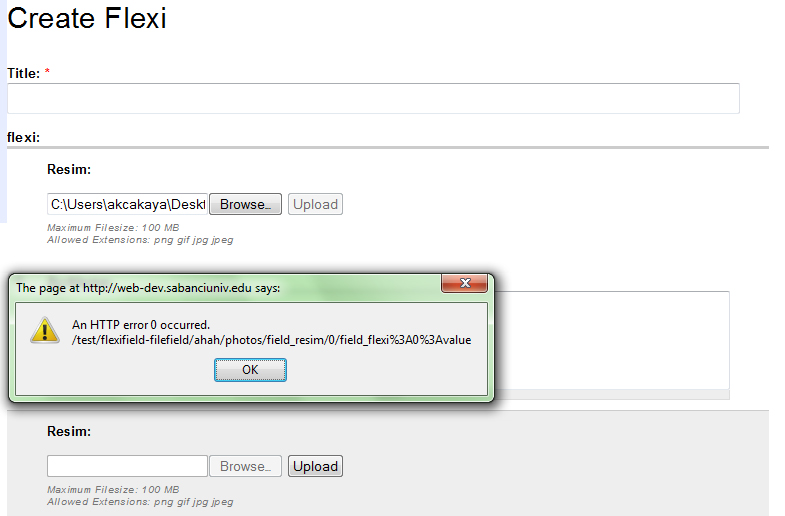
akcakaya commentedHello,
i tried to use Flexifield and FileField/ImageField but i get an error. After press the upload button, it says;
An HTTP error 0 occurred.
/flexifield-filefield/ahah/photos/field_resim/0/field_flexi%3A0%3Avalue
Also i tried to use dev and alpha5 version, but i get same error.
Thanks,
Comment #24
stefan81 commentedsame issue as #23
Comment #25
rp7 commentedSee #853742: filefield.module updates on filefield_edit_access() breaks flexifield saving. .
Comment #26
sdemi commentedUsing patch from #25 fixed the issue.
was happening with:
Drupal 6.20
CCK 2.9
Flexifield 1.x-dev