

Closed (fixed)
Project:
FAQ_Ask
Version:
6.x-1.2
Component:
User interface
Priority:
Normal
Category:
Task
Assigned:
Unassigned
Reporter:
Created:
31 Oct 2008 at 12:42 UTC
Updated:
19 Oct 2010 at 22:38 UTC
Jump to comment: Most recent file


Comments
Comment #1
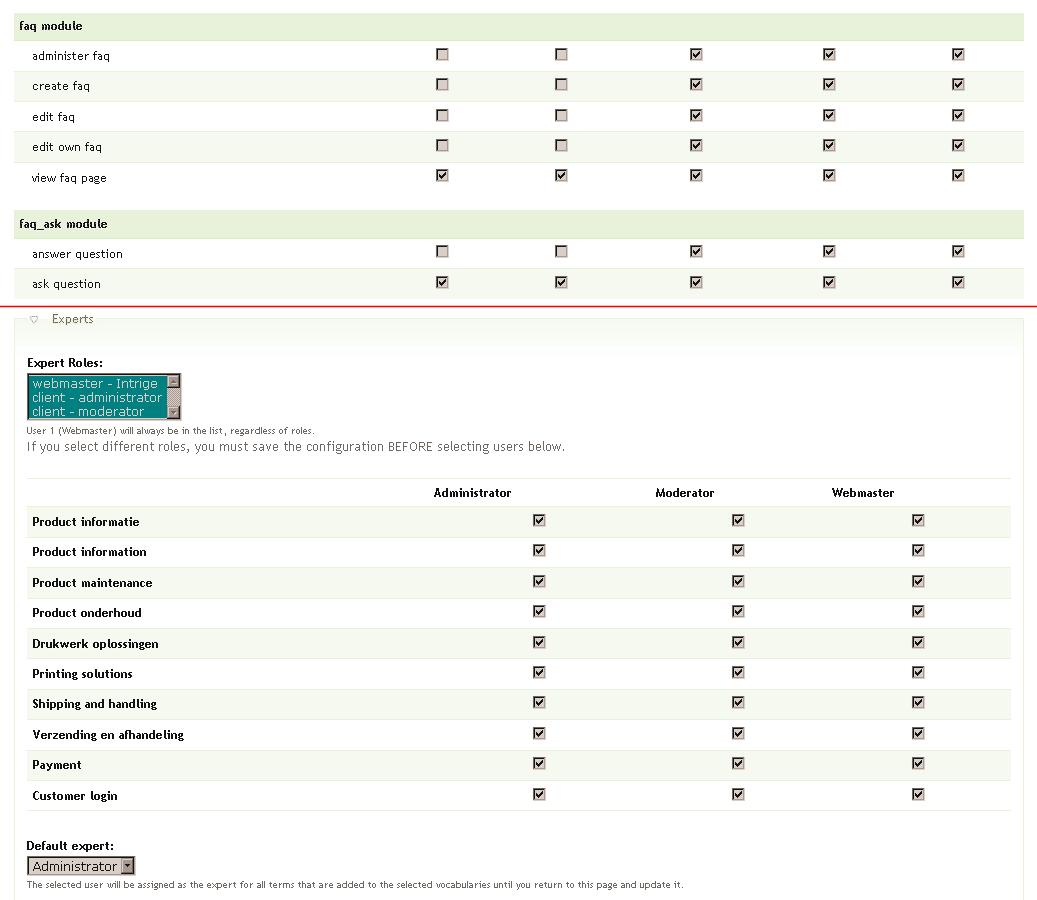
nancydruYou should be seeing permissions like in the attached picture. If not, you have a serious Drupal issue.
Comment #2
hannesh commentedYes, i see the permissions, they are all set for allow for the expert and the expert is set in the faq admin page.
Comment #3
emdalton commentedI have this too, in faq_ask 5.x. My permissions for the expert role are set. (In fact, all the FAQ permissions are currently turned on for this role, even "administer faq." The block shows the unanswered FAQ questions for the faq_expert role, but when I am logged in as that role and click on a faq, I get "Access Denied" AND the status of that question is set to "published," so it shows without an answer. If I am already logged in on my browser and click on the email notification link, the same thing happens. (Then, even as admin, I can't edit the question and set it back to "unpublished" without entering a dummy answer.) If I am logged in as admin, the link works correctly -- I am brought to the question page and the status is set to "published." I even tried giving the faq_expert role "Administer Nodes" access, but was still unable to answer questions from that role.
I have already noted a conflict with revisions in notifications. What other modules has FAQ_ask been tested with? Maybe there's a conflict somewhere? I can experiment with this on my test server, but it would help if someone can suggest some likely candidates for conflicts.
Comment #4
hannesh commentedi could send you a list of all the extra modules i have, but cannot suggest anything specific.
Comment #5
nancydruThis is the way FAQ works. Once a question has been selected, Faq_Ask marks it published and then you switch into the FAQ module and Faq_Ask is completely out of the picture.
@emdalton: - is "notifications" a module? Or are you talking about Faq_Ask's notifications?
@emdalton: I'm not sure what other modules you might be looking for. I have tested it with Subscriptions and found that Subscriptions specifically ignores unpublished content, which is what an unanswered question is. I have a bunch of modules on my test site, but I don't see where that list is germane to this.
If you are using an access control module (e.g. TAC or Node_Access), make sure the expert is allowed to edit FAQ content.
Comment #6
nancydruNo further update.
Comment #7
bartezz commentedHi Nancy,
I'm encountering the same problem. Only my 'webmaster' role (user's id = 1) can answer questions, other users with expert permissions get an access denied.
Funny detail is that questions once they have been answered by 'webmaster' do become editable for my 'administrator' and 'moderator' users/roles.
I've attached a screendump of 'access control' and 'faq experts' settings.
Hope you can help!
Comment #8
bartezz commentedThink I found the problem!
After exploring the database I found out that the node (when saved in the node_revisions table) is stored with format 3.
This is the filtered HTML input format which is in Drupal core, but it's a deletable input format. On my client's website it was deleted.
Therefore causing problems! When I changed the format of the nodes in the node_revisions table to 1 for instance I could access them without problems.
Edit: this is the full HTML filter, I was wrong. But in my case it is a filter problem anyway. Now that I have added the filtered HTML input format again
and gave the 'administrator' and 'moderator' roles access to this input format all was good!
Is this fixable? I will create the filtered HTML input format again for now but would like to disable this again if there is an update for this problem.
Cheers,
Bartezz
Comment #9
verta commentedtypo in title
Comment #10
bartezz commentedAre you kidding me?
Comment #11
nancydruHow are they getting set to "Full HTML?" That should never be a site default (for security reasons). But that certainly would cause problems for anyone who isn't allowed to use that format.