

Closed (fixed)
Project:
Entity Browser
Version:
8.x-1.x-dev
Component:
User interface
Priority:
Normal
Category:
Feature request
Assigned:
Issue tags:
Reporter:
Created:
30 Mar 2016 at 14:26 UTC
Updated:
19 Oct 2016 at 12:54 UTC
Jump to comment: Most recent, Most recent file



Comments
Comment #2
Nenad commentedComment #3
Nenad commentedComment #4
Nenad commentedComment #5
miro_dietikerFirst approach thinking:
Note we don't have bootstrap in admin UI and we can't just depend on its features.
The filename below the image is indeed a problem, if combined with an extra metadata column.
Moving it over to the description field could make sense and is already a great improvement.
The core admin UI has responsive tables from core to allow hiding columns.
We could just drop the description column in responsive mode below a certain size.
But this is not acceptable since it is not editable anymore for mobile users.
Also note that the description could be a textarea (hidden setting).
But different approach seems better to me:

I checked core and it shows multivalue image fields like this:
By not adding the metadata column it results in much less issues for mobile.
And core does also apply responsive width to these text fields:

So, just make the buttons stack up vertically, output the text fields below the image, and add responsiveness like core does.
Additionally, we should check the filename and limit it with a text overflow ellipsis definition to make sure the width is not extended accidentally.

Comment #6
miro_dietikerAww unfixing the images..
Comment #7
pivica commented> Note we don't have bootstrap in admin UI and we can't just depend on its features.
For sure we would not add bootstrap dependency, that table responsive thingy from BS are just couple of simple CSS rules that we would copy&paste&modify to our needs. You just need to add one wrapping div around table element and set it up to do horizontal scroll on overflow.
Having said that, i do like more vertical stacking approach from #5.
Comment #8
Nenad commentedPlease check updated designs and description.
Comment #9
miro_dietikerThis issue is getting longer and extended in scope.
We originally have discussed a problem and i have proposed to fix the wrapping of the filename and the description field.
Now you mix it up with dialog and other aspects and make it more a meta issue. Let's revert that step.
Please create separate issues for separate elements and remove those elements again from the issue.
Only if you limit a single issue to a specific problem then progress is possible.
If you want to create an overview, additionally create a new meta issue and link to the individual issues.
Comment #10
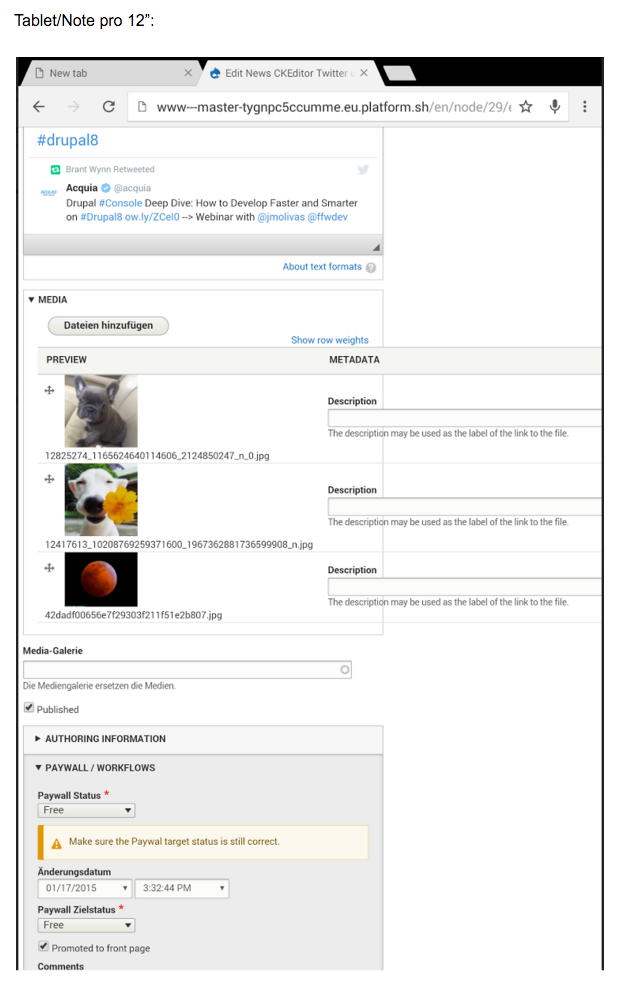
johnchqueHere is a patch, also and screenshot about the changes, IMHO it looks better. :)
Comment #11
miro_dietiker1250 is a rather large number for a mobile switch.
Let's quickly test drive this and discuss the approach.
Comment #12
johnchqueCore uses
(max-width: 60em) { /* 920px */for tables, maybe use the same?
Comment #13
Nenad commentedI am working on meta issue, so everything except table overflow will be moved to separate issues.
Comment #14
Nenad commentedComment #15
pivica commentedI've quickly checked core CSS and there is no definite answer what are the recommended breakpoints for mobile, tablet and big scrrens. Most used media queries are
And there are more of them, this are just the ones that make more sense ;). But based on this I would say core target couple of breakpoints for
Comment #16
pivica commentedAnd for our thing from 600px to 780px makes the most sense.
Not sure should we have two breakpoints and two layouts (for mobile and tablet), but seems that targeting tablets and smaller screen with only one breakpoint is enough.
Comment #17
pivica commented> (max-width: 60em) { /* 920px */
Yeah also check 920px - maybe that is also a good candidate if layout starts to break below 920px.
Comment #18
miro_dietikerThe problem is, the break points also depend if the tray is open or closed.
(The tray is the top admin menu items, if moved to the left side, and will steal width to content.)
It results in strange effects such as having some elements temporarily switch to mobile display while tray and right edit column is active... and back to regular display when they are removed due to low width. All in all, horrible edit UX.
Comment #19
pivica commented> It results in strange effects such as having some elements temporarily switch to mobile display while tray and right edit column is active... and back to regular display when they are removed due to low width. All in all, horrible edit UX.
This does not make any sense to me, for a very narrow screens like mobile and tablets that tray (vertical menu) should just go on top of everything (like position: absolute and z-index higher) and other page elements can be partially or fully hidden. For example https://codyhouse.co/demo/mega-dropdown/index.html.
Or at least when tray is showed, just push the page to the right, but do not do any crazy additional breakpoints for page elements that are dependable on tray component. For example http://codepen.io/Shven/full/chKqD/ or http://codepen.io/adriangyuricska/full/bNXaBj/.
Check lot of other examples on http://navnav.co/ - i've quickly checked most of them and it seems there is no example that is doing something like Drupal... Would really like to hear why this kind of tray behaviour is implemented for narrow screens?
Lets get some more info about this somehow, and if more people are agree on this we should open a core issue.
Comment #20
vyasamit2007 commentedWe've had an issue with bigger screens more than 1250px as well with Verticlal Tabs. With #10 breaks when you have vertical tabs in the form. I've so, created a patch on top of #10 to make sure in bigger screens as well the Entity Browser do not break. Please review.
Comment #21
vyasamit2007 commentedComment #22
sumitmadan commentedRe-rolled the patch as the issue was still there when we are in edit mode.
Comment #24
sumitmadan commentedRe-rolling the patch.
Comment #25
slashrsm commentedThank you for your work. This looks very nice and almost ready to go!
I tested this with entity_browser_example module and at certain size I still get a bit of overflow:

This library belongs to the entity reference field widget, which is quite different from the design perspective.
It would be better to create a new library and use that for this widget.
Comment #26
sanja_m commentedAssigning to me.
Comment #27
sanja_m commentedFixed bugs from #25.
Comment #28
slashrsm commentedGreat, thank you for the improvements. Almost there :)
Responsiveness now works OK when there is no toolbar open. When the side admin toolbar is there content still overflows at some sizes.
Comment #29
sanja_m commentedFixed responsiveness when admin toolbar is open.
Comment #30
slashrsm commentedI am still seeing some overflow between 1020px and 1140px of screen width. See attached screenshot.
I made sure that the latest CSS was loaded.
Comment #31
sanja_m commentedFixed bug from #30.
Comment #32
slashrsm commentedCommitted. Thanks!
Comment #34
miro_dietikerI would love to see here screens of the clean versions of the display variants we decide for.
Comment #35
sanja_m commentedScreenshots for 700px and 1040px of screen width with opened admin toolbar and for 860px of screen width with closed admin toolbar.
Comment #36
sanja_m commentedScreenshot for 700px of screen width with opened admin toolbar and enabled file entity (now the missing edit button is displayed).