

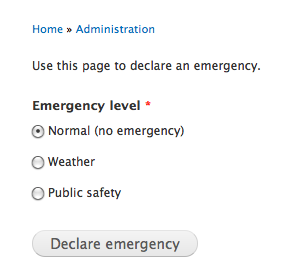
The emergency module allows you to override the normal layout and content of your site in the event of an emergency. It is primarily designed for institutional websites (such as universities), but could be used by any site that needs to broadcast urgent information to visitors.
By declaring an emergency, non-essential block regions can be hidden and information related to the emergency (such as contact numbers) can be shown instead. This gives critical information more visibility, and allows you to quickly disable non-critical, bandwidth-intensive content to better endure increased site traffic. You can also define multiple emergency levels with different sets of overrides. For example, you could have a "closure" level that is used to declare a campus closure due to inclement weather, and a separate "public safety issue" level for life-threatening situations.
So... why do I need a module to do this?
Obviously, you could achieve these same results by simply changing your site's block configuration and publishing new content. However, that approach may not be desirable. For example, in a university setting, the department responsible for communicating an emergency probably does not (and should not) have access to administer the site configuration; if that department has to rely on a system administrator in order to manage an emergency situation, critical information could be delayed. This module allows you to separate those responsibilities: system administrators can pre-configure the appropriate layout changes for a given type of emergency, while other staff can be empowered to activate those changes when needed with a simple "declare emergency" form.
Project information
 Seeking new maintainer
The current maintainers are looking for new people to take ownership. Obsolete
Use of this project is deprecated.- Project categories: Content display, Performance
 19 sites report using this module
- Created by muriqui on , updated
 Stable releases for this project are covered by the security advisory policy.
There are currently no supported stable releases.

