Description
When one has applied a Display Suite layout to a Content Type there are options to add 'Custom wrappers' and 'Custom classes'. These can be seen at the bottom of: admin/structure/types/manage/blog/display/
When I add a Custom Class to 'Class for layout' and the DS layout is being applied to a custom View Mode the class is not applied to the markup. (I am applying this View Mode to a View block).
Adding a Custom Class to 'Class for layout' works just fine when the 'Default' View Mode is used and the node is rendered as a page.
When using the custom View Mode, Custom Classes applied to other DS regions also work fine, as does changing the 'Custom wrapper' for the 'Layout wrapper'.
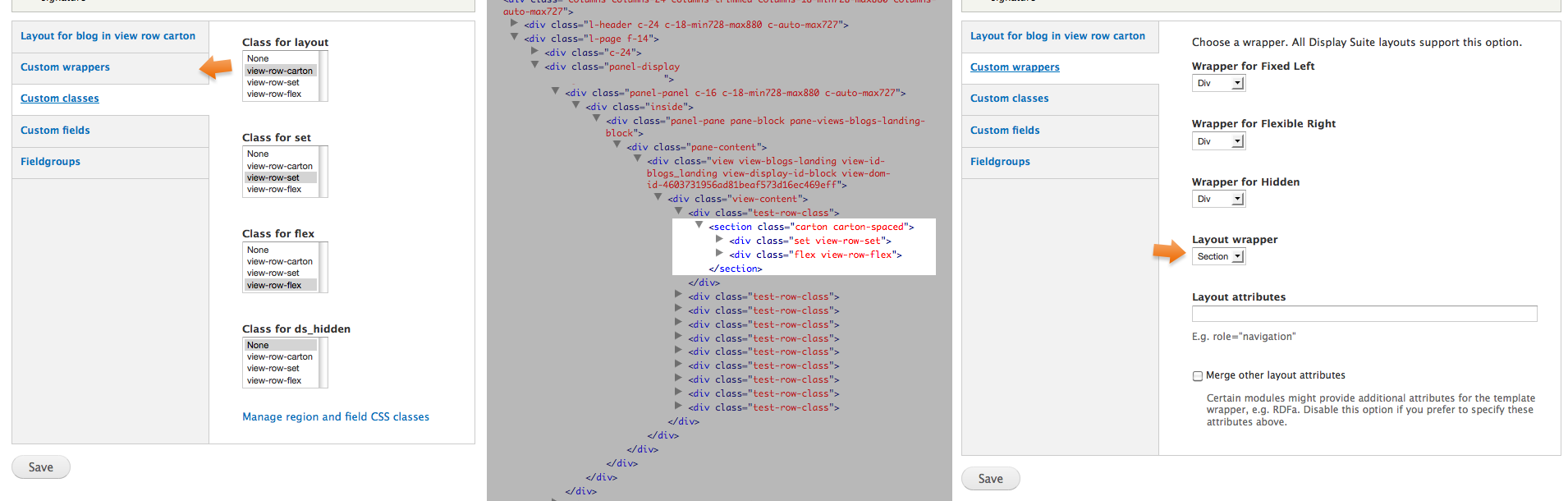
The image of screenshots I have attached shows the 'Custom class' and 'Custom wrapper' settings used and the html they produce. Notice that custom classes .view-row-set and .view-row-flex are being correctly applied to DS regions, whereas the Section element is lacking the custom class .view-row-carton.
Steps to repeat
- create a new View Mode for nodes: admin/structure/ds/view_modes
- edit a Content Type, apply the View Mode to it, and give the View Mode a Display Suite layout
- apply a Custom Class to 'Class for layout'
- create a View block that filters in this Content Type
- format the view:
Format: Unformatted list
Show: Display Suite
- in the view edit the Settings to the right of Display Suite
- apply the View Mode
Using Drupal 7.18 with all modules up to date on 14 Jan 2013


Comments
Comment #1
paulhhowells commentedClosed. This "bug" was due to my error rather than Display Suite’s. Apologies for not spotting this sooner!
Comment #2
dman commentedI found the same.
If anyone else searches and comes here, I found that the problem was the 'Merge other layout attributes' checkbox in the 'custom wrappers' page.
In contrast to what the label implies, I needed to turn OFF "Merge other layout attributes" in order to get the other attributes (in this case the usual css class that said "node-teaser") to show up as normal and merged into the classes array
Comment #3
codemode01 commentedTurning off "Merge other layer attributes" has no effect for me. I've been running Field Formatter Class 7.x 1.1 and DS 7.x-2.4 together on several sites and had no major issues until now. Now I can't get either DS or FFC to work.
Searching for answers and will post if I find any.
Comment #4
pakati commentedAny solutions to this guys?
I couldn't make it work either. Defined the CSS classes, added to the proper part of layout, but they are not showing up in the code.
I'm sure I'm missing something easy there - a checkbox somewhere, or something similar.
I followed the documentation on drupal.org, also found this one:
http://zugec.com/2011/09/display-suite-part-1-layouts-and-styles
When I do a search on Google basically this is the only page - the one you are reading now - which is about this error. So if you could share your experience, would be great.
Thanks
Comment #5
ledbelly2142 commentedI have the same problem.
Comment #6
amaisano commentedI had a somewhat related problem too - I wanted to merge in an *additional* class to what was output to the node wrapper (I set this to be an 'article' element in the 'Custom Wrappers' tab), not replace every attribute on that element with my one class.
When I added my custom attribute through the custom wrappers "Layout attributes" field, it wiped out all default attributes when "Merge with..." was unchecked (makes sense), but the class didn't output at all when I had the Merge checkbox checked.
I found a workaround (whether by design or not) by adding a Custom Class first, then in Custom Classes on my custom display, selected my custom class for "Layout" and it was properly appended to the default set of classes output for the node wrapper.
Comment #7
leducvin commentedI ran into this issue (except applying layout on node, not a Views row). I struggled with it for a long while.
It turns out, in my case, the display was using a Panels layout. I thought this was supported by Display Suite, but the custom classes would never be applied to the regions. It may not even be DS's fault. Maybe some other module is playing havoc.
Anyway, switching to an equivalent Display Suite layout made the classes appear. Hope this helps someone out there.